7
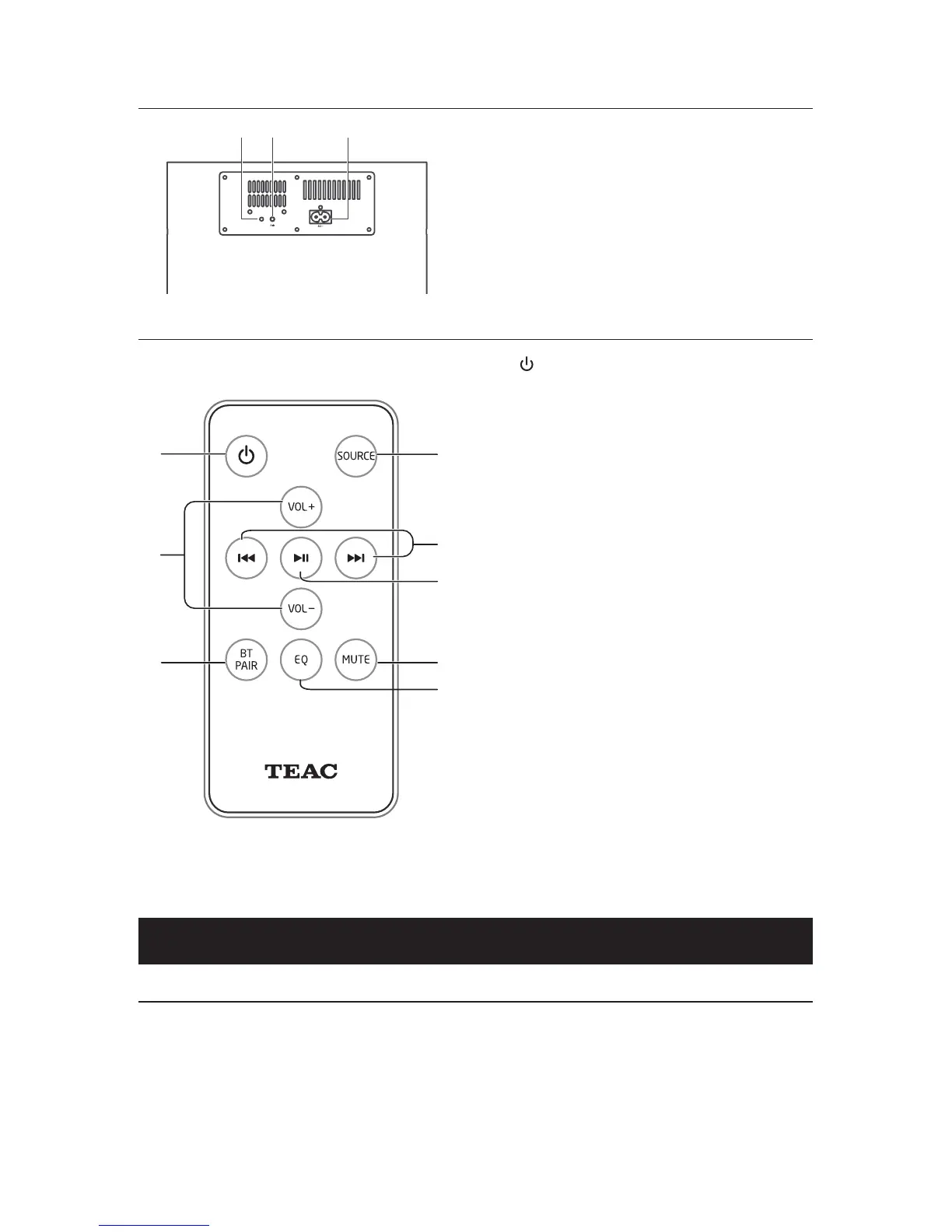
Wireless Subwoofer
1 PAIR Indicator Light
• Pairindicatorlightsupwhenthepairing
succeeds.
2 PAIR button
• Connecttothemainunit.
3 AC~ Socket
• Connecttopower.
Remote Control
1
• SwitchtheunitbetweenONandSTANDBY
mode.
2 SOURCE
• Switchesthemodes.
3 VOL+/VOL-
• Adjustthevolume.
4
H
/
G
• InBluetoothmode,skiptoprevious/next
audio le.
5
BF
• InBluetoothmode,startorpause
playback.
6 BT PAIR
• Activatethepairingfunctionin
BLUETOOTH mode and disconnect the
existing paired Bluetooth device.
7 MUTE
• Muteorresumethesound.
8 EQ
• Selectapresetsoundeect.
Preparations
Prepare the Remote Control
The provided Remote Control allows the unit to be operated from a distance.
•
Even if the Remote Control is operated within the eective range (6m), remote control
operation may be impossible if there are any obstacles between the unit and the remote
control.
•
If the Remote Control is operated near other products which generate infrared rays, or if other
remote control devices using infra-red rays are used near the unit, it may operate incorrectly.
Conversely, the other products may operate incorrectly.


 To Next Page