EasyManua.ls Logo

Teac V-1030 - Troubleshooting Common Issues; Dolby HX Pro Technology; Product Specifications

Teac V-1030
9 pages
Print Icon
To Previous Page IconTo Previous Page
Loading...
Troubleshooting
Basic
troubleshooting
of
a
cassette
tape
deck
is
similar
to
troubleshooting
any
other
electrical
or
electronic
equipment.
Always
check
the
most
obvious
possible
causes
first.
To
give
you
a
few
ideas
of
what
to
look
for,
check
the
following:
e
No
power:
Is
the
power
cord
connected?
Tape
begins
running
when
power
is
turned
on:
Is
the
TIMER
function
on?
DOLBY
HX
PRO
Dolby
HX
Pro
is
an
“active
bias”
technique
that
can
improve
the
quality
of
audio
tape
recordings.
High-level
high
frequencies
can
be
recorded
more
accurately,
without
sacrificing
signal-to-noise
ratio,
while
such
side
effects
of
tape
saturation
as
distortion
are
reduced.
What
Is
Bias?
Bias
is
a
very
high-frequency
signal
generat-
ed
within
a
tape
deck
and
recorded
on
the
tape
simultaneously
with
the
program
material.
This
inaudible
signal
allows
a
low
noise,
low
distortion
recording
and
flat
frequency
response.
Different
magnetic
tape
formulations
require
different
amounts
of
bias
for
optimum
performance.
If
the
bias
level
is
too
high,
high-frequency
Maximum
Output
Level
(MOL)
decreases.
The
Problem
of
Self-Bias
Unfortunately,
bias
level
is
often
influenced
by
the
signal
being
recorded.
The
high
fre-
quencies
contained
in
some
music
act
as
bias.
This
unpredictable
source
of
bias
is
added
to
the
existing
bias,
resulting
in
a
loss
of
high-frequency
response.
As
the
high-
frequency
content
of
the
signal
increases,
No
audio
output:
Are
all
connections
properly
made?
Degraded
sound
quality:
Are
the
heads
dirty
or
magnetized?
Are
you
using
good
quality
tape?
Is
the
proper
NR
System
select
switch
on?
Unable
to
select
record
mode:
Are
the
record
protection
tabs
on
the
tape
in
place?
the
ability
of
the
recorder
to
record
high
frequencies
(MOL)
decreases.
This
pheno-
menon
is
called
self-biasing.
The
Dolby
HX
Pro
Solution
The
Dolby
HX
Pro
monitors
the
high-
frequency
content
of
the
program
material
and
adjusts
the
recorder
bias
oscillator
to
maintain
a
constant
total
bias
level.
The
result
is
improved
high-frequency
response
and
lower
distortion.
Depending
on
the
type
of
tape,
the
improvement
in
headroom
can
be
6
dB
or
more.
The
Benefits
With
Dolby
HX
Pro,
it
is
easier
to
make
more
accurate
recordings
of
the
kind
of
music
which
contains
high-level
high
fre-
quencies.
The
improvement
is
similar
to
that
of
high-performance
tape
over
conven-
tional
tape,
so
regardless
of
the
type
of
tape
used,
the
results
will
sound
better.
Most
important
of
all,
Dolby
HX
Pro
requires
no
decoding
process.
Once
the
tape
is
recorded
with
it,
the
improvements
will
be
realized
when
playing
the
tape
back
on
any
machine.
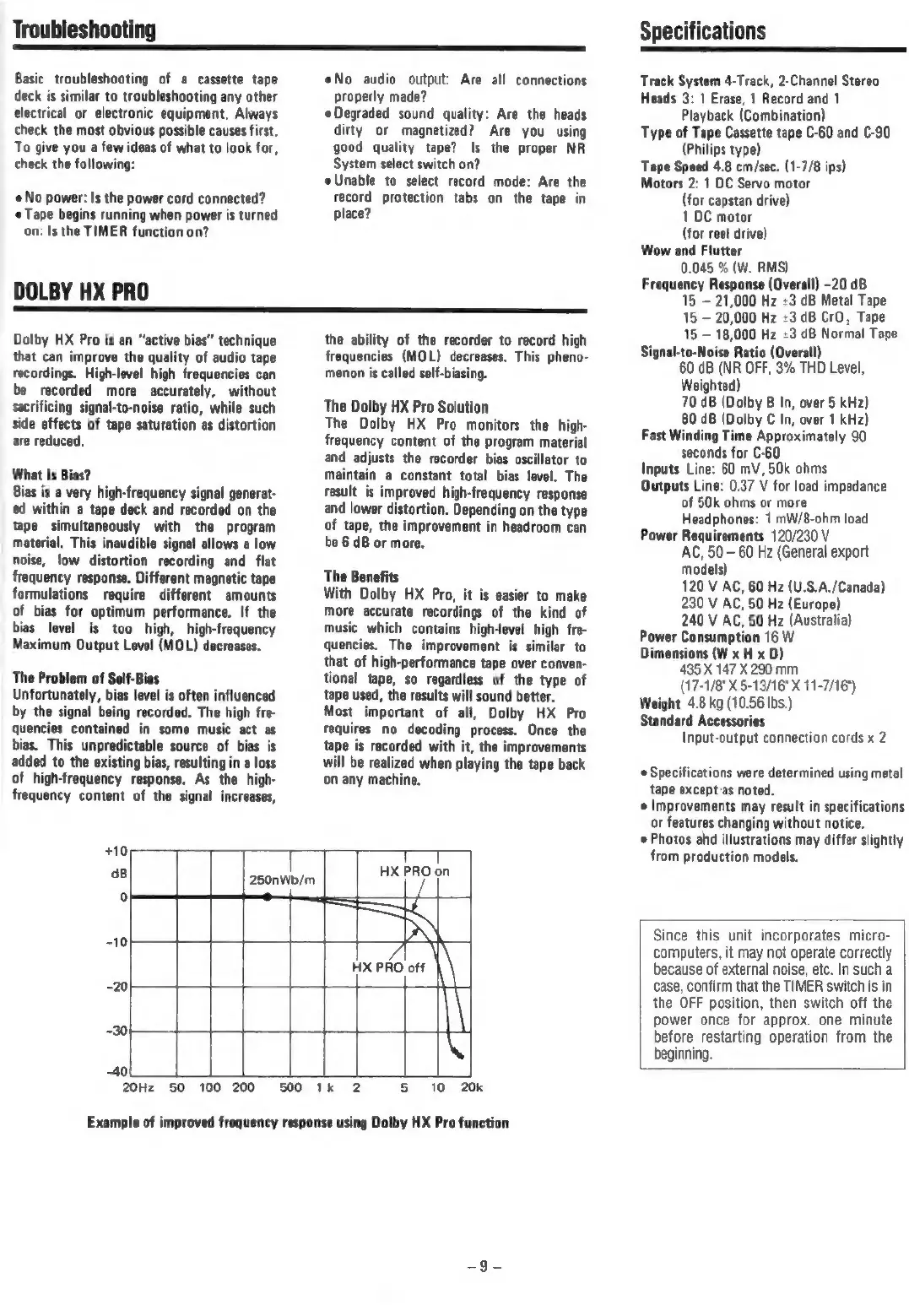
+10
dB
°
250nWb/m
T
HX
PRO
on
HX
PRO
off
-30
40
20Hz
50
100
200
500
1k
2 5
10
20k
Example
of
improved
frequency
response
using
Dolby
HX
Pro
function
Specifications
Track
System
4-Track,
2-Channel
Stereo
Heads
3:
1
Erase,
1
Record
and
1
Playback
(Combination)
je
Cassette
tape
C-60
and
C-90
s
type)
Tape
Speed
4.8
cm/sec.
(1-7/8
ips)
Motors
2:
1
DC
Servo
motor
(for
capstan
drive)
1
DC
motor
(for
reel
drive)
Wow
and
Flutter
0.045
%
(W.
RMS)
Frequency
Response
(Overall)
-20
dB
15
21,000
Hz
+3
dB
Metal
Tape
15
20,000
Hz
+3
dB
CrO,
Tape
15
18,000
Hz
+3
dB
Normal
Tape
Signal-to-Noise
Ratio
(Overall)
60
dB
(NR
OFF,
3%
THD
Level,
Weighted)
70
dB
(Dolby
B
In,
over
§
kHz)
80
dB
(Dolby
C
In,
over
1
kHz)
Fast
Winding
Time
Approximately
90
seconds
for
C-60
Inputs
Line:
60
mV,
50k
ohms
Outputs
Line:
0.37
V
for
load
impedance
of
50k
ohms
or
more
Headphones:
1
mW/8-ohm
load
Power
Requirements
120/230
V
AC,
50
-
60 Hz
(General
export
models)
120
V
AC,
60
Hz
(U.S.A./Canada)
230
V
AC,
50 Hz
(Europe)
240
V
AC,
50
Hz
(Australia)
Power
Consumption
16
W
Dimensions
(W
x
H
x
D)
435
X
147
X
290
mm
(17-1/8"
X
5-13/16"
X
11-7/16")
Weight
4.8
kg
(10.56
Ibs.)
Standard
Accessories
Input-output
connection
cords
x
2
e
Specifications
were
determined
using
metal
tape
except-as
noted.
e
Improvements
may
result
in
specifications
or
features
changing
without
notice.
Photos
ahd
illustrations
may
differ
slightly
from
production
models.
Since
this
unit
incorporates
micro-
computers,
it
may
not
operate
correctly
because
of
external
noise,
etc.
In
such
a
case,
confirm
that
the
TIMER
switch
is in
the
OFF
position,
then
switch
off
the
power
once
for
approx.
one
minute
before
restarting
operation
from
the
beginning.

Related product manuals