EasyManua.ls Logo

Teac V-8000S - Advanced Features, Maintenance, and Troubleshooting; Indicators, Jacks, and Tape Controls; Maintenance and Troubleshooting Guide

Teac V-8000S
12 pages
Print Icon
To Next Page IconTo Next Page
To Previous Page IconTo Previous Page
Loading...
©
Multi-Display
Window
@
PEAK
LEVEL
METER
This
meter
shows
the
peak
level
of
the
input
or
playback
signal,
The
meter
has
a
peak
hold
feature;
when
the
level
exceeds
-7
dB,
the
peak
level
is
held
for
approx,
2
seconds,
Tape
Type
Indicator
©
CALIBRATION
Indicator
©
DOLBY
NR
S/B/C
©
OO
HX
PRO:
The
Dolby
HX
Pro
in-
dicator
lights
during
the
recording
mode,
indicating
that
the
Dolby
HX
Pro
circuit
in
the
deck
is
operating.
This
is
engaged
automatically
whenever
the
deck
is
used
for
recording.
©
MPX
FILTER
Indicator
@
LEVEL/BIAS
Indicator
(@TAPE/SOURCE
Indicator
Indicates
whether
the
deck
is set
for
tape
or
source
monitoring.
MAINTENANCE
©
Level
Indicator
©
Tape
Travel
Operation
Buttons
¢
(
4)
rewind
Button
Press
this
button
to
rewind
the
tape
at
high
speed.
o(
>>
)
Fast-forward
Button
Press
this
button
to
advance
the
tape
at
high
speed.
@
OPEN/CLOSE
Button
(
*
)
Press
this
button
to
open
or
close
the
cas-
sette
holder.
As
this
deck
employs
a
power
loading
mechanism,
opening
and
closing
the
cassette
holder
is
possible
only
when
the
power
is
on.
Even
if
the
holder
is
open,
it
Closes
automatically
and
the
corresponding
operation
is
performed
when
the
»
button,
etc,
is
pressed,
The
cassette
holder
can
also
be
closed
manually.
@
PHONES
Jack
Plug
stereo
headphones
into
this
jack
for
private
listening
or
monitoring.
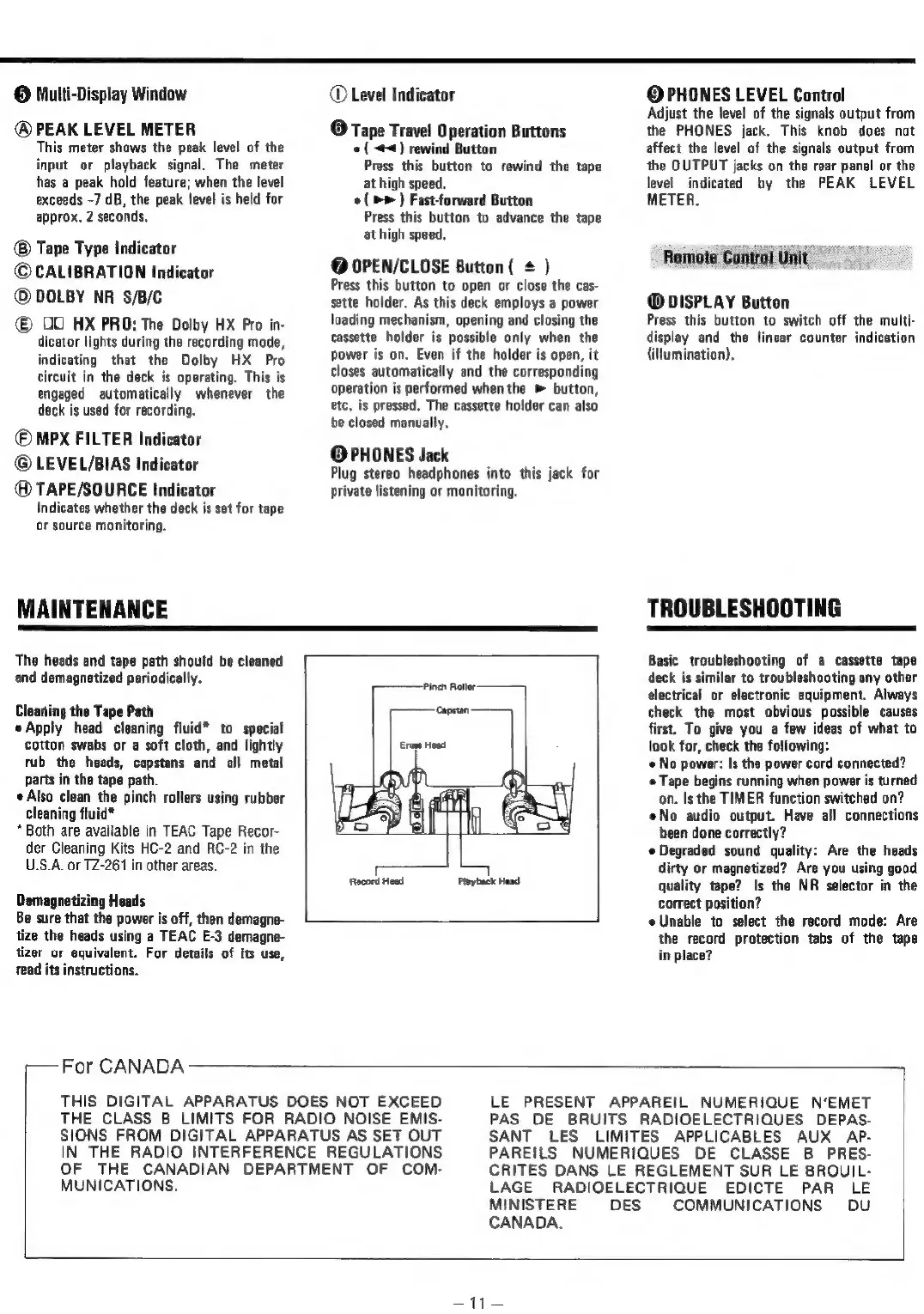
The
heads
and
tape
path
should
be
cleaned
and
demagnetized
periodically.
Cleaning
the
Tape
Path
Apply
head
cleaning
fluid*
to
special
Cotton
swabs
or
a
soft
cloth,
and
lightly
rub
the
heads,
capstans
and
all
metal
parts
in
the
tape
path.
Also
clean
the
pinch
rollers
using
rubber
cleaning
fluid*
*
Both
are
available
in
TEAC
Tape
Recor-
der
Cleaning
Kits
HC-2
and
RC-2
in
the
U.S.A.
or
TZ-261
in
other
areas.
Demagnetizing
Heads
Be
sure
that
the
power
is
off,
then
demagne-
tize
the
heads
using
a
TEAC
E-3
demagne-
tizer
ur
equivalent.
For
details
of
its
use,
read
its
instructions.
t—
For
CANADA
c 1
Record
Head
Playback
Head
©
PHONES
LEVEL
Control
Adjust
the
level
of
the
signals
output
from
the
PHONES
jack.
This
knob
does
not
affect
the
level
of
the
signals
output
from
the
QUTPUT
jacks
on
the
rear
panel
or
the
level
indicated
by
the
PEAK
LEVEL
METER.
Remote
Control
Unit
@
DISPLAY
Button
Press
this
button
to
switch
off
the
multi-
display
and
the
linear
counter
indication
(illumination).
TROUBLESHOOTING
Basic
troubleshooting
of
a
cassette
tape
deck
is
similar
to
troubleshooting
any
other
electrical
or
electronic
equipment.
Always
check
the
most
obvious
possible
causes
first.
To
give
you
a
few
ideas
of
what
to
look
for,
check
the
following:
No
power:
Is
the
power
cord
connected?
¢
Tape
begins
running
when
power
is
turned
on.
Is
the
TIMER
function
switched
on?
eNo
audio
output.
Have
all
connections
been
done
correctly?
Degraded
sound
quality:
Are
the
heads
dirty
or
magnetized?
Are
you
using
good
quality
tape?
Is
the
NR
selector
in
the
correct
position?
Unable
to
select
the
record
mode:
Are
the
record
protection
tabs
of
the
tape
in
place?
THIS
DIGITAL
APPARATUS
DOES
NOT
EXCEED
THE
CLASS
B
LIMITS
FOR
RADIO
NOISE
EMIS-
SIONS
FROM
DIGITAL
APPARATUS
AS
SET
OUT
IN
THE
RADIO
INTERFERENCE
REGULATIONS
OF
THE
CANADIAN
DEPARTMENT
OF
COM-
MUNICATIONS.
LE
PRESENT
APPAREIL
NUMERIQUE
N’EMET
PAS
DE
BRUITS
RADIOELECTRIQUES
DEPAS-
SANT
LES
LIMITES
APPLICABLES
AUX
AP-
PAREILS
NUMERIQUES
DE
CLASSE
B
PRES-
CRITES
DANS
LE
REGLEMENT
SUR
LE
BROUIL-
LAGE
RADIOELECTRIQUE
EDICTE
PAR
LE
MINISTERE
DES
COMMUNICATIONS
DU
CANADA.
==

Related product manuals