EasyManua.ls Logo

Teac V-8000S - TEAC V-8000 S Features and Controls; Remote Control Operation Details; Front Panel Control Buttons Explained

Teac V-8000S
12 pages
Print Icon
To Next Page IconTo Next Page
To Previous Page IconTo Previous Page
Loading...
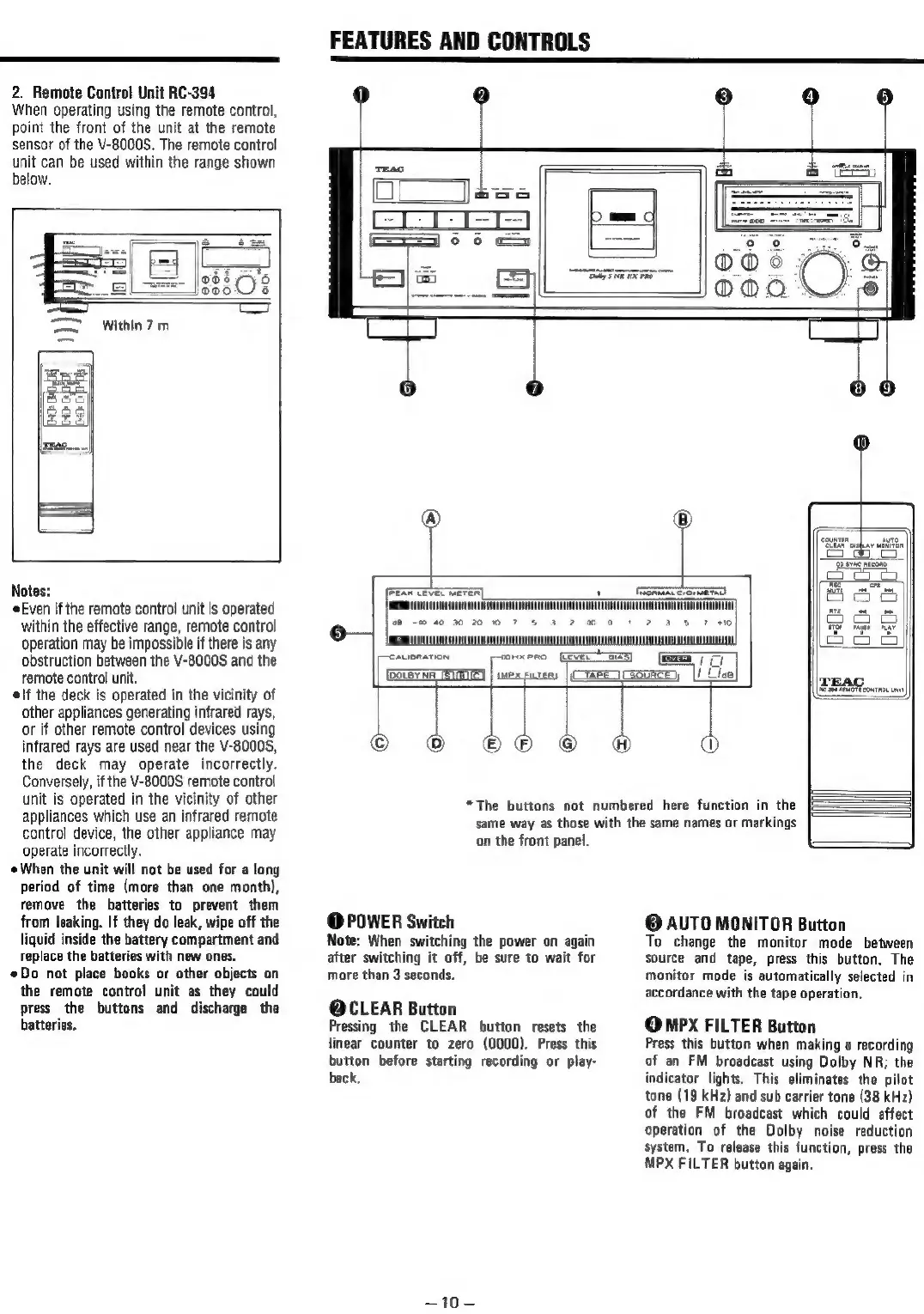
2.
Remote
Control
Unit
RC-394
When
operating
using
the
remote
control,
point
the
front
of
the
unit
at
the
remote
sensor
of
the
V-8000S.
The
remote
control
unit
can
be
used
within
the
range
shown
below.
FEATURES
AND
CONTROLS
Notes:
Even
if
the
remote
control
unit
is
operated
within
the
effective
range,
remote
control
operation
may
be
impossible
if
there
is
any
obstruction
between
the
V-8000S
and
the
remote
control
unit.
elf
the
deck
is
operated
in
the
vicinity
of
other
appliances generating
infrared
rays,
or
if
other
remote
control
devices
using
infrared
rays
are
used
near
the
V-8000S,
the
deck
may
operate
incorrectly.
Conversely,
if
the
V-8000S
remote
control
unit
is
operated
in
the
vicinity
of
other
appliances
which
use
an
infrared
remote
control
device,
the
other
appliance
may
operate
incorrectly.
When
the
unit
will
not
be
used
for
a
long
period
of
time
(more
than
one
month),
remove
the
batteries
to
prevent
them
from
leaking.
If
they
do
leak,
wipe
off
the
liquid
inside
the
battery
compartment
and
replace
the
batteries
with
new
ones.
Do
not place
books
or
other
objects
on
the
remote
control
unit
as
they
could
press
the
buttons
and
discharge
the
batteries.
ur
bye
were
©
*The
buttons
not
numbered
here
function
in
the
same
way
as
those
with
the
same
names
or
markings
‘on
the
front
panel.
@
POWER
Switch
Note:
When
switching
the
power
on
again
after
switching
it
off,
be
sure
to
wait
for
more
than
3
seconds.
@CLEAR
Button
Pressing
the
CLEAR
button
resets
the
linear
counter
to
zero
(0000).
Press
this
button
before
starting
recording
or
play-
back,
~10—
Cancer,
|!
Cee
®
oO
@
AUTO
MONITOR
Button
To
change
the
monitor
mode
between
source
and
tape,
press
this
button.
The
monitor
mode
is
automatically
selected
in
accordance
with
the
tape
operation,
Qmpx
FILTER
Button
Press
this
button
when
making
a
recording
of
an
FM
broadcast
using
Dolby
NR;
the
indicator
lights,
This
eliminates
the
pilot
tone
(19
kHz)
and
sub
carrier
tone
(38
kHz)
of
the
FM
broadcast
which
could
affect
operation
of
the
Dolby
noise
reduction
system,
To
release
this
function,
press
the
MPX
FILTER
button
again.

Related product manuals