EasyManua.ls Logo

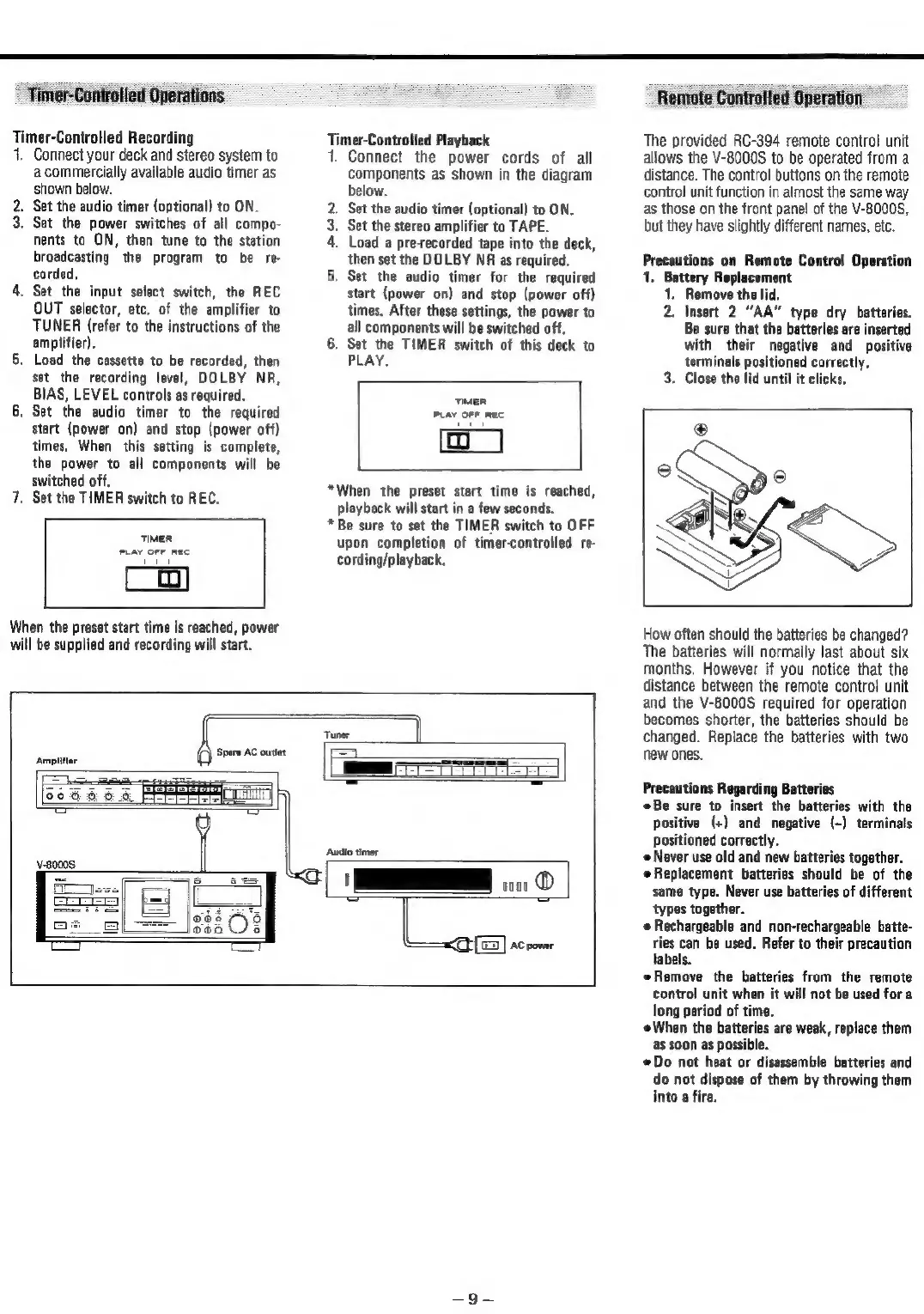
Teac V-8000S - Automated and Remote Operations; Timer-Controlled Recording and Playback; Remote Control Unit RC-394 Usage

Teac V-8000S
12 pages
Print Icon
To Next Page IconTo Next Page
To Previous Page IconTo Previous Page
Loading...
Timer-Controlled
Operations
Timer-Controlled
Recording
1.
Connect
your
deck
and
stereo
system
to
a
commercially
available
audio
timer
as
shown
below.
2.
Set
the
audio
timer
(optional)
to
ON.
3.
Set
the
power
switches
of
all
compo-
nents
to
ON,
then
tune
to
the
station
broadcasting
the
program
to
be
re-
corded,
4.
Set
the
input
select
switch,
the
REC
OUT
selector,
etc.
of
the
amplifier
to
TUNER
(refer
to
the
instructions
of
the
amplifier).
5.
Load
the
cassette
to
be
recorded,
then
set
the
recording
level,
DOLBY
NR,
BIAS,
LEVEL
controls
as
required.
Set
the
audio timer
to
the
required
start
(power
on)
and
stop
(power
off)
times,
When
this
setting
is
complete,
the
power
to
all
components
will
be
switched
off.
7.
Set
the
TIMER
switch
to
REC.
2
TIMER
PLAY
OFF REC
When
the
preset
start
time
is
reached,
power
will
be
supplied
and
recording
will
start.
Timer-Controlled
Playback
1.
Connect
the
power
cords
of
all
components
as
shown
in
the
diagram
below.
.
Set
the
audio timer
(optional)
to
ON.
.
Set
the
stereo
amplifier
to
TAPE.
}.
Load
a
pre-recorded
tape
into
the
deck,
then
set
the
DOLBY
NR
as
required.
|.
Set
the
audio
timer
for
the
required
start
(power
on)
and
stop
(power
off)
times,
After
these
settings,
the
power
to
all
components
will
be
switched
off,
6.
Set
the
TIMER
switch
of
this
deck
to
PLAY.
Pen
a
TIMER
PLAY
OFF
REC
*When
the
preset
start
time
is
reached,
playback
will
start
in
a
few
seconds.
*
Be
sure
to
set
the
TIMER
switch
to
OFF
upon
completion
of
timer-controlled
re-
cording/playback.
Amplifier
Remote
Controlled
Operation
The
provided
RC-394
remote
control
unit
allows
the
V-8000S
to
be
operated
from
a
distance.
The
control
buttons
on
the
remote
control
unit
function
in
almost
the
same
way
as
those
on
the
front
panel
of
the
V-8000S,
but
they
have
slightly
different
names,
etc,
Precautions
on
Remote
Control
Operation
1.
Battery
Replacement
1.
Remove
the
lid.
2.
Insert
2
“AA”
type
dry
batteries.
Be
sure
that
the
batteries
are
inserted
with
their
negative
and
positive
terminals
positioned
correctly.
3.
Close
the
lid
until
it
clicks,
How
often
should
the
batteries
be
changed?
The
batteries
will
normally
last
about
six
months.
However
if
you
notice
that
the
distance
between
the
remote
control
unit
and
the
V-8000S
required
for
operation
becomes
shorter,
the
batteries
should
be
changed.
Replace
the
batteries
with
two
new
ones.
Precautions
Regarding
Batteries
Be
sure
to
insert
the
batteries
with
the
positive
(+)
and
negative
(-)
terminals
positioned
correctly.
Never
use
old
and
new
batteries
together.
«Replacement
batteries
should
be
of
the
same
type.
Never
use
batteries
of
different
types
together.
e
Rechargeable
and
non-rechargeable
batte-
ries
can
be
used.
Refer
to
their
precaution
labels.
©
Remove
the
batteries
from
the
remote
control
unit
when
it
will
not
be
used
for
a
long
period
of
time.
When
the
batteries
are
weak,
replace
them
as
soon
as
possible.
©
Do
not
heat
or
disassemble
batteries
and
do
not
dispose
of
them
by
throwing
them
into
a
fire.

Related product manuals