EasyManua.ls Logo

Teac V-8000S - CD Synchro Dubbing Operations; Synchro Dubbing Preparation Steps; Executing CD Synchro Dubbing

Teac V-8000S
12 pages
Print Icon
To Next Page IconTo Next Page
To Previous Page IconTo Previous Page
Loading...
CD
Synchro
Dubbing
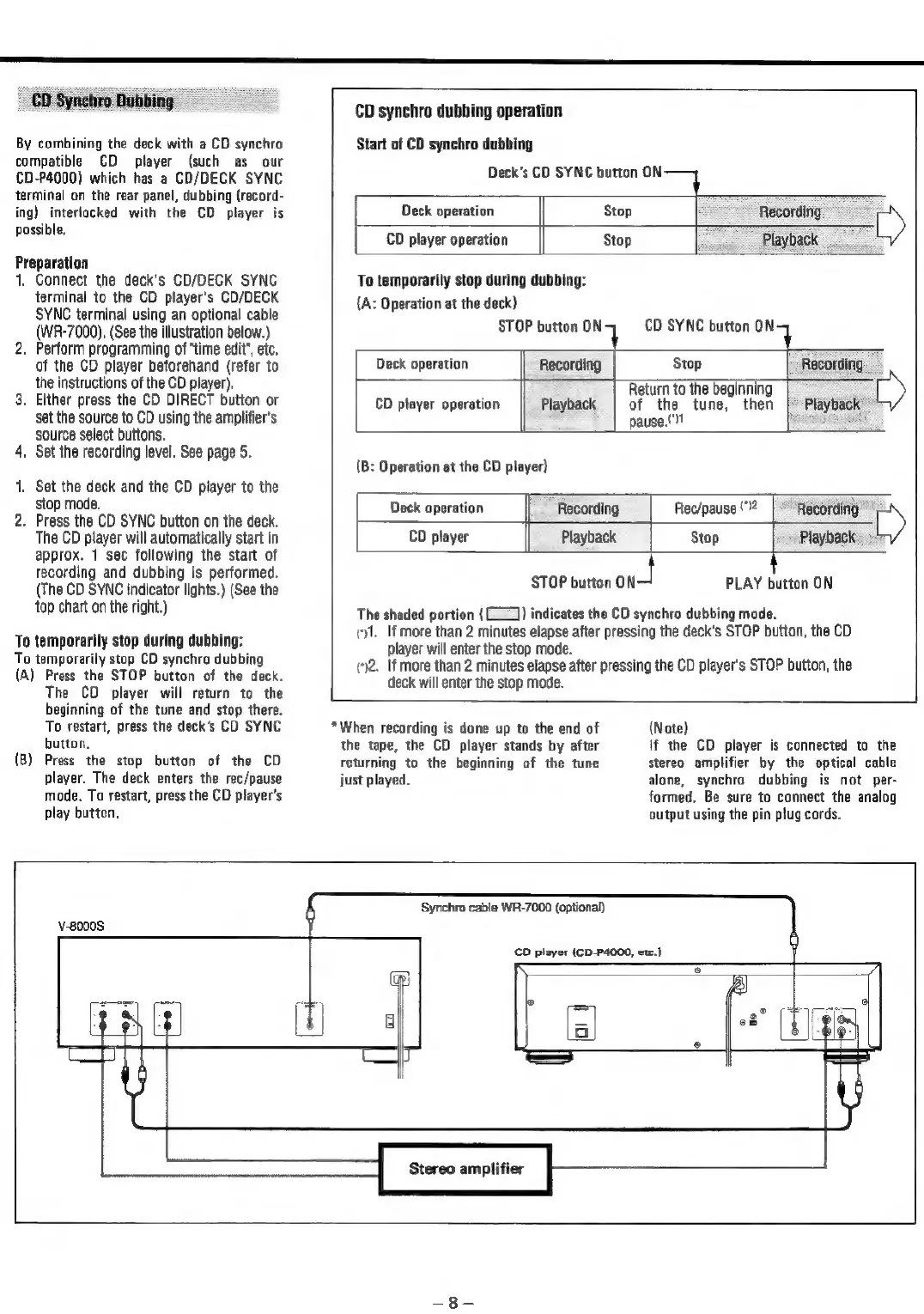
By
combining
the
deck
with
a
CD
synchro
compatible
CD
player
(such
as
our
CD-P4000)
which
has
a
CD/DECK
SYNC
terminal
on
the
rear
panel,
dubbing
(record-
ing)
interlocked
with
the
CD
player
is
possible.
Preparation
1.
Connect
the
deck's
CD/DECK
SYNC
terminal
to
the
CD
player's
CD/DECK
SYNC
terminal
using
an
optional
cable
(WR-7000).
(See
the
illustration
below.)
2.
Perform
programming
of
“time
edit’,
etc.
of
the
CD
player
beforehand
(refer
to
the
instructions
of
the
CD
player).
3.
Either
press
the
CD
DIRECT
button
or
set
the
source
to
CD
using
the
amplifier's
source
select
buttons.
4.
Set
the
recording
level.
See
page
5.
1.
Set
the
deck
and
the
CD
player
to
the
stop
mode.
2.
Press
the
CD
SYNC
button
on
the
deck.
The
CD
player
will
automatically
start
in
approx.
1
sec
following
the
start
of
recording
and
dubbing
is
performed.
(The
CD
SYNC
indicator
lights.)
(See
the
top
chart
on
the
right.)
To
temporarily
stop
during
dubbing:
To
temporarily
stop
CD
synchro
dubbing
(A)
Press
the
STOP
button
of
the
deck.
The
CD
player
will
return
to
the
beginning
of
the
tune
and
stop
there.
To
restart,
press
the
deck’s
CD
SYNC
button.
(B)
Press
the
stop
button
of
the
CD
player.
The
deck
enters
the
rec/pause
mode.
To
restart,
press
the
CD
player's
play
button.
CD
synchro
dubbing
operation
Start
of
CD
synchro
dubbing
Deck’s
CD
SYNC
button
ON
Deck
operation
Stop
Recording
»
CD
player
operation
Stop
Playback
To
temporarily
stop
during
dubbing:
{A:
Operation
at
the
deck)
STOP
button
ony
CD
SYNC
button
ony
Deck
operation
Recording
Stop
Recording
Return
to
the
beginning
»
CD
player
operation
Playback
of
the
tune,
then
|
Playback
pause,"
(B:
Operation
at
the
CD
player)
Deck
operation
CD
player
Recording
Playback
Rec/pause
("
Recording
»
Stop
|
Playback
player
will
enter
the
stop
mode.
deck
will
enter
the
stop
mode.
STOP
button
ON—
PLAY
button
ON
The
shaded
portion
((_))
indicates
the
CD
synchro
dubbing
mode.
cyl.
If
more
than
2
minutes
elapse
after
pressing
the
deck's
STOP
button,
the
CD
2.
If
more
than
2
minutes
elapse
after
pressing
the
CD
player's
STOP
button,
the
*When
recording
is
done
up
to
the
end
of
the
tape,
the
CD
player
stands
by
after
returning
to
the
beginning
of
the
tune
just
played,
(Note)
lf
the
CD
player
is
connected
to
the
stereo
amplifier
by
the
optical
cable
alone,
synchro
dubbing
is
not
per-
formed.
Be
sure
to
connect
the
analog
output
using
the
pin
plug
cords.
v-8000S
‘Synchro
cable
WR-7000
(optional)
CD
player
(CD-P4000,
etc.)

Related product manuals