EasyManua.ls Logo

Teac V-8000S - Tape Management and Calibration; Return To Zero (RTZ) Functionality; Cassette Tape Calibration Procedure

Teac V-8000S
12 pages
Print Icon
To Next Page IconTo Next Page
To Previous Page IconTo Previous Page
Loading...
RITZ
(Return
To
Zero)
Function
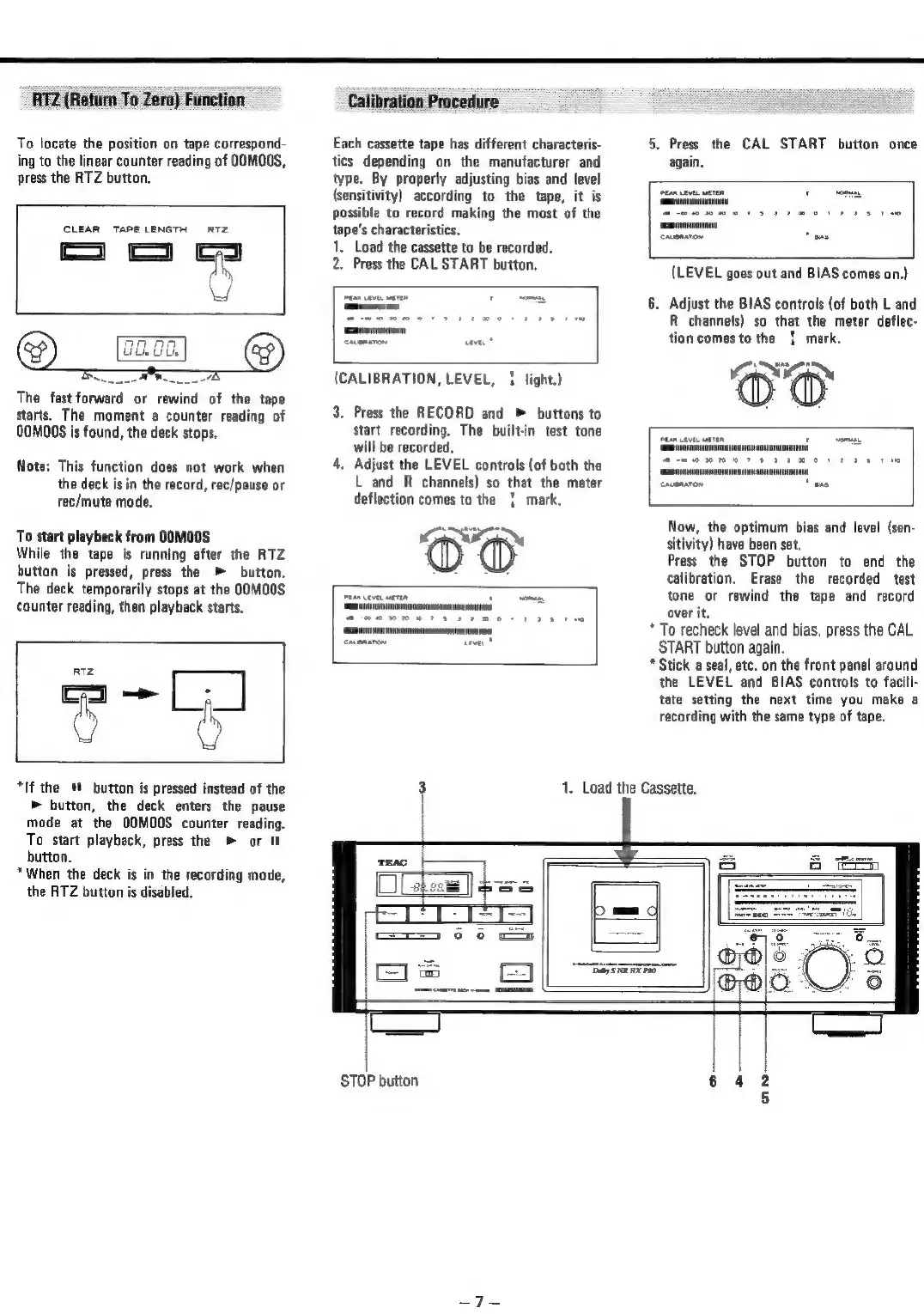
To
locate
the
position
on
tape
correspond-
ing
to
the
linear
counter
reading
of
OOMOOS,
press
the
RTZ
button.
CLEAR
TAPE
LENGTH
RTZ
marae
4
np.
u
The
fast
forward
or
rewind
of
the
tape
starts.
The
moment
a
counter
reading
of
QOMO0S
is
found,
the
deck
stops.
Note:
This
function
does
not
work
when
the
deck
is
in
the
record,
rec/pause
or
rec/mute
mode.
To
start
playback
from
OOMO0S
While
the
tape
is
running
after
the
RTZ
buttan
is
pressed,
press
the
»
button.
The
deck
temporarily
stops
at
the
OOMO0S
counter
reading,
then
playback
starts.
RITZ
ee
*If
the
button
is
pressed
instead
of
the
»
button,
the
deck
enters
the
pause
mode
at
the
OOMOOS
counter
reading.
To
start
playback,
press
the
»
or
I
button.
*When
the
deck
is
in
the
recording
mode,
the
RTZ
button
is
disabled.
Calibration
Procedure
Each
cassette
tape
has
different
characteris-
tics
depending
on
the
manufacturer
and
type.
By
properly
adjusting
bias
and
level
(sensitivity)
according
to
the
tape,
it
is
possible
to
record
making
the
most
of
the
tape’s
characteristics.
1,
Load
the
cassette
to
be
recorded.
2.
Press
the
CAL
START
button.
(CALIBRATION,
LEVEL,
1
light.)
3.
Press
the
RECORD
and
»
buttons
to
start
recording.
The
built-in
test
tone
will
be
recorded,
4,
Adjust
the
LEVEL
controls
(of
both
the
L
and
R
channels)
so
that
the
meter
deflection
comes
to
the
|
mark.
5.
Press
the
CAL
START
button
once
again.
(LEVEL
goes
out
and
BIAS
comes
on.)
6.
Adjust
the
BIAS
controls
(of
both
L
and
R
channels)
so
that
the
meter
deflec-
tion
comes
to
the
|
mark.
x0}
Now,
the
optimum
bias
and
level
(sen-
sitivity)
have
been
set,
Press
the
STOP
button
to
end
the
calibration.
Erase
the
recorded
test
tone
or
rewind
the
tape
and
record
over
it.
*
To
recheck
level
and
bias,
press
the
CAL
START
button
again.
*
Stick
a
seal,
etc.
on
the
front
panel
around
the
LEVEL
and
BIAS
controls
to
facili-
tate
setting
the
next
time
you
make
a
recording
with
the
same
type
of
tape.
3
1.
Load
the
Cassette.
STOP
button

Related product manuals