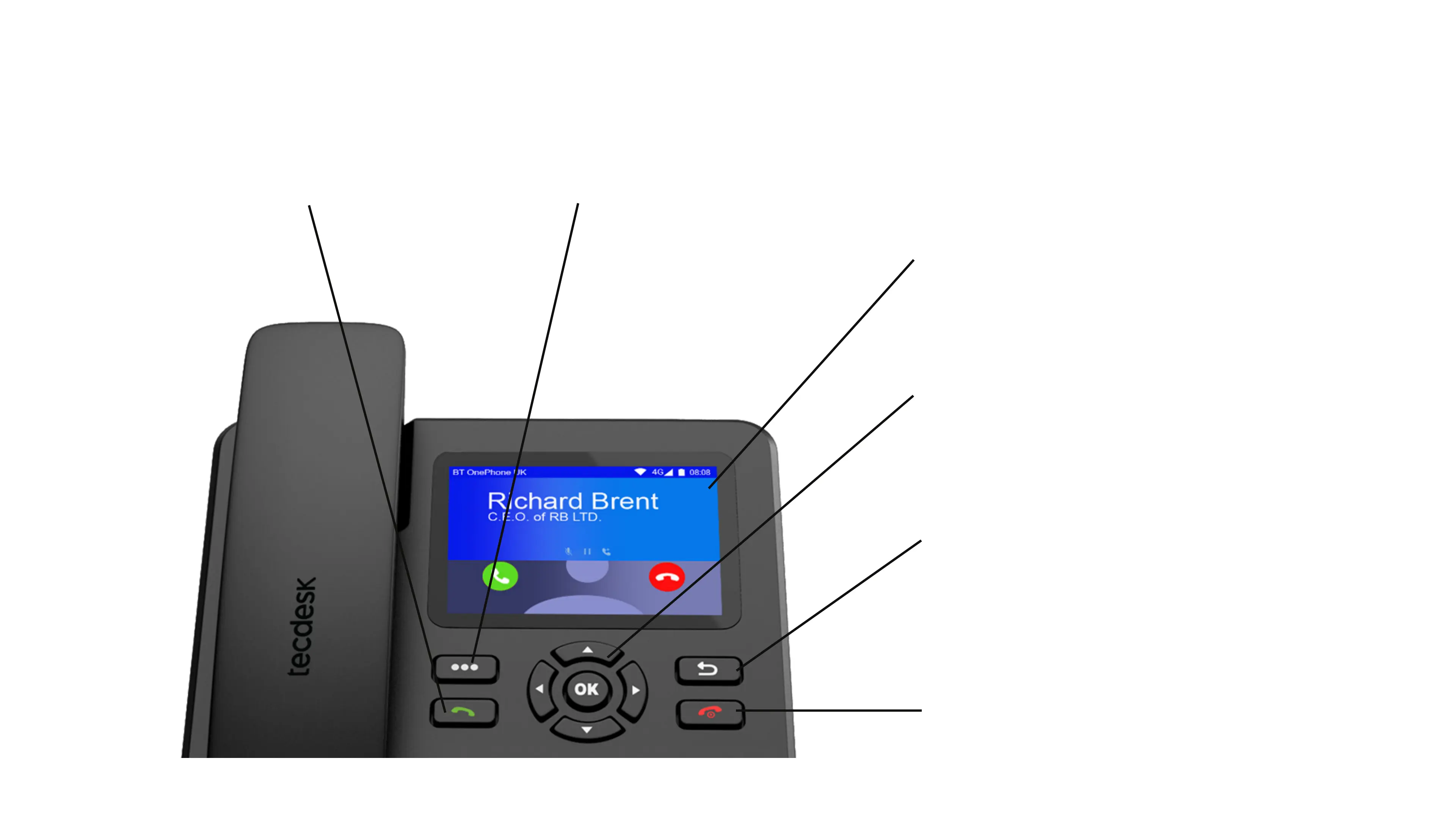
2.1 HARD KEYS AND THEIR FUNCTIONALITY
You can use the touch screen to access
the full functionality of the device including
making calls, adding contacts, sending and
receiving text messages, making notes, setting alarms
and changing the settings of the device.
Press once to access the widgets,
shortcuts and settings.
Use these keys to navigate through apps on
the screen. Press the OK button to accept your
selection.
Use these keys to navigate through apps on the screen.
Press the OK button to accept your selection.
Press this key once to go back 1 step. Press it again to go
back another step. Repeat the process until you reach
the home screen on
the device.
Press this key to end a call. Long press this key to power on
the device. Long press this key to give you options to; power
off, reboot and select aeroplane mode. Aeroplane mode
disables on connections including your voice and data.
4. Screen Navigation Keys
5. Go Back
6. End Call & Power ON/ OFF
1. Touch Screen
2. Widgets / Shortcuts3. Answer Call & Open Dialler


 To Next Page