EU-290 user’s manual
13
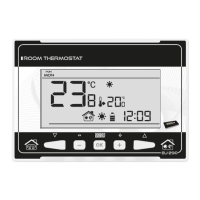
1. Current operation mode:
a. weekly
b. manual
c. day/night
2. Current temperature of the room
3. Parameters icons (see: table below)
4. Icon indicating economical temperature (according to weekly control or day/night
settings)
5. Icon indicating comfort temperature (according to weekly control or day/night settings)
6. Day of the week
7. External temperature: available only when the wireless version of the controller (EU-
290v2, EU-290v4) is used, together with the external temperature sensor.
8. Pre-set temperature of the room
9. Time
10. Battery level
11. Temperature information (depending on the current operation mode):
o heating mode - the icon is flashing when the pre-set temperature of the room has
not been reached and it is steady when the pre-set temperature has been reached.
o cooling mode – the icon is moving when the room temperature is above the pre-
set value and it is steady when the pre-set temperature has been reached.


 To Next Page