TECH
12
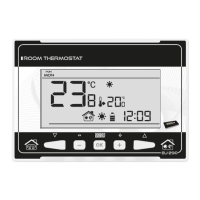
VII.b) Main screen view and description
The user operates the device using buttons. While one parameter is being edited, the remaining
icons are not displayed.
1. Display
2. - pressing this button in the main screen view activates weekly control mode. After
entering the menu, this button is used to move from one option to another.
3. Minus button (-) – pressing this button in the main screen view activates manual mode
and decreases the pre-set temperature. After entering the menu, this button is used to
adjust parameters, enter the service code etc.
4. MENU button – hold this button in order to enter the controller menu. While editing
parameters press and hold this button to confirm the changes and return to main screen
view.
5. Plus button (+) – pressing this button in the main screen view activates manual mode and
increases the pre-set temperature. After entering the menu, this button is used to adjust
parameters, enter the service code etc.
6. - pressing this button in the main screen view activates day/night mode. After entering
the menu, this button is used to move from one option to another.


 To Next Page