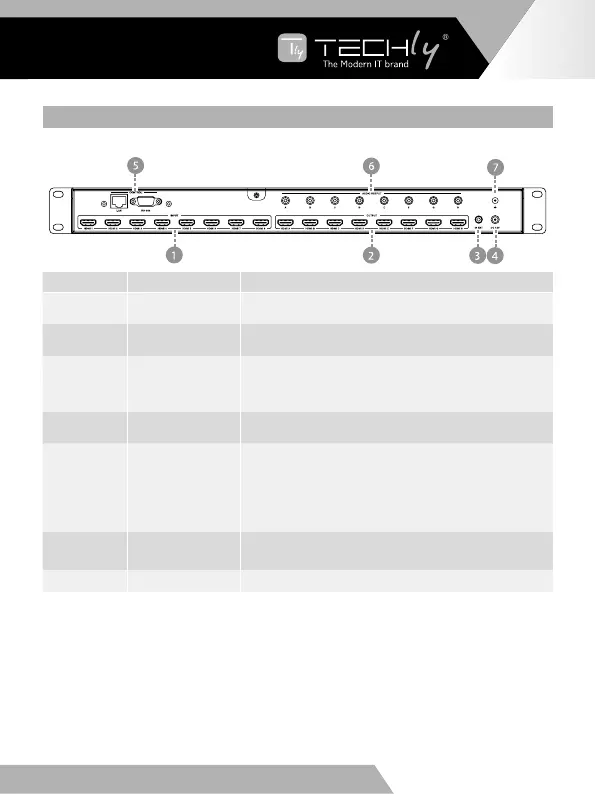
5.2 REAR PANEL
Number Name Function descriptions
1 HDMIINPUT
Connect to the HDMI input source devices such as a
DVD player or Set-top Box.
2 HDMI OUTPUT
Connect to the HDMI output source devices such as a
TV player or monitor.
3 IR EXT
If the front IR sensor of unit is obstructed or the unit is
installed in a closed area out of infrared line of sight, the
IR receiver cable can be inserted to this IR EXT port to
extend IR signal.
4 DC 12V
Plugthe12V/3AadaptertoACwalloutletforpower
supply.
5
CONTROL
LAN:connectstoanactiveEthernetlinkbyan
RJ-45cable.
RS-232: Connect to a PC or control system by
DSub9-pincabletocontrolthematrixwithRS-
232 commands.
6
AUDIO OUTPUT
Connect to audio amplifiers or speakers. The
audio is from extract HDMI output port signal.
7
GND ConnecttheGNDporttotheground.
EN - 7
EN
WWW.TECHLY.COM WWW.TECHLY.COM
8X8 HDMI MATRIX
4K@60HZ YUV 4:4:4 18GBPS



 To Next Page