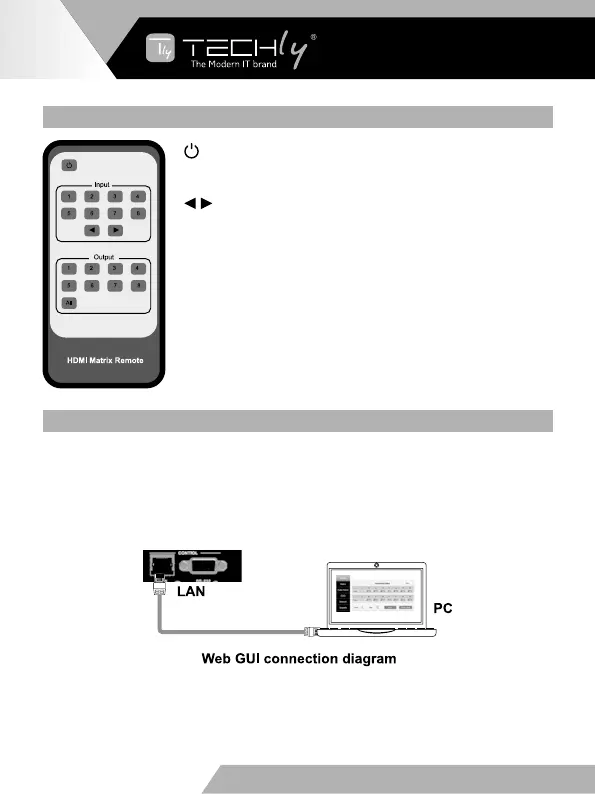
6. IR REMOTE
Poweronorsetittostandbystatus.
Input 1/2/3/4/5/6/7/8: Press these button to select input
signal source.
: Press these button to select the last or the next input
signal source.
Output 1/2/3/4/5/6/7/8: Press these button to select
output signal source.
All: Press this button to select all output signal source
simultaneously.
Operating instructions: User need select output button
firstly and then select input button to select output display
corresponding input signal source.
7. WEB GUI USER GUIDE
The Matrix can be controlled via Web GUI. You must know current Matrix IP
address. The static IP address is 192.168.1.100. You can get current IP address
viaon-panelbutton.TheLANportoftheMatrixconnectsdirectlyaPCwithan
UTPcable.ThefollowingistheWebGUIconnectiondiagram.Pleasecheckthe
followingoperationinstruction.
TheMatrixgetsIPaddressviaon-panelbutton.OntheinitialOLEDdisplay,you
can press “Menu” button to enter function page. Then press “Up” or “Down”
button to select function. When select the “View IP” function, then press the
“Right” button to check current IP address and DHCP status. At this moment, you
can get current IP address.
EN - 8
WWW.TECHLY.COM WWW.TECHLY.COM
8X8 HDMI MATRIX
4K@60HZ YUV 4:4:4 18GBPS



 To Next Page