1
1. Before you start
Carefully read the Safety Instructions and Regulatory Notices document included
in your package before continuing with the installation of your DWA1230.
2. Check the content of your package
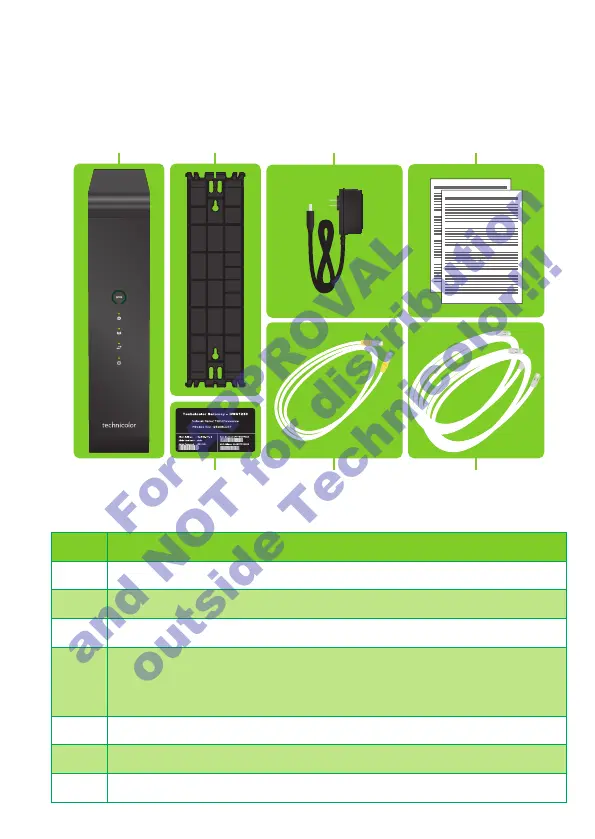
Besides this Quick Setup Guide, your package contains the following items:
Item Description
A One DWA1230
B One wall mount bracket
C One power adapter (type may dier depending on region)
D One Safety Instructions and Regulatory Information booklet (other
additional regulatory documents may be included)
One wall mount instructions leaflet
E One DWA1230 settings card
F Two DSL cables
G One Ethernet cable with yellow connectors
3. Connect the DWA1230 to the Broadband service
1 Take both DSL cables.
2 Plug one DSL cable into the DSL 1 port and plug the other one in the DSL2 port.
3 Plug the other end of both DSL cables into your telephone wall sockets.
4. Power on the DWA1230
1 Plug the connector of the electric power supply adapter into the Power port. Plug
the adapter into a nearby power outlet.
2 Press the On/O button.
For APPROVAL
and NOT for distribution
outside Technicolor!!!














 To Next Page