EasyManua.ls Logo

Technics RS-610US - Page 5

Technics RS-610US
25 pages
Print Icon
To Next Page IconTo Next Page
To Previous Page IconTo Previous Page
Loading...
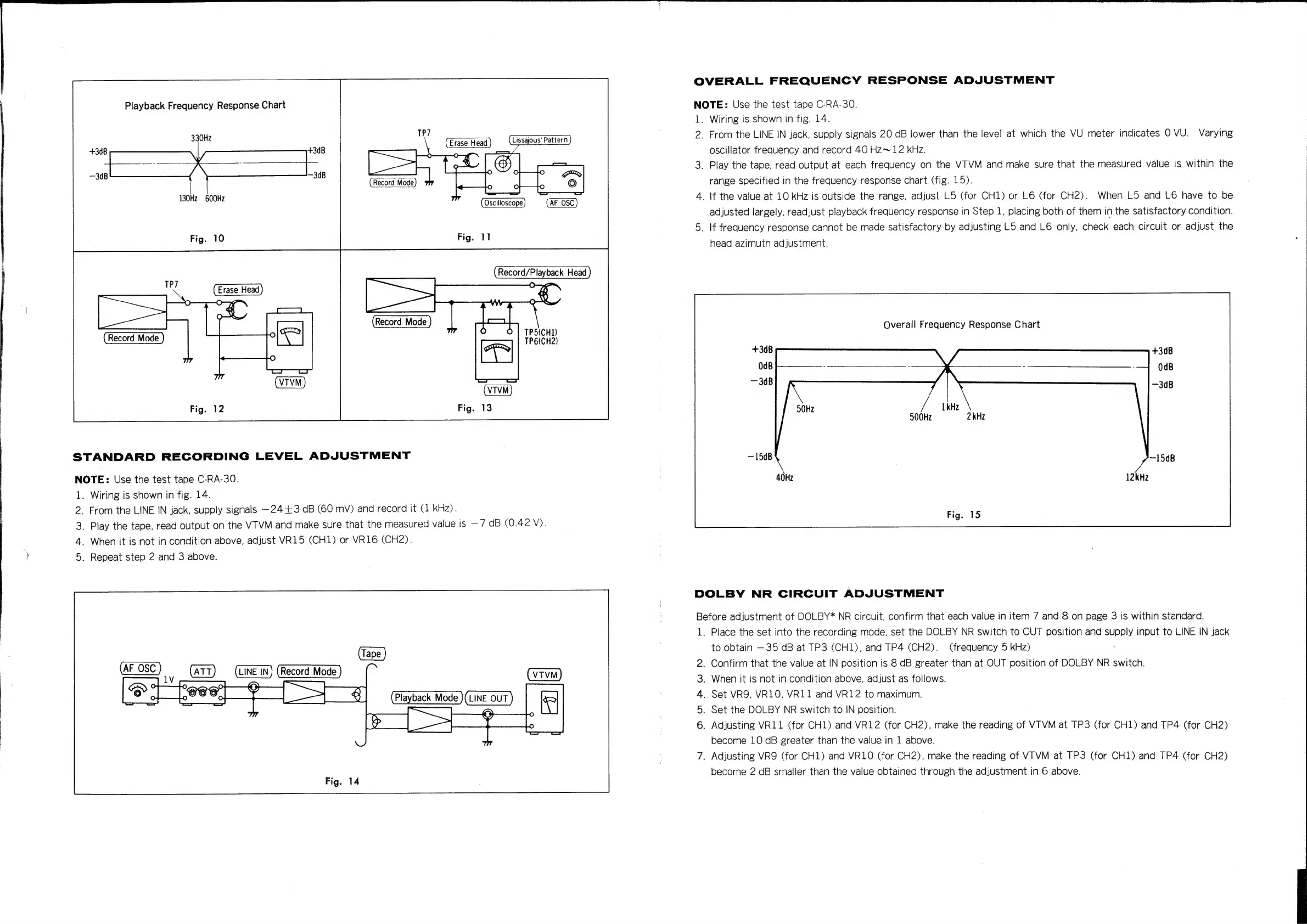
Playback
Frequency
Response
Chart
330Hz
130Hz
600Hz
STANDARD
RECORDING
LEVEL
ADJUSTMENT
NOTE:
Use
the
test
tape
C-RA-30.
1.
_
From
the
LINE
IN
jack,
supply
signals
—24+3
dB
(60
mV)
and
record
it
(1
kHz).
_
Play
the
tape,
read
output
on
the
VTVM
and
make
sure
that
the
measured
value
is
—7
dB
(0.42
V).
_
When
it
is
not
in
condition
above,
adjust
VR15
(CH1)
or
VR16
(CH2).
.
Repeat
step
2
and
3
above.
af
WwW
Nh
Wiring
is
shown
in
fig.
14.
Lissajous'
Pattern
(AE
OSC)
TPS(CH1)
TP6(CH2)
OVERALL
FREQUENCY
RESPONSE
ADJUSTMENT
NOTE:
Use
the
test
tape
C-RA-30.
ds
2.
Wiring
is
shown
in
fig.
14.
From
the
LINE
IN
jack,
supply
signals
20
dB
lower
than
the
level
at
which
the
VU
meter
indicates
O
VU.
Varying
oscillator
frequency
and
record
40
Hz~12
kHz.
_
Play
the
tape,
read
output
at
each
frequency
on
the
VTVM
and
make
sure
that
the
measured
value
is
within
the
range
specified
in
the
frequency
response
chart
(fig.
15).
_
If
the
value
at
10
kHz
is
outside
the
range,
adjust
L5
(for
CH1)
or
L6
(for
CH2).
When
L5
and
L6
have
to
be
adjusted
largely,
readjust
playback
frequency
response
in
Step
1,
placing
both
of
them
in
the
satisfactory
condition.
_
If
frequency
response
cannot
be
made
satisfactory
by
adjusting
L5
and
L6
only,
check
each
circuit
or
adjust
the
head
azimuth
adjustment.
Overall
Frequency
Response
Chart
500Hz
DOLBY
NR
CIRCUIT
ADJUSTMENT
Before
adjustment
of
DOLBY*
NR
circuit,
confirm
that
each
value
in
item
7
and
8
on
page
3
is
within
standard.
1.
nar
WD
Place
the
set
into
the
recording
mode,
set
the
DOLBY
NR
switch
to
OUT
position
and
supply
input
to
LINE
IN
jack
to
obtain
—35
dB
at
TP3
(CH1),
and
TP4
(CH2).
(frequency
5
kHz)
.
Confirm
that
the
value
at
IN
position
is
8
dB
greater
than
at
OUT
position
of
DOLBY
NR
switch.
.
When
it
is
not
in
condition
above,
adjust
as
follows.
.
Set
VR9Y,
VR1O,
VR11
and
VR12
to
maximum.
.
Set
the
DOLBY
NR
switch
to
IN
position.
.
Adjusting
VR11
(for
CH1)
and
VR12
(for
CH2),
make
the
reading
of
VTVM
at
TP3
(for
CH1)
and
TP4
(for
CH2)
become
10
dB
greater
than
the
value
in
1
above.
.
Adjusting
VR9
(for
CH1)
and
VR1O
(for
CH2),
make
the
reading
of
VTVM
at
TP3
(for
CH1)
and
TP4
(for
CH2)
become
2
dB
smaller
than
the
value
obtained
through
the
adjustment
in
6
above.

Related product manuals