EasyManua.ls Logo

Technics RS-676US - Page 15

Technics RS-676US
61 pages
Print Icon
To Next Page IconTo Next Page
To Previous Page IconTo Previous Page
Loading...
ITEM
MEASUREMENT
&
ADJUSTMENT
REMARKS
Overall
Gain
Equipments:
*
AF
Oscillator
*
VTVM
*
ATT
*
Oscilloscope
*
Test
Tape
(Reference
Blank
Tape)...C-RA
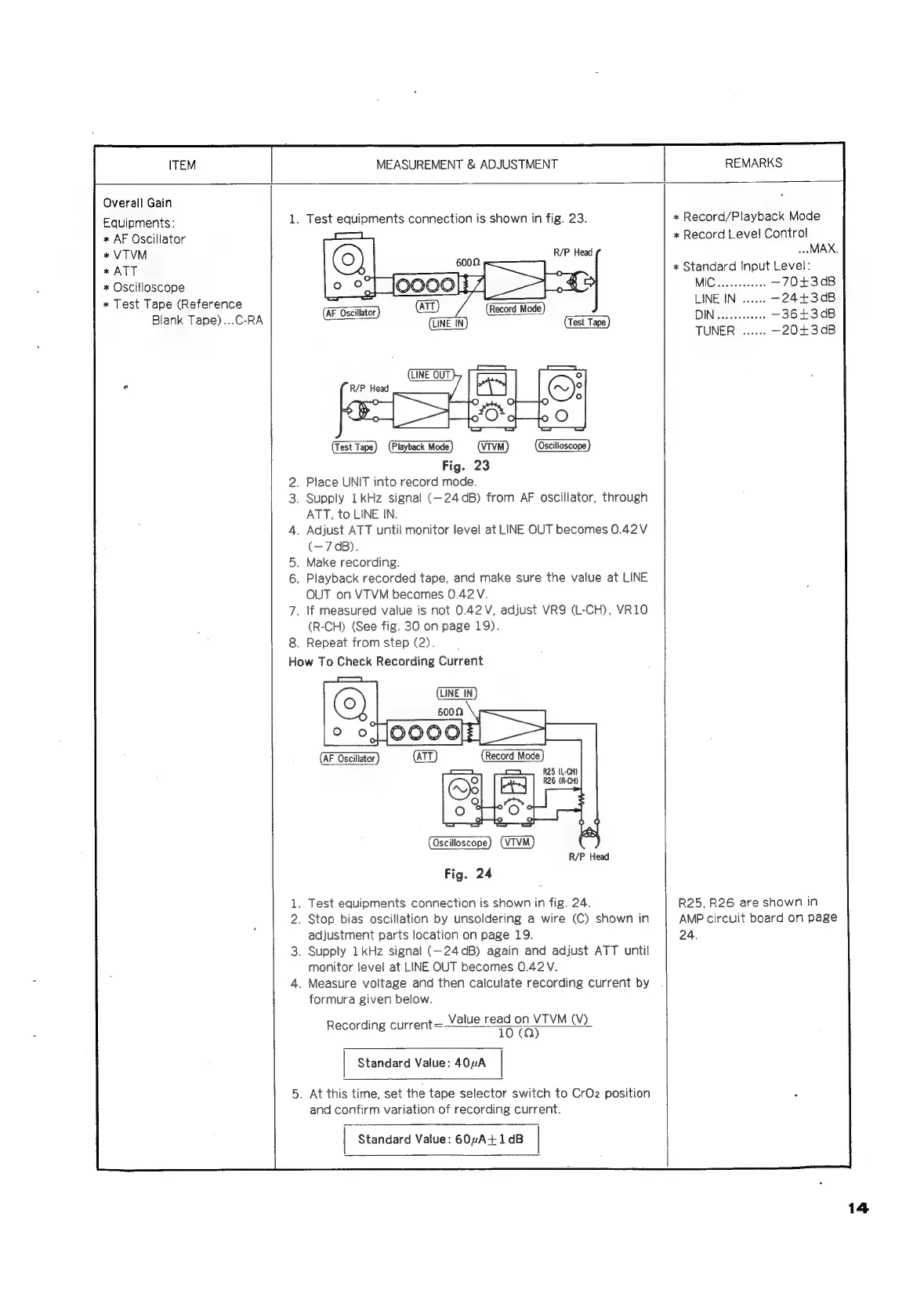
1.
Test
equipments
connection
is
shown
in
fig.
23.
R/P
Head
Oscilloscope)
(Test
Tape)
(Playback
Mode)
(VTVM)
Fig.
23
.
Place
UNIT
into
record
mode.
.
Supply
1kHz
signal
(—24dB)
from
AF
oscillator,
through
ATT,
to
LINE
IN.
.
Adjust
ATT
until
monitor
level
at
LINE
OUT
becomes
0.42V
(—7
dB).
.
Make
recording.
.
Playback
recorded
tape,
and
make
sure
the
value
at
LINE
OUT
on
VTVM
becomes
0.42
V.
.
lf
measured
value
is
not
0.42V,
adjust
VR9
(L-CH),
VR10
(R-CH)
(See
fig.
30
on
page
19).
8.
Repeat
fromstep
(2).
How
To
Check
Recording
Current
LINE
IN
R/P
Head
Fig.
24
.
Test
equipments
connection
is
shown
in
fig.
24.
.
Stop
bias
oscillation
by
unsoldering
a
wire
(C)
shown
in
adjustment
parts
location
on
page
19.
.
Supply
1kHz
signal
(—24dB)
again
and
adjust
ATT
until
monitor
level
at
LINE
OUT
becomes
0.42
V.
.
Measure
voltage
and
then
calculate
recording
current
by
formura
given
below.
Value
read
on
VTVM
(V)
Recording
current=
10
(0)
|
Standard
Value:
40”A
|
.
At
this
time,
set
the
tape
selector
switch
to
CrOz
position
and
confirm
variation
of
recording
current.
|
Standard
Value:
602A-+1dB
|
«x
Record/Playback
Mode
*
Record
Level
Control
MAX.
*
Standard
Input
Level:
+3
dB
—244+3
dB
—36+43dB
—20+3dB
R25,
R26
are
shown
in
AMP
circuit
board
on
page
24.
14

Related product manuals