EasyManua.ls Logo

Technics RS-B765 - Page 10

Technics RS-B765
38 pages
Print Icon
To Next Page IconTo Next Page
To Previous Page IconTo Previous Page
Loading...
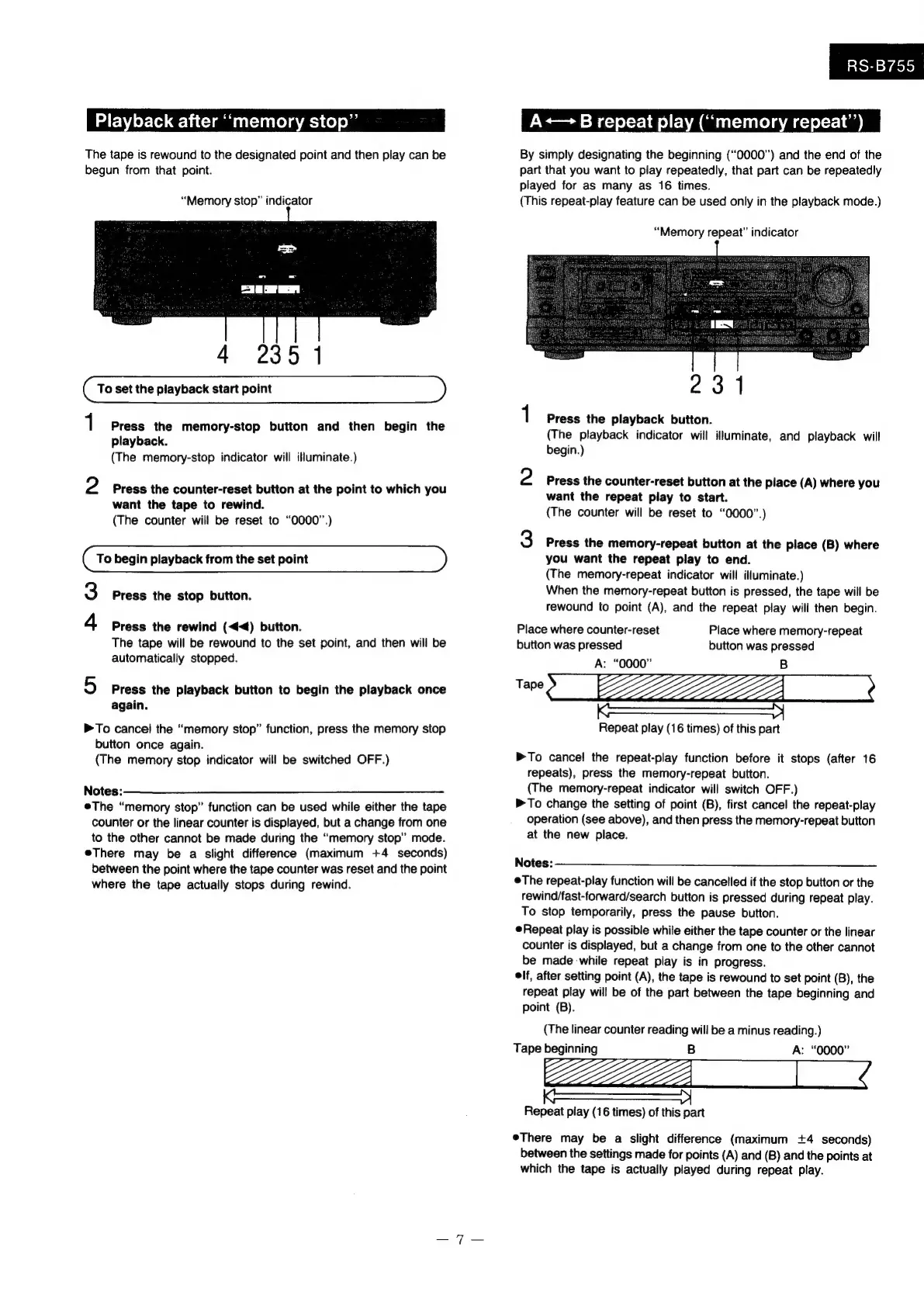
Playback
after
“‘memory
stop”’
The
tape
is
rewound
to
the
designated
point
and
then
play
can
be
begun
from
that
point.
“Memory
stop”
indicator
4
235
1
1
Press
the
memory-stop
button
and
then
begin
the
playback.
(The
memory-stop
indicator
will
illuminate.)
2
Press
the
counter-reset
button
at
the
point
to
which
you
want
the
tape
to
rewind.
(The
counter
will
be
reset
to
“0000”.)
To
begin
playback
from
the
set
point
Press
the
stop
button.
-
W
Press
the
rewind
(<<)
button.
The
tape
will
be
rewound
to
the
set
point,
and
then
will
be
automatically
stopped.
5
Press
the
playback
button
to
begin
the
playback
once
again.
>To
cancel
the
“memory
stop”
function,
press
the
memory
stop
button
once
again.
(The
memory
stop
indicator
will
be
switched
OFF.)
Notes
:——__$$$
The
“memory
stop”
function
can
be
used
while
either
the
tape
counter
or
the
linear
counter
is
displayed,
but
a
change
from
one
to
the
other
cannot
be
made
during
the
“memory
stop”
mode.
eThere
may
be
a
slight
difference
(maximum
+4
seconds)
between
the
point
where
the
tape
counter
was
reset
and
the
point
where
the
tape
actually
stops
during
rewind.
RS-B755
A+—
B
repeat
play
(“memory
repeat’)
By
simply
designating
the
beginning
(“0000”)
and
the
end
of
the
part
that
you
want
to
play
repeatedly,
that
part
can
be
repeatedly
played
for
as
many
as
16
times.
(This
repeat-play
feature
can
be
used
only
in
the
playback
mode.)
“Memory
repeat”
indicator
231
1
Press
the
playback
button.
(The
playback
indicator
will
illuminate,
and
playback
will
begin.)
2
Press
the
counter-reset
button
at
the
place
(A)
where
you
want
the
repeat
play
to
start.
(The
counter
will
be
reset
to
“0000”.)
3
Press
the
memory-repeat
button
at
the
place
(B)
where
you
want
the
repeat
play
to
end.
(The
memory-repeat
indicator
will
illuminate.)
When
the
memory-repeat
button
is
pressed,
the
tape
will
be
rewound
to
point
(A),
and
the
repeat
play
will
then
begin.
Place
where
counter-reset
Place
where
memory-repeat
button
was
pressed
button
was
pressed
A:
“0000”
B
ed
ZZZ_n
——Seee
eS
Repeat
play
(16
times)
of
this
part
To
cancel
the
repeat-play
function
before
it
stops
(after
16
repeats),
press
the
memory-repeat
button.
(The
memory-repeat
indicator
will
switch
OFF.)
>To
change
the
setting
of
point
(B),
first
cancel
the
repeat-play
operation
(see
above),
and
then
press
the
memory-repeat
button
at
the
new
place.
Notes:
eThe
repeat-play
function
will
be
cancelled
if
the
stop
button
or
the
rewind/fast-forward/search
button
is
pressed
during
repeat
play.
To
stop
temporarily,
press
the
pause
button.
Repeat
play
is
possible
while
either
the
tape
counter
or
the
linear
counter
is
displayed,
but
a
change
from
one
to
the
other
cannot
be
made
while
repeat
play
is
in
progress.
elf,
after
setting
point
(A),
the
tape
is
rewound
to
set
point
(B),
the
repeat
play
will
be
of
the
part
between
the
tape
beginning
and
point
(B).
(The
linear
counter
reading
will
be
a
minus
reading.)
Tape
beginning
B
A:
“0000”
LZZZZ-=-A_____—\
A
Repeat
play
(16
times)
of
this
part
There
may
be
a
slight
difference
(maximum
+4
seconds)
between
the
settings
made
for
points
(A)
and
(B)
and
the
points
at
which
the
tape
is
actually
played
during
repeat
play.

Related product manuals