EasyManua.ls Logo

Technics RS-M10 - Page 4

Technics RS-M10
14 pages
Print Icon
To Next Page IconTo Next Page
To Previous Page IconTo Previous Page
Loading...
MEASUREMENT
AND
ADJUSTMENT
METHOD
NOTE:
1.
Make
sure
heads
are
clean.
2.
Make
sure
capstan
and
pressure
roller
are
clean.
3.
Judgeable
room
temperature:
20+5°C
(68+9°F).
4.
Dolby
NR
switch:
OUT.
5.
Tape
selector:
Normal.
Pressure
of
pressure
roller
Equipment:
*
Tension
gauge
(max.
500
gr)
Takeup
tension
Equipment:
*
Cassette
torque
meter
-+-
QZZSRKCT
Head
azimuth
adjustment
Equipment:
*VTVM
*
Oscilloscope
*
Test
tape
(azimuth)
«++
QZZCFM
MEASUREMENT
&
ADJUSTMENT
.
Place
UNIT
into
playback
mode.
.
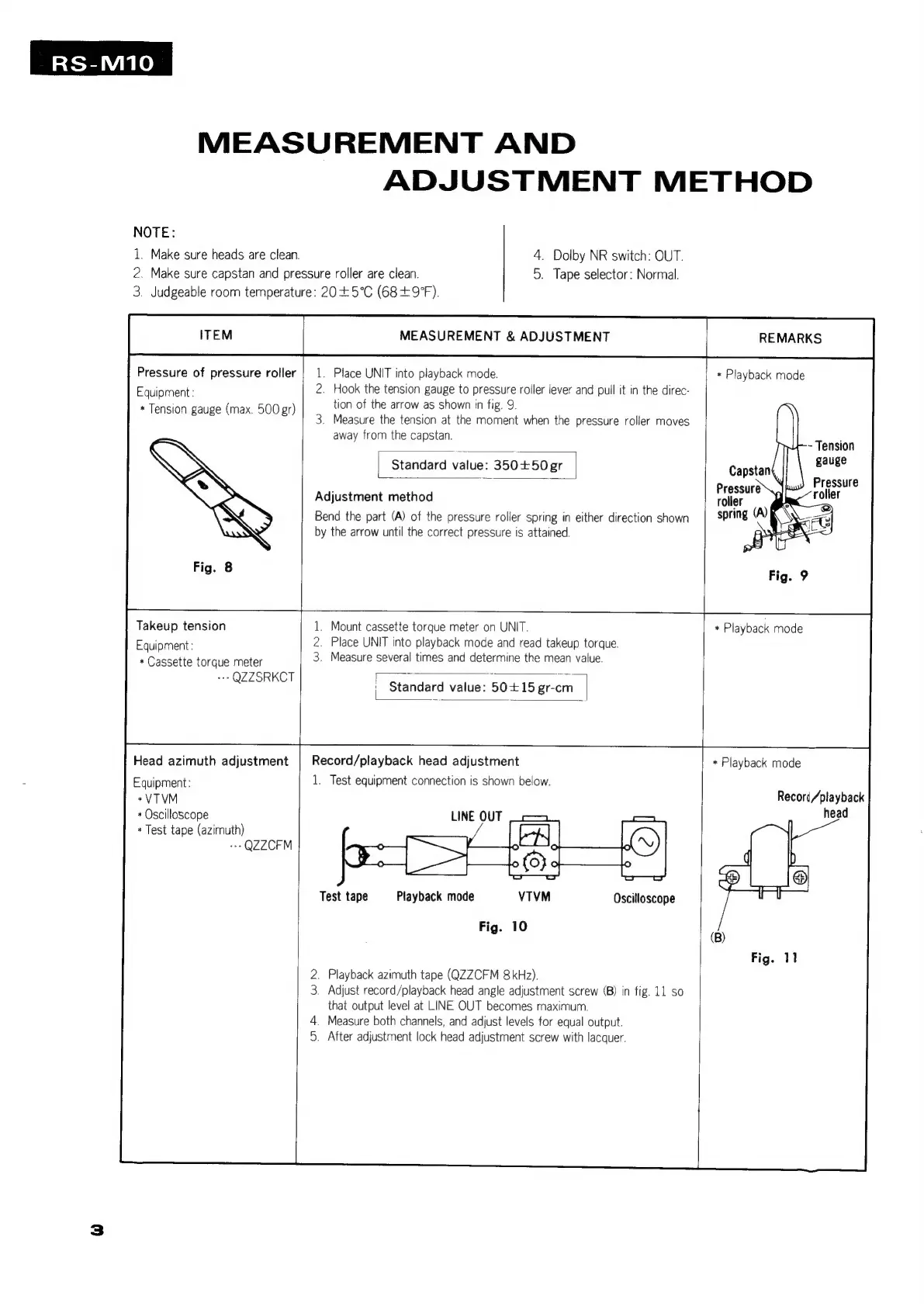
Hook
the
tension
gauge
to
pressure
roller
lever
and
pull
it
in
the
direc-
tion
of
the
arrow
as
shown
in
fig.
9.
.
Measure
the
tension
at
the
moment
when
the
pressure
rolier
moves
away
from
the
capstan.
Standard
value:
350+50gr
l
Adjustment
method
Bend
the
part
(A)
of
the
pressure
roller
spring
in
either
direction
shown
by
the
arrow
until
the
correct
pressure
is
attained.
1.
Mount
cassette
torque
meter
on
UNIT.
2.
Place
UNIT
into
playback
mode
and
read
takeup
torque.
3.
Measure
several
times
and
determine
the
mean
value.
=
ee
en
'
Standard
value:
50+15
gr-cm
REMARKS
*
Playback
mode
~
Tension
gauge
Pressure
roller
spring
(A)
*
Playback
mode
Record/playback
head
adjustment
1.
Test
equipment
connection
is
shown
below.
LINE
OUT
Test
tape
Playback
mode
VTVM
Oscilloscope
Fig.
10
.
Playback
azimuth
tape
(QZZCFM
8kHz).
.
Adjust
record/playback
head
angle
adjustment
screw
(B)
in
fig.
11
so
that
output
level
at
LINE
OUT
becomes
maximum.
.
Measure
both
channels,
and
adjust
levels
for
equal
output.
.
After
adjustment
lock
head
adjustment
screw
with
lacquer.
*
Playback
mode
Recori/playback
head

Related product manuals