EasyManua.ls Logo

Technics RS-M228X - Page 16

Technics RS-M228X
40 pages
Print Icon
To Next Page IconTo Next Page
To Previous Page IconTo Previous Page
Loading...
RS-M228X
RS-M228X
[AALAND
MM
7
ALA
LYMM
mii
itil
WITT
iia
Name
&
Description
r
Holder
ing
Screw
@3x
10
n
Socket
(L-Type)
t
Lever
Clamper
Australia.]
h
Cover
(for
S10)
pt
United
Kingdom,
East
and
Afriaca
Socket
Socket
ain
Tube
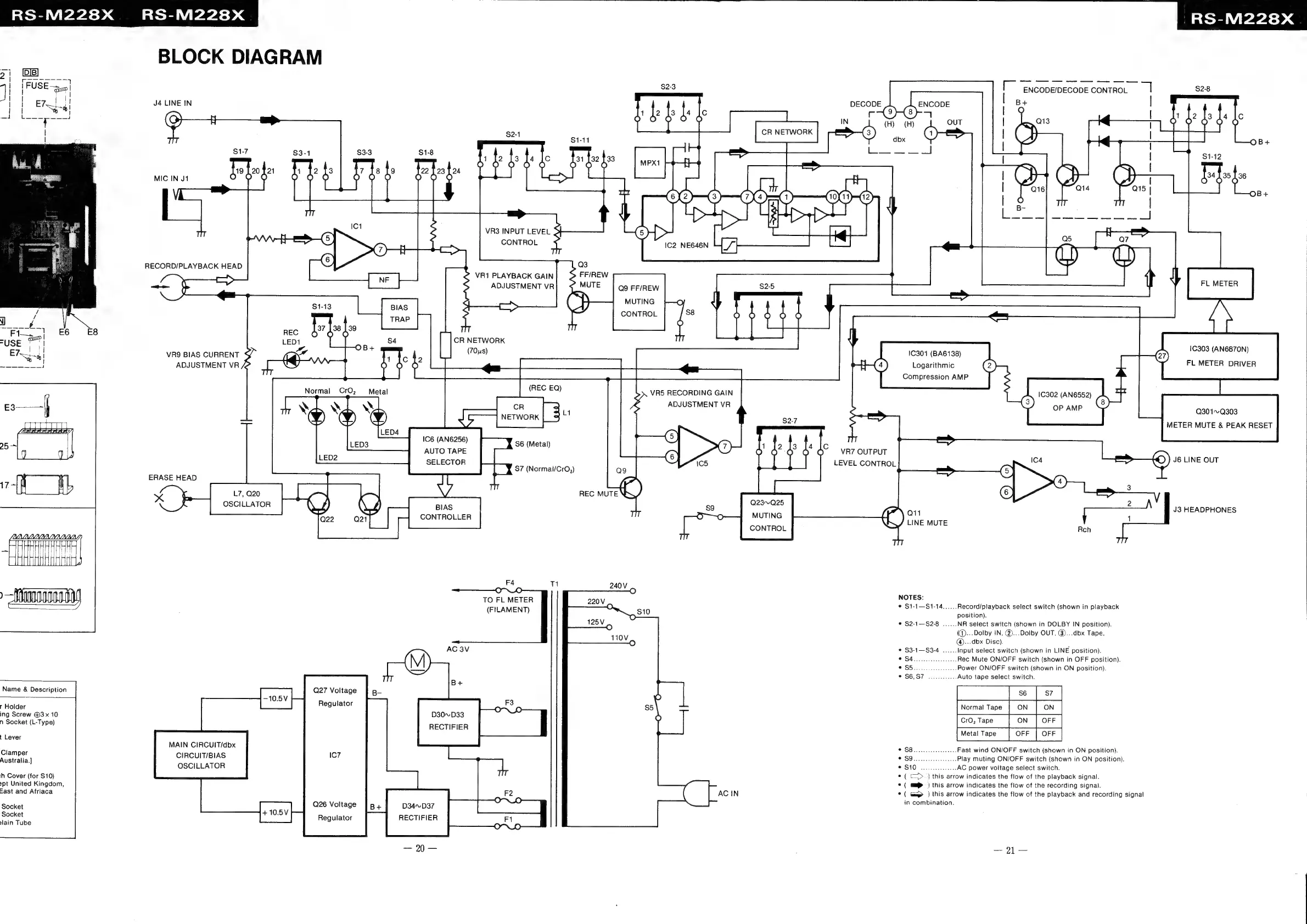
BLOCK
DIAGRAM
J4
LINE
IN
$1-7
$3-1
$3-3
$1-8
19
20
f21
1
[2
]3
7
{8
Jo
MIC
IN
J1
Oo
Ff
F
O
oO
°
VR3
INPUT
LEVEL
CONTROL
VR1
PLAYBACK
GAIN
ADJUSTMENT
VR
CR
NETWORK
oy
VRQ
BIAS
CURRENT
(a
1
Ic
j2
ADJUSTMENT
VR
an
77
O O O
Normal
CrO,
Metal
wh
wb
al
as
q
y)
yy)
5
NETWORK
|
=
1C6
(AN6256)
AUTO
TAPE
(REC
EQ)
S6
(Metal)
SELECTOR
|
Y
S7
(Normal/CrO,)
ERASE
HEAD
ees
x
¥
L7,
Q20
|
A
OSCILLATOR
K
}
eo,
BIAS
CONTROLLER
F4
11
TO
FL
METER
(FILAMENT)
Q27
Voltage
Regulator
D30~D33
RECTIFIER
MAIN
CIRCUIT/dbx
CIRCUIT/BIAS
OSCILLATOR
Q26
Voltage
Regulator
D34~D37
RECTIFIER
DECODE
ENCODE
(@-5
OUT
OB+
B+
Q3
FF/REW
Q9
FF/REW
MUTING
CONTROL
1C303
(AN6870N)
FL
METER
DRIVER
1C301
(BA6138)
Logarithmic
Compression
AMP
G7)
VR5
RECORDING
GAIN
ADJUSTMENT
VR
10302
(AN6552)
OP
AMP
Q301~Q303
METER
MUTE
&
PEAK
RESET
VR7
OUTPUT
cs
LEVEL
CONTROL
sc
=—_
(5)
(Pr
(4)
4
REC
MUTE
\Q,
(6)
many,
23~-Q25
2
es
Q23~Q
P
on1
J3
HEADPHONES
ae
aia
1@
LINE
MUTE
L
CONTROL
Roh
240V
O
NOTES:
©
$1-1—S1-14......
Record/playback
select
switch
(Shown
in
playback
position).
©
$2-1—S2-8
......
NR
select
switch
(shown
in
DOLBY
IN
position).
(®...Dolby
IN,
@...Dolby
OUT,
@)...dbx
Tape,
@...dbx
Disc).
©
$3-1—S3-4
......
Input
select
switch
(shown
in
LINE
position).
©
S4
ened
as
.Rec
Mute
ON/OFF
switch
(shown
in
OFF
position).
.Power
ON/OFF
switch
(shown
in
ON
position).
@:S6.S7
soa:
Auto
tape
select
switch.
Paee
Cn
Normal
Tape
Fon
|
[e.tare
[on
[OFF
|
©1983
fies
wicca
mesma:
Fast
wind
ON/OFF
switch
(shown
in
ON
position).
-Play
muting
ON/OFF
switch
(shown
in
ON
position).
S10
as
sisast
AC
power
voltage
select
switch.
*
(
<>
)
this
arrow
indicates
the
flow
of
the
playback
signal.
¢
(
mi
)
this
arrow
indicates
the
flow
of
the
recording
signal.
AC
IN
°
(
Gm
)
this
arrow
indicates
the
flow
of
the
playback
and
recording
signal
|
in
combination.

Related product manuals