EasyManua.ls Logo

Technics SC-HD51 - Setting the System Time; Clock Setting Procedure

Technics SC-HD51
48 pages
Print Icon
To Next Page IconTo Next Page
To Previous Page IconTo Previous Page
Loading...
Before
use
A
TUNING/TIME
ADJUST
;
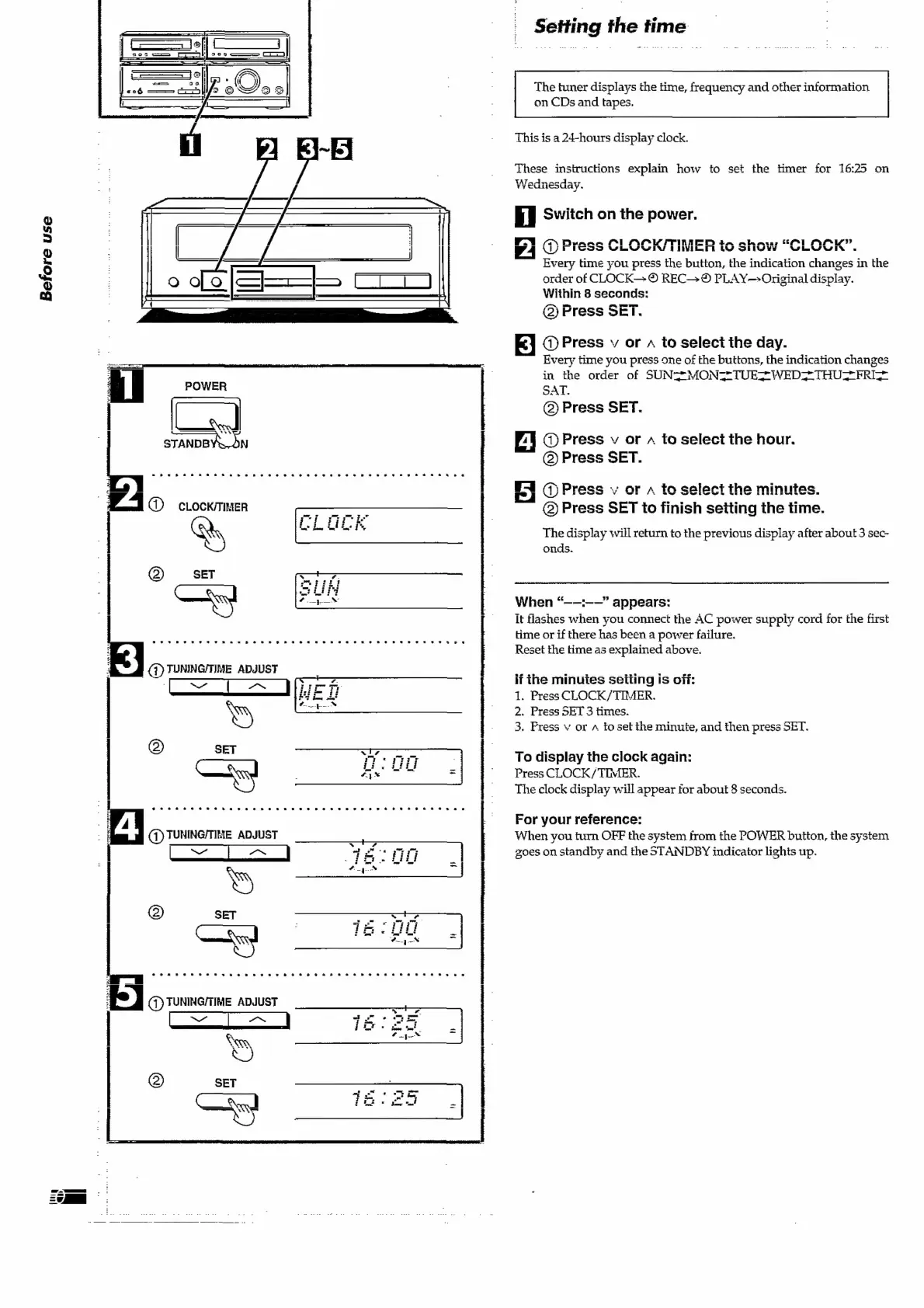
Setting
the
time
The
tuner
displays
the
time,
frequency
and
other
information
on
CDs
and
tapes.
This
is
a
24-hours
display
clock.
These
instructions
explain
how
to
set
the
timer
for
16:25
on
TAT
nAwnn
CULIS.
iF
Cu
1
Switch
on
the
power.
a
ess
CLOCK/T!
Every
time
you
press
the
button,
the
indication
changes
in
the
order
of
CLOCK—-
©
REC->®
PLAY—>Original
display.
Within
8
seconds:
@)
Press
SET.
RAED
+
yw
KAT
AP”
WILLEER
&
ar
Le
0
am
aha
WV
Oliv
m
«
N
©
G@)
Press
v
or
a
to
select
the
day.
Every
time
you
press
one
of
the
buttons,
the
indication
changes
in
the
order
of
SUNS7MONZ=TUES-WED2{THUSFRI*
SAT.
(2)
Press
SET.
@)
Press
v
or
to
select
the
hour.
@)
Press
SET.
Fl
@
Press
v
or
a
to
select
the
minutes.
@)
Press
SET
to
finish
setting
the
time.
The
display
will
return
to
the
previous
display
after
about
3
sec-
onds.
When
“——:——”
appears:
It
flashes
when
you
connect
the
AC
power
supply
cord
for
the
first
time
or
if
there
has
been
a
power
failure.
Reset
the
time
as
explained
above.
if
the
minutes
seiting
is
off:
1.
Press
CLOCK/TIMER.
2.
Press
SET
3
times.
3.
Press
v
or
a
to
set
the
minute,
and
then
press
SET.
To
display
the
clock
again:
Press
CLOCK/
TIMER.
The
clock
display
will
appear
for
about
8
seconds.
For
your
reference:
When
you
turn
OFF
the
system
from
the
POWER
button,
the
system
zoes
on
standby
and
the
STANDBY
indicator
lights
up.

Related product manuals