EasyManua.ls Logo

Technics SC-HD81 - User Manual

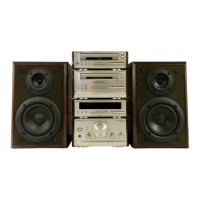
Technics SC-HD81
48 pages
Print Icon
To Next Page IconTo Next Page
Loading...
System
Component
SC-HD51
SC-HD&
I
Operating
Instructions
oe
EF
Ly
oe :
E
7:
The
illustrations
show
SC-HD51.
a
ONS
DIGITAL
AUDIO
‘echnics
Note:
The
“EB”
indication
shown
on
the
outside
packing
case
indicates
United
Kingdom.
o
<
Before
connecting,
operating
or
adjusting
this
prod-
uct,
please
read
these
instructions.
completely:
Please
save
this
manual.
Question and Answer IconNeed help?

Do you have a question about the Technics SC-HD81 and is the answer not in the manual?

Technics SC-HD81 Specifications

General IconGeneral
Input Power (DIN)40 W
Crossover Frequency3 kHz
Impedance6 Ω
Frequency Range45 Hz
Type2-way bass reflex

Summary

AC Mains Lead Safety

How to Replace the Fuse

Step-by-step guide to replacing the fuse in the AC plug.

Preparing for the Remote Control

Battery Installation

How to insert batteries into the remote control, with precautions.

Connections

Connecting the AC Mains Lead

Final connection step for the power cord.

Front Panel Controls

Tuner Section Controls

Identifies controls for the tuner section.

Amplifier Section Controls

Identifies controls for the amplifier section.

CD Player and Changer Controls

Identifies controls for the CD player and changer sections.

Cassette Deck Section Controls

Identifies controls for the cassette deck section.

Setting the Time

Setting the Clock

How to set the current time using the control buttons.

Memory Presetting

Automatic Memory Presetting

Automatically scans and stores available radio stations.

Manual Memory Presetting

Tuning and Saving Stations

How to tune to a station and save it to a preset channel.

Listening to Radio Broadcasts

Listening to Compact Discs (SC-HD51)

Sequential Play

How to play tracks in their normal order.

Program Play (SC-HD51)

Loading CDs (SC-HD81)

Removing the Shipping Spacer

How to remove the protective spacer before first use.

How to Load CDs

Step-by-step guide to placing CDs into the changer trays.

Sequential Play (SC-HD81)

Program Play (SC-HD81)

Listening to Tapes

Before Recording

To Erase Recorded Sounds

How to erase existing recordings on a tape.

Recording from Radio Broadcasts

Starting Recording

How to initiate the recording process.

Recording from Compact Discs (SC-HD51)

One-Touch Editing (SC-HD51)

Recording onto Left Over Space (LINK) (SC-HD51)

Recording from Compact Discs (SC-HD81)

Normal Recording

Standard procedure for recording a CD onto tape.

Recording Programmed Tracks

How to record a custom sequence of tracks from a CD.

One-Touch Editing (SC-HD81)

To Edit-Record Programmed Tracks

How to record programmed tracks using one-touch editing.

Recording onto Left Over Space (LINK) (SC-HD81)

Using the Timer

Setting the Play Timer

How to set the system to wake up to music at a specific time.

Setting the Play Timer (Continued)

Selecting the Source and Volume

How to choose the audio source and set the wake-up volume.

Setting the Record Timer

Setting the Record Timer (Continued)

Selecting the Preset Channel

How to choose the radio station for recording.

Using the Sleep Timer

Setting the Sleep Timer

How to set the duration for the sleep timer.

Using an External Unit

Recording from an External Source

How to record audio from an external device onto tape.

Remote Control Buttons and Functions (SC-HD51)

Remote Control Buttons and Functions (SC-HD81)

Suggestions for Safety

Placement Precautions

Guidance on where to place the unit to avoid damage.

Voltage and Power Cord Safety

Warnings regarding power sources and cord handling.

Foreign Material and Cleaning Safety

Precautions against foreign objects and cleaning solvents.

Technical Specifications

Troubleshooting Guide

Problems Common to All Systems

Troubleshooting for general system issues like humming or no sound.

While Listening to FM Broadcasts

Solutions for FM reception issues like noise or distortion.

While Listening to AM Broadcasts

Solutions for AM reception issues like hum or frequency problems.

Maintenance

Related product manuals