EasyManua.ls Logo

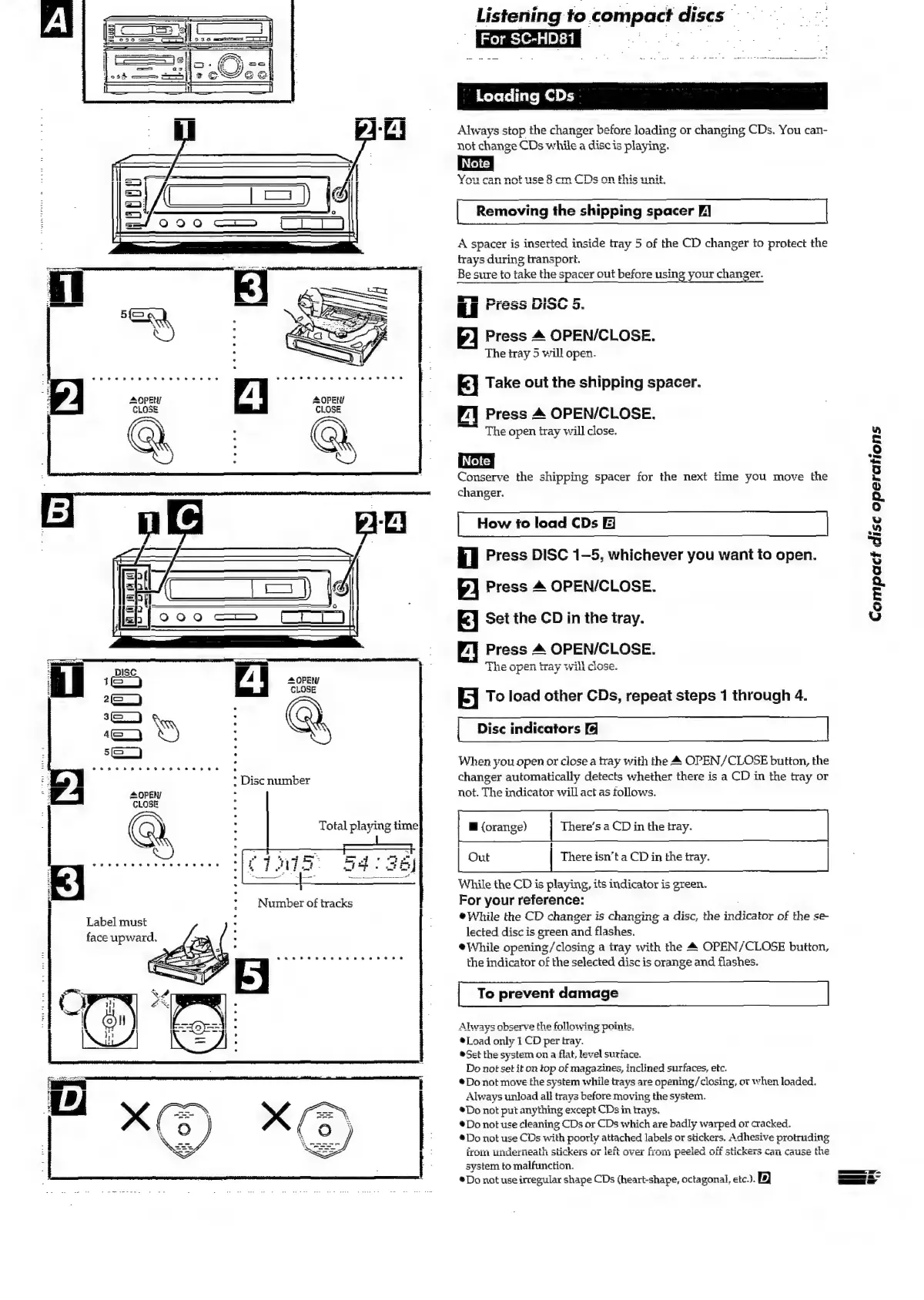
Technics SC-HD81 - Loading CDs (SC-HD81); Removing the Shipping Spacer; How to Load CDs

Technics SC-HD81
48 pages
Print Icon
To Next Page IconTo Next Page
To Previous Page IconTo Previous Page
Loading...
OPEN
CLOSE
Label
must
face
upward,
*
Disc
number
eoesevweve
Total
playing
time
Listening
to
compact
discs
me
For
SC-HD81
ieee
See
BD
Loading
CDs
Always
stop
the
changer
before
loading
or
changing
CDs.
You
can-
not
change
CDs
while
a
disc
is
playing.
|
Removing
the
shipping
spacer
FJ
|
A
spacer
is
inserted
inside
tray
5
of
the
CD
changer
to
protect
the
trays
during
transport.
Be
sure
to
take
the
spacer
out
before
using
your
changer.
rm.
a
RIAA
r
FPrFESs
VIGOYL
J.
Press
4
OPEN/CLOSE.
The
tray
5
will
open.
3
|
Take
out
the
shipping
spacer.
~:]
Press
4
OPEN/CLOSE.
“~~
The
open
tray
will
close.
Conserve
the
shipping
spacer
for
the
next
time
you
move
the
changer.
How
fo
load
CDs
Compact
disc
operations
il
Press
DISC
1-5,
whichever
you
want
to
open.
2
Press
&
OPEN/CLOSE.
E]
Set the
CD
in
the
tray.
Press
4
OPEN/CLOSE.
TTL.
.
manne
fener
carthl
alana
LUE
GPC
Tay
Win
Civse.
Je]
To
load
other
CDs,
repeat
steps
1
through
4.
Disc
indicators
When
you
open
or
close
a
tray
with
the
&
OPEN/CLOSE
button,
the
changer
automatically
detects
whether
there
is
a
CD
in
the
tray
or
not.
The
indicator
will
act
as
tollows.
@
(orange)
There’s
a
CD
in
the
tray.
Out
There
isn’t
a
CD
in
the
tray.
While
the
CD
is
playing,
its
indicator
is
green.
For
your
reference:
@While
the
CD
changer
is
changing
a
disc,
the
indicator
of
the
se
lected
disc
is
green
and
flashes.
eWhile
opening/closing
a
tray
with
the
&
OPEN/CLOSE
button,
the
indicator
of
the
selected
disc
is
orange
and
flashes.
To
prevent
damage
Always
observe
the
following
point
®Load
only
1
CD
per
tray.
®Set
the
system
on
a
flat,
level
surface.
Do
not
set
it
on
top
of
magazines,
inclined
surfaces,
etc.
*Do
not
move
the
system
while
trays
are
opening/closing,
or
when
loaded.
Always
unload
all
trays
before
moving
the
system.
*Do
not
put
anything
except
CDs
in
trays.
®Do
not
use
cleaning
CDs
or
CDs
which
are
badly
warped
or
cracked.
®Do
not
use
CDs
with
poorly
attached
labels
or
stickers,
Adhesive
protruding
irom
underneath
stickers
o7
left
over
from
peeled
off
stickers
can
cause
the
system
to
malfunction.
®Do
not
use
irregular
shape
CDs
(heart-shape,
octagonal,
etc.).
|D
a

Related product manuals