EasyManua.ls Logo

Technics SC-HD51 - Cassette Tape Playback; Basic Playback and Volume; Dolby NR and Reverse Mode; One-Touch Tape Playback

Technics SC-HD51
48 pages
Print Icon
To Next Page IconTo Next Page
To Previous Page IconTo Previous Page
Loading...
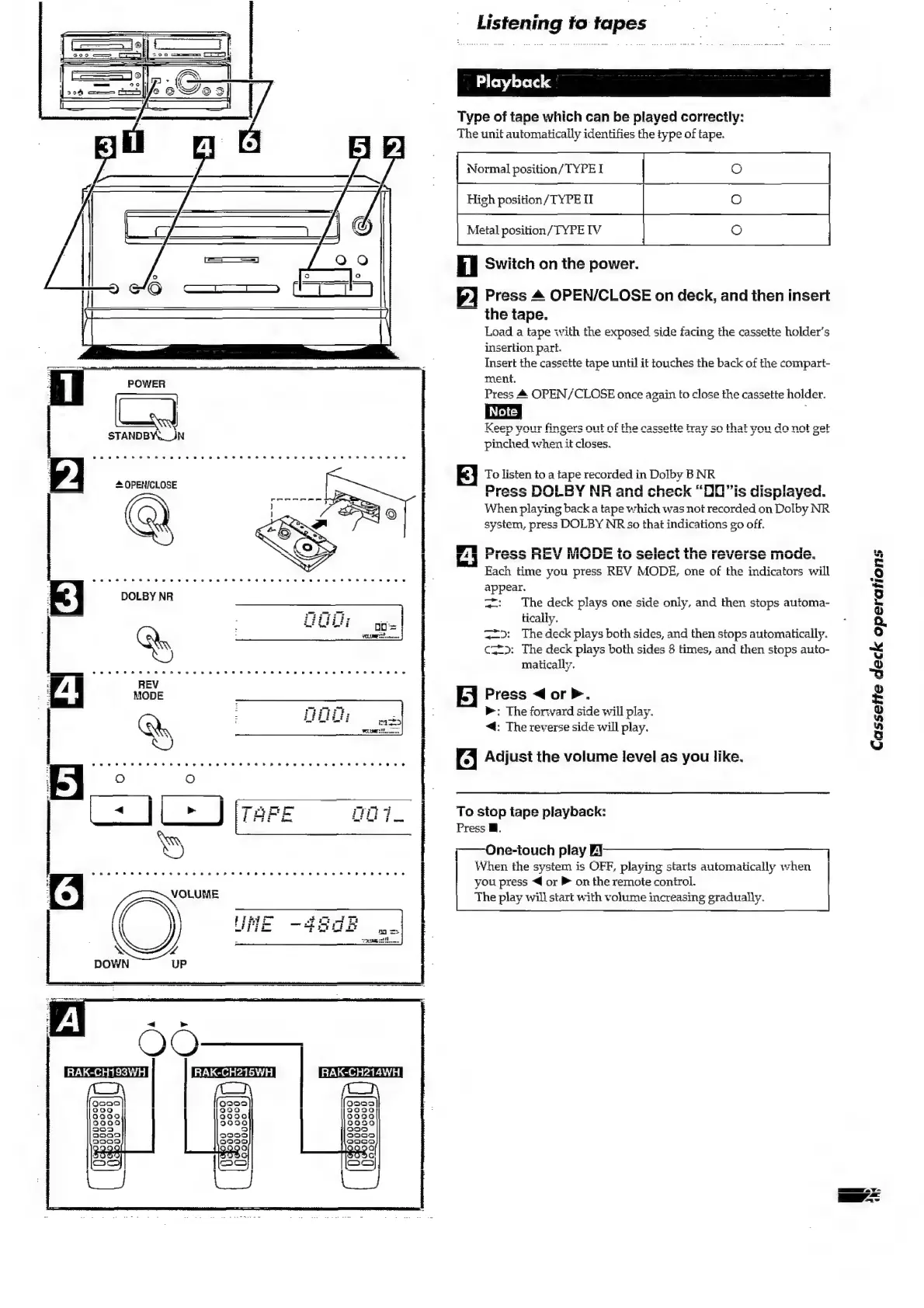
Playback
Type
of
tape
which
can
be
played
correctly:
The
unit
automatically
identifies
the
type
of
tape.
O
High
position/TYPE
1
Metal
position/TYPE
IV
il
Switch
on
the
power.
fy]
Press
4
OPEN/CLOSE
on
deck,
and
then
insert
the
tape.
Load
a
tape
with
the
exposed
side
facing
the
cassette
holder’s
insertion
part.
Insert
the
cassette
tape
until
it
touches
the
back
of
the
compart-
ment.
Press
&
OPEN/CLOSE
once
again
to
close
the
cassette
holder.
pinched
when
it
closes.
E}
To
listen
to
a
tape
recorded
in
Dolby
B
NR
Drace
NAMI
RV
AID
and
ashael
“FW
"Ile
Alan!
Lice)
MW
1
IND
GU
GiGUR
Lak
FO
Ul
1
When
playing
back
a
tape
which
was
not
recorded
on
Dolby
NR
system,
press
DOLBY
NR
so
that
indications
go
off.
A
Press
REV
MODE
to
select
the
reverse
mode.
Each
time
you
press
REV
MODE,
one
of
the
indicators
will
appear.
=:
The
deck
plays
one
side
only,
and
then
stops
automa-
tically.
==>:
The
deck
plays
both
sides,
and
then
stops
automatically.
c—=>:
The
deck
plays
both
sides
8
times,
and
then
stops
auto-
matically.
[ej
Press
<orP.
>:
The
forward
side
will
play.
<4:
The
reverse
side
will
play.
6]
Adjust
the
volume
level
as
you
like.
To
stop
tape
playback:
Press
Mf.
;——
One-touch
play
When
the
system
is
OFF,
playing
starfs
automatically
when
you
press
<4
or
®
on
the
remote
control.
The
play
will
start
with
volume
increasing
gradually.
Cassette
deck
operations
a
a
Y-
{or

Related product manuals