EasyManua.ls Logo

Technics SE-A50 - Page 4

Technics SE-A50
15 pages
Print Icon
To Next Page IconTo Next Page
To Previous Page IconTo Previous Page
Loading...
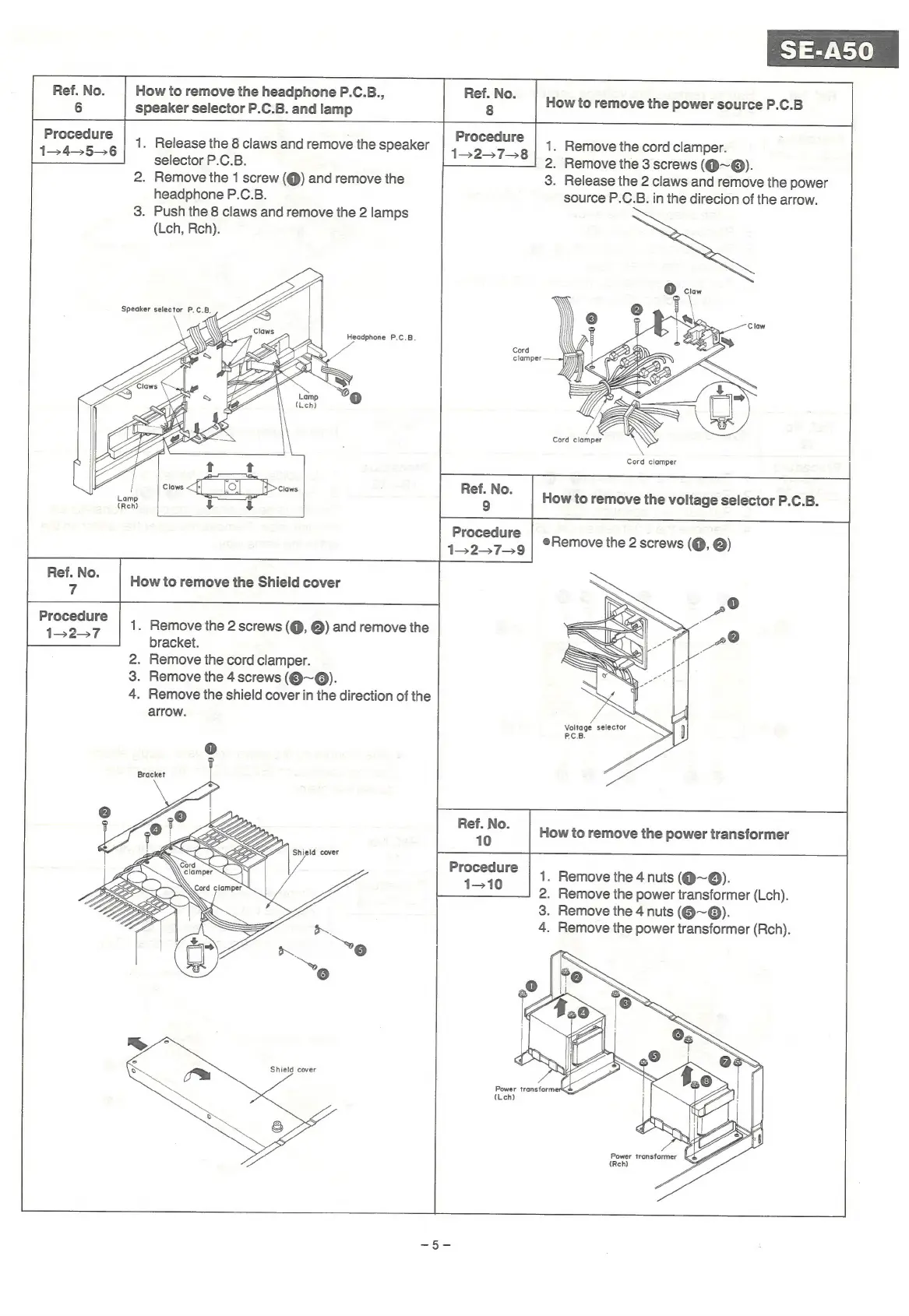
How
to
remove
the
headphone
P.C.B.,
speaker
selector
P.C.B.
and
lamp
How
to
remove
the
power
source
P.C.B
Procedure
1345536
1.
Release
the
8
claws
and
remove
the
speaker
selector
P.C.B.
2.
Remove
the
1
screw
(@)
and
remove
the
headphone
P.C.B.
3.
Push
the
8
claws
and
remove
the
2
lamps
(Lch,
Rech).
Procedure
452-57
1.
Remove
the
2
screws
(@,
@)
and
remove
the
bracket.
.
Remove
the
cord
clamper.
.
Remove
the
4
screws
(Q@~@).
.
Remove
the
shield
cover
in
the
direction
of
the
arrow.
Ref.
No.
7
2
3
4
@
g
Bracket
Shield
cover
Shield
cover
Procedure
1-278
1.
Remove
the
cord
clamper.
2.
Remove
the
3
screws
(Q@~6).
3.
Release
the
2
claws
and
remove
the
power
source
P.C.B.
in
the
direcion
of
the
arrow.
Cord
clamper
Procedure
1327-9
.
;
SS
4
7
S
1.
Remove
the
4
nuts
(@~@).
2.
Remove
the
power
transformer
(Lch).
3.
Remove
the
4
nuts
(@~®@).
4.
Remove
the
power
transformer
(Rch).
(Lch

Related product manuals