EasyManua.ls Logo

Technics SH-EX1200 - User Manual

Technics SH-EX1200
12 pages
Print Icon
To Next Page IconTo Next Page
Loading...
Operating Instructions
Model No.
SH-EX1200
RQT6018-1Y
Audio Mixer
PP
Before connecting, operating or adjusting this product, please read these
instructions completely.
Please keep this manual for future reference.
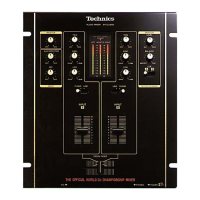
The photograph shows the silver model.
En

Questions and Answers

  • M
    Mackenzie WatsonAug 12, 2025
    What to do if there is no sound even when power is supplied to my Technics SH-EX1200 Music Mixer?
    • O
      oboydAug 12, 2025
      If there's no sound from your Technics Music Mixer despite the power being on, consider these potential causes and solutions: * Check if the input selector control is set to the correct source. If it isn't, adjust it accordingly. * Ensure all units are properly connected. Incorrect connections can lead to a lack of sound. * Verify that the master level control or any other volume level control isn't set to the minimum [MIN] position. Adjust the volume levels as needed.
  • C
    Christine JohnsonAug 16, 2025
    Why does my Technics SH-EX1200 have a low hum or buzz during play?
    • J
      Jordan RitterAug 16, 2025
      A low hum or buzz during playback on your Technics Music Mixer can be due to a couple of reasons: 1. Check if there's a fluorescent light or another electrical appliance (or its AC mains lead) near any of the connecting cords. If so, try to move these items as far away from the audio mixer as possible. 2. Also, verify that the turntable’s grounding wire is securely connected. A disconnected grounding wire can introduce unwanted noise.
  • D
    David SmithAug 20, 2025
    What to do if the left and right sound is reversed on my Technics Music Mixer?
    • A
      Adam GarrisonAug 20, 2025
      If the left and right sound channels are reversed on your Technics Music Mixer, the issue likely stems from incorrect connections. Ensure that all units are connected with the channels correctly oriented.
  • A
    Ashley SantiagoAug 23, 2025
    How to fix a fader that doesn't move smoothly on my Technics SH-EX1200 Music Mixer?
    • S
      Sabrina NewmanAug 23, 2025
      If a fader (slide volume control) on your Technics Music Mixer isn't moving smoothly, it might be worn. In this case, replace it with a new fader. Refer to the additional instructions provided separately for guidance on this process.
  • T
    taylor30Aug 27, 2025
    What to do if my Technics SH-EX1200 has no sound?
    • N
      Natalie MartinAug 27, 2025
      If your Technics Music Mixer has no sound, even when power is on, several issues could be the cause. First, check that the input selector is set to the correct source. Next, ensure all units are properly connected. Finally, make sure the master level control or other volume controls are not set to the minimum position; adjust them appropriately.
  • A
    Albert BakerAug 31, 2025
    Why is my Technics Music Mixer humming?
    • C
      Christopher RodriguezAug 31, 2025
      If you hear a low hum or buzz during play with your Technics Music Mixer, it could be due to nearby electrical appliances or a disconnected turntable grounding wire. Try moving fluorescent lights, other appliances, and their power cords away from the audio mixer. Also, ensure the turntable’s grounding wire is securely connected.
  • R
    Robert PerezSep 3, 2025
    How to fix reversed left and right sound on Technics SH-EX1200 Music Mixer?
    • A
      Amanda ToddSep 4, 2025
      If the left and right sound channels are reversed on your Technics Music Mixer, it is likely that some of the units have been connected with the left and right channels reversed. To fix this, ensure that all channels are connected correctly.
  • J
    John ChapmanSep 7, 2025
    What to do if fader fails on Technics Music Mixer?
    • A
      Amy RobersonSep 8, 2025
      If the fader on your Technics Music Mixer doesn't move smoothly, it might be worn. Replace it with a new fader, referring to the additional instructions provided separately.

Summary

Supplied Accessories

Listening Caution

Important Safety Instructions

Features

Operating Ease

Discusses the mixer's height and panel layout for user-friendly operation.

Construction and Materials

Details the durable faders and switches used in the mixer's design.

Functions

Explains the mixer's equalizer, trim, cross fader, monitor, and input features.

Connections

Rear Panel Connections

Illustrates and explains how to connect external devices to the mixer's rear panel ports.

Front Panel Connections

Covers headphone and microphone connections on the mixer's front panel.

Connecting Two Audio Mixers Side by Side

Guides on linking two mixers for expanded functionality and volume alignment.

Names of the Parts

Block Diagram

Maintenance

Product Service

Troubleshooting Guide

Specifications

Technics SH-EX1200 Specifications

General IconGeneral
TypeDJ Mixer
Channels2
Equalizer3-band EQ
Inputs2 Phono, 2 Line, 1 Mic
OutputsMaster, Booth, Headphones
CrossfaderYes
EffectsNo

Related product manuals