EasyManua.ls Logo

Technics SH-MZ1200 - User Manual

Technics SH-MZ1200
16 pages
Print Icon
To Next Page IconTo Next Page
Loading...
Model No.
SH-MZ1200
RQT7231-2B
EB EP
Note:
“EB” on the packaging indicates the United Kingdom.
Before connecting, operating or adjusting this product,
please read the instructions completely.
Please keep this manual for future reference.
GN
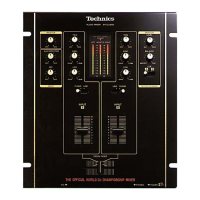
The photograph shows the silver model.
Operating Instructions
DJ Mixer

Questions and Answers

  • A
    Amanda RobertsAug 18, 2025
    What to do if my Technics SH-MZ1200 has no sound even when the power is on?
    • Q
      qrojasAug 18, 2025
      If there is no sound from your Technics Music Mixer, even when powered on, several factors could be at play. First, ensure the input switch is correctly set to your desired source. Next, verify all units are properly connected. Finally, check that the master level and other volume controls aren't set to the MIN position; adjust them as necessary.
  • Z
    ztannerAug 20, 2025
    Why is the sound distorted on my Technics SH-MZ1200?
    • L
      Linda MccartyAug 20, 2025
      Sound distortion on your Technics Music Mixer can occur if the master volume level or monitor volume level is too high. Adjust the MASTER LEVEL or MONITOR LEVEL control knobs. Also, check if the input level is too high and reduce it by turning the TRIM control knob.
  • T
    Tami ThomasAug 22, 2025
    What to do if the left and right sound is reversed on my Technics Music Mixer?
    • C
      Carlos SmithAug 23, 2025
      If the left and right sound channels are reversed on your Technics Music Mixer, check if you have connected the left and right terminals in reverse. Ensure that you connect the channels correctly.
  • E
    Edward NicholsonAug 26, 2025
    What to do if I cannot use the cross fader on my Technics Music Mixer?
    • C
      Christopher McmahonAug 26, 2025
      If you cannot use the cross fader on your Technics Music Mixer, the ASSIGN A and ASSIGN B switch settings might be incorrect. Select the appropriate input source assigned to A and B.
  • D
    Daniel RodriguezAug 28, 2025
    Why is there a low hum or buzz heard during play on my Technics Music Mixer?
    • M
      masonchristopherAug 28, 2025
      A low hum or buzz during playback on your Technics Music Mixer could be due to a fluorescent light or other electrical appliances, or their power cables being too close to the connecting cables. Move these items as far away from the unit as possible. Also, check if the turntable’s grounding wire has been disconnected and ensure it is securely connected.
  • A
    Amber MillerAug 30, 2025
    What to do if the external effector's sound is distorted on my Technics SH-MZ1200 Music Mixer?
    • N
      Nicholas GallowayAug 30, 2025
      If the external effector's sound is distorted when using your Technics Music Mixer, the input level from the external effector may be too high. Reduce the external effector's output level by adjusting the SEND or RETURN control knob.
  • Z
    Zachary MartinezSep 2, 2025
    What to do if the effect does not appear to be working on my Technics Music Mixer?
    • E
      Elizabeth NelsonSep 2, 2025
      If the effect does not appear to be working on your Technics Music Mixer, check if the EFFECT switch is turned OFF. Turn the EFFECT switch ON for the channel you intend to use.
  • D
    Danielle WilliamsSep 4, 2025
    How to fix fader operation if it is reversed on Technics SH-MZ1200 Music Mixer?
    • J
      Jonathan SchmidtSep 4, 2025
      If the fader operation is reversed on your Technics Music Mixer, it means the fader operation switch is in the REVERSE position. Turn the switch to the NORMAL position.
  • C
    colemanrobertSep 7, 2025
    What to do if my Technics Music Mixer has no power?
    • L
      Lisa LeblancSep 7, 2025
      If your Technics Music Mixer has no power, connect the power plug securely.
  • J
    Jonathan TurnerSep 9, 2025
    What to do if the output is not separated on Technics SH-MZ1200 Music Mixer?
    • M
      malloryjonesSep 9, 2025
      If the output is not separated on your Technics Music Mixer, check if the SEPARATE OUT switch is OFF. Switch the SEPARATE OUT switch to ON.

Summary

General Safety Precautions

Installation and Ventilation Warnings

Warnings about placement, confinement, and ventilation to prevent hazards.

Electrical Safety and Environmental Risks

Precautions against rain, moisture, liquids, and naked flames.

AC Mains Lead Caution (UK)

Fuse Replacement Procedure

Instructions on checking and replacing the fuse in the UK plug.

Plug Suitability and Wiring

Guidance on plug suitability, cutting off unsuitable plugs, and wiring color codes.

Safety Precautions

Voltage and Power Source Safety

Warnings about high voltage and DC power sources to prevent overload and fire.

AC Lead and Foreign Matter Safety

Precautions for the AC lead, handling plugs, and preventing foreign matter ingress.

Component Part Names - Control Panel

Component Part Names - Panel Layout

Connections - Output Side

Connecting Speakers and Amplifiers

Diagrams for connecting speakers, amplifiers, and monitor amplifiers using phono and XLR cables.

Connections - Input Side

Connecting Audio Sources

Diagrams for connecting turntables, CD players, and cassette decks via various input terminals.

Mixing Basic Operations

Input Source Selection and Adjustment

Instructions for selecting input sources and adjusting TRIM, HIGH, MID, LOW controls.

Volume and Sound Adjustment

Guides on using channel faders, cross fader, and master level/balance controls.

Microphone and External Recording

Additional Mixing Operations

Monitor Sound Adjustment

How to cue channels, monitor effect return, select modes, and adjust volume.

Play Mode Functions

Individual Left;Right Input Adjustment

How to use L/R SPLIT to adjust left and right channel input levels and sound.

Output Separation Setup

Instructions for turning SEPARATE OUT ON for dual output and using the cross fader.

Fader Start Function

Using Channel Fader for Start

How to use the channel fader to start digital turntable playback.

Using Cross Fader for Start

How to use the cross fader to start digital turntable playback.

Alternate Playback with Two Turntables

Instructions for alternate playback using the cross fader with CH1 and CH4.

Troubleshooting Guide

Power and Sound Issues

Addresses problems like no power, no sound, and low volume, with checks and actions.

Technics SH-MZ1200 Specifications

Input Sensitivity and Impedance IconInput Sensitivity and Impedance
PHONO input sensitivity2.5 mV
PHONO input impedance47 kΩ
LINE input sensitivity250 mV
LINE input impedance10 kΩ
EFFECT RETURN input sensitivity250 mV
EFFECT RETURN input impedance47 kΩ
MIC input sensitivity0.7 mV
MIC input impedance1 kΩ
Output Voltage and Impedance IconOutput Voltage and Impedance
MASTER 1, 2 (RCA) output voltage1 V
MASTER 1, 2 (RCA) output impedance600 Ω
MASTER 1 (XLR) output voltage1 V
MASTER 1 (XLR) output impedance600 Ω
MONITOR output voltage1 V
MONITOR output impedance1 kΩ
REC OUT output voltage250 mV
REC OUT output impedance1 kΩ
EFFECT SEND output voltage250 mV
EFFECT SEND output impedance1 kΩ
Headphone output power30 mW
Headphone output impedance32 Ω
Frequency Response IconFrequency Response
MASTER 1, 2 frequency response20 Hz to 20 kHz
REC OUT frequency response20 Hz to 20 kHz
EFFECT RETURN frequency response20 Hz to 20 kHz
MIC frequency response20 Hz to 20 kHz
Digital Audio IconDigital Audio
Coaxial digital input compatible sampling rate48 kHz/44.1 kHz/32 kHz
Coaxial digital output sampling rate44.1 kHz
Equalizer Characteristics IconEqualizer Characteristics
CD/LINE/PHONO LOW EQ gain+12 dB, –24 dB (50 Hz)
CD/LINE/PHONO MID EQ gain+12 dB, –24 dB (1 kHz)
CD/LINE/PHONO HIGH EQ gain+12 dB, –24 dB (10 kHz)
MIC LOW EQ gain+12 dB, –24 dB (100 Hz)
MIC HIGH EQ gain+12 dB, –24 dB (10 kHz)
General IconGeneral
Power supplyAC 230-240 V, 50 Hz
Power consumption35 W
Dimensions (WxHxD)300 mm x 103 mm x 330 mm
Mass5.3 kg

Related product manuals