EasyManua.ls Logo

Technics SL-J110R - Connections; Power and Audio Connections

Technics SL-J110R
11 pages
Print Icon
To Next Page IconTo Next Page
To Previous Page IconTo Previous Page
Loading...
SL-J110R
@
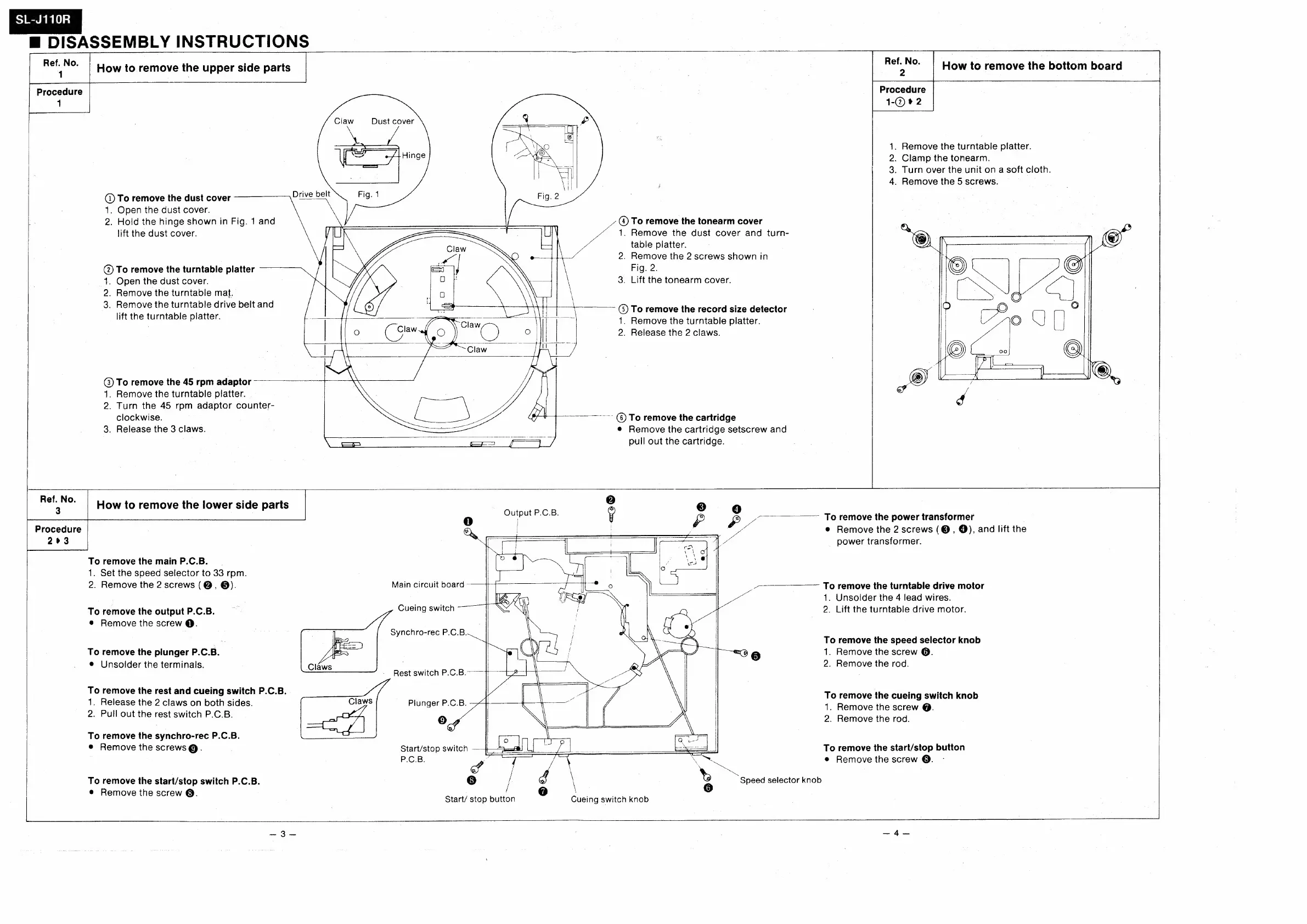
DISASSEMBLY
INSTRUCTIONS
How
to
remove
the
upper
side
parts
|
How
to
remove
the
bottom
board
Procedure
1
Claw
Dust
cover
1.
Remove
the
turntable
platter.
2.
Clamp
the
tonearm.
3.
Turn
over
the
unit
on
a
soft
cloth.
4.
Remove
the
5
screws.
(1)
To
remove
the
dust
cover
Drive
belt
1.
Open
the
dust
cover.
2.
Hold
the
hinge
shown
in
Fig.
1
and
lift
the
dust
cover.
_
To
remove
the
tonearm
cover
1.
Remove
the
dust
cover
and
turn-
table
platter.
2.
Remove
the
2
screws
shown
in
Fig.
2.
3.
Lift
the
tonearm
cover.
@)
To
remove
the
turntable
platter
+.
Open
the
dust
cover.
2.
Remove
the
turntable
mat.
3.
Remove
the
turntable
drive
belt
and
lift
the
turntable
platter.
(3)
To
remove
the
record
size
detector
1.
Remove
the
turntable
platter.
2.
Release
the
2
claws.
@)
To
remove
the
45
rpm
adaptor
1.
Remove
the
turntable
platter.
2.
Turn
the
45
rpm
adaptor
counter-
Ly
clockwise.
ote
Soy
gH
=="
@)
To
remove
the
cartridge
3,
Release
the
3
claws.
;
seus
e
Remove
the
cartridge
setscrew
and
==
=
oars
pull
out
the
cartridge.
oe
|
How
to
remove
the
lower
side
parts
Procedure
263
To
remove
the
main
P.C.B.
1.
Set
the
speed
selector
to
33
rpm.
2.
Remove
the
2
screws
(@,
®).
Main
circuit
board
~
,
To
remove
the
power
transformer
e
Remove
the
2
screws
(©,
@),
and
lift
the
power
transformer.
oo
To
remove
the
turntable
drive
motor
1.
Unsolder
the
4
lead
wires.
Cueing
switch
2.
Lift
the
turntable
drive
motor.
To
remove
the
output
P.C.B.
@
Remove
the
screw
@.
ne
ar
To
remove
the
speed
selector
knob
no
=
g
1.
Remove
the
screw
@.
2.
Remove
the
rod.
To
remove
the
plunger
P.C.B.
e
Unsolder
the
terminals.
Rest
switch
P.C.B.
To
remove
the
rest
and
cueing
switch
P.C.B.
r
m
. .
1.
Release
the
2
claws
on
both
sides.
Claws
Plunger
P.C.B.
To
remove
the
cheng
ewichikneb
1.
Remove
the
screw
@.
2.
Pull
out
the
rest
switch
P.C.B.
om
2.
Remove
the
rod.
T
th
h
c
P.C.B
.
o
remove
the
synchro-rec
P.C.B.
|
e
Remove
the
screws@.
Start/stop
switch
ae
te
na
——
To
remove
the
start/stop
button
P.C.B.
a
a
ey
a
¢
Remove
the
screw
@.
SS
f
IS,
a
To
remove
the
start/stop
switch
P.C.B.
8]
;
©)
\
©
Speed
selector
knob
#
Remove
th
r
:
7
Start/
stop
button
o
Cueing
switch
knob

Other manuals for Technics SL-J110R

Related product manuals