Special Features
(continued)
O i OPEN/CLOSE
olsc1 D_SC2 DISC3 DISC4 [_sS_5
66660
66666
oo (56
TIME
QQ DD
II STOP II PAt_E • PLAY
Q F---n r----1
TIME MODE
_ J
3O
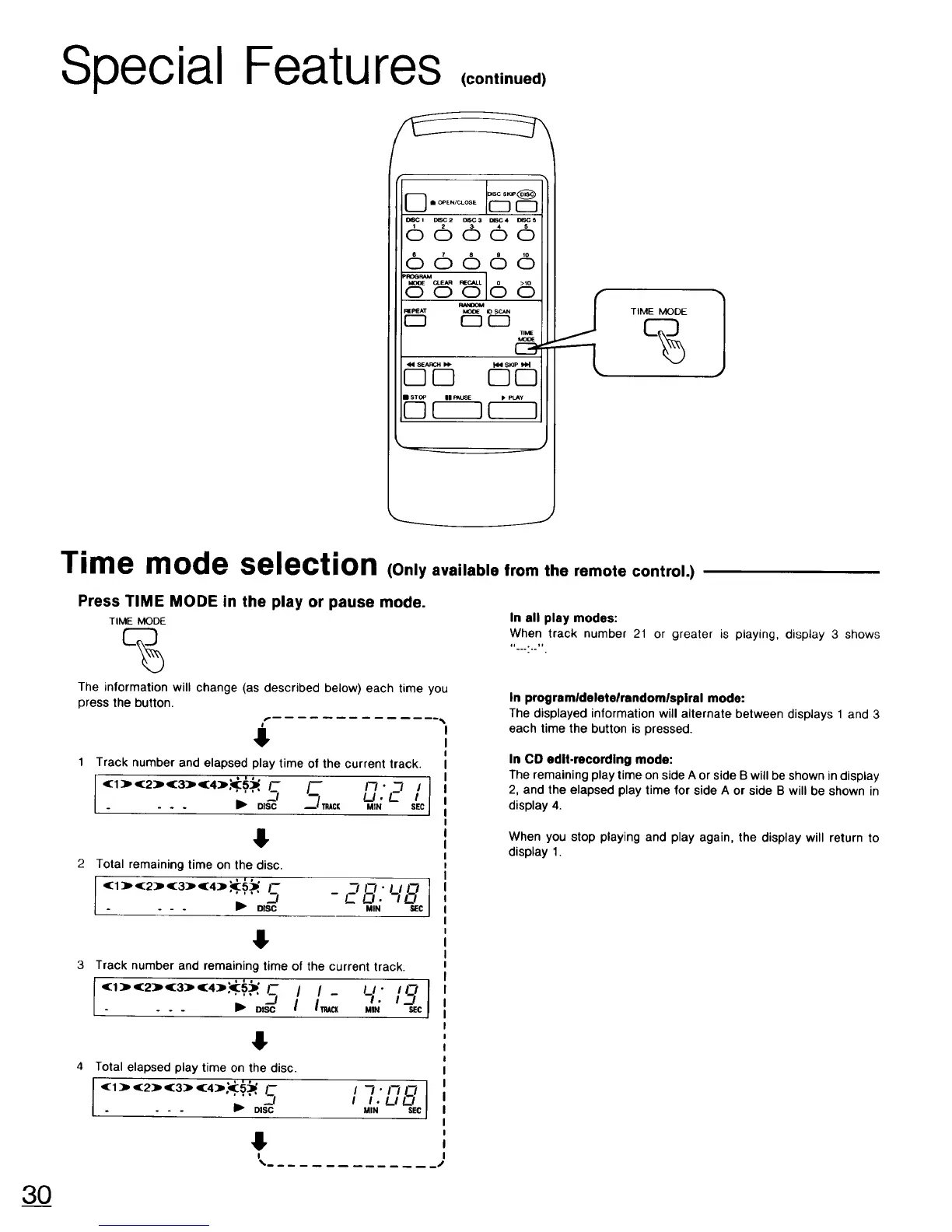
Time mode selection (Only available from the remote control.)
Press TIME MODE in the play or pause mode.
TIME MODE
%
The information will change (as described below) each time you
press the button.
4
1 Track number and elapsed play time of the current track.
(1)(2)(3)(4)_ .... --II-- --I,,,c,I- un _ / J
. . . _1_ DISC MIN SEC
4r
Total remaining time on the disc.
I .....s 28 1
<1 ) (:2) (3) (4) _5_ - .'lll-J_lIZI
- - - _ DISC MIN SEC
Track number and remaining time of the current track.
(:1:)"(:2) (:3:)' (:4),_'.' 5_' 1-- LI" 19 I
... ;o,aII.:. =
Total elapsed play time on the disc.
I '(:1:)' (:2) (3:]) '(:4)'_::' ''_'I-. _ . II_''" D,SC'_I I1"1"1"_11'_1II N LI !._lsec
In all play modes:
When track number 21 or greater is playing, display 3 shows
,,_....,,
In programldeletelrandomlspiral mode:
The displayed information will alternate between displays 1 and 3
each time the button is pressed.
In CO edit.recording mode:
The remaining play time on side A or side B will be shown in display
2, and the elapsed play time for side A or side B will be shown in
display 4.
When you stop playing and play again, the display will return to
display 1.


 To Next Page