EasyManua.ls Logo

Technics SU-V620 - Function of IC Terminals

Technics SU-V620
16 pages
Print Icon
To Next Page IconTo Next Page
To Previous Page IconTo Previous Page
Loading...
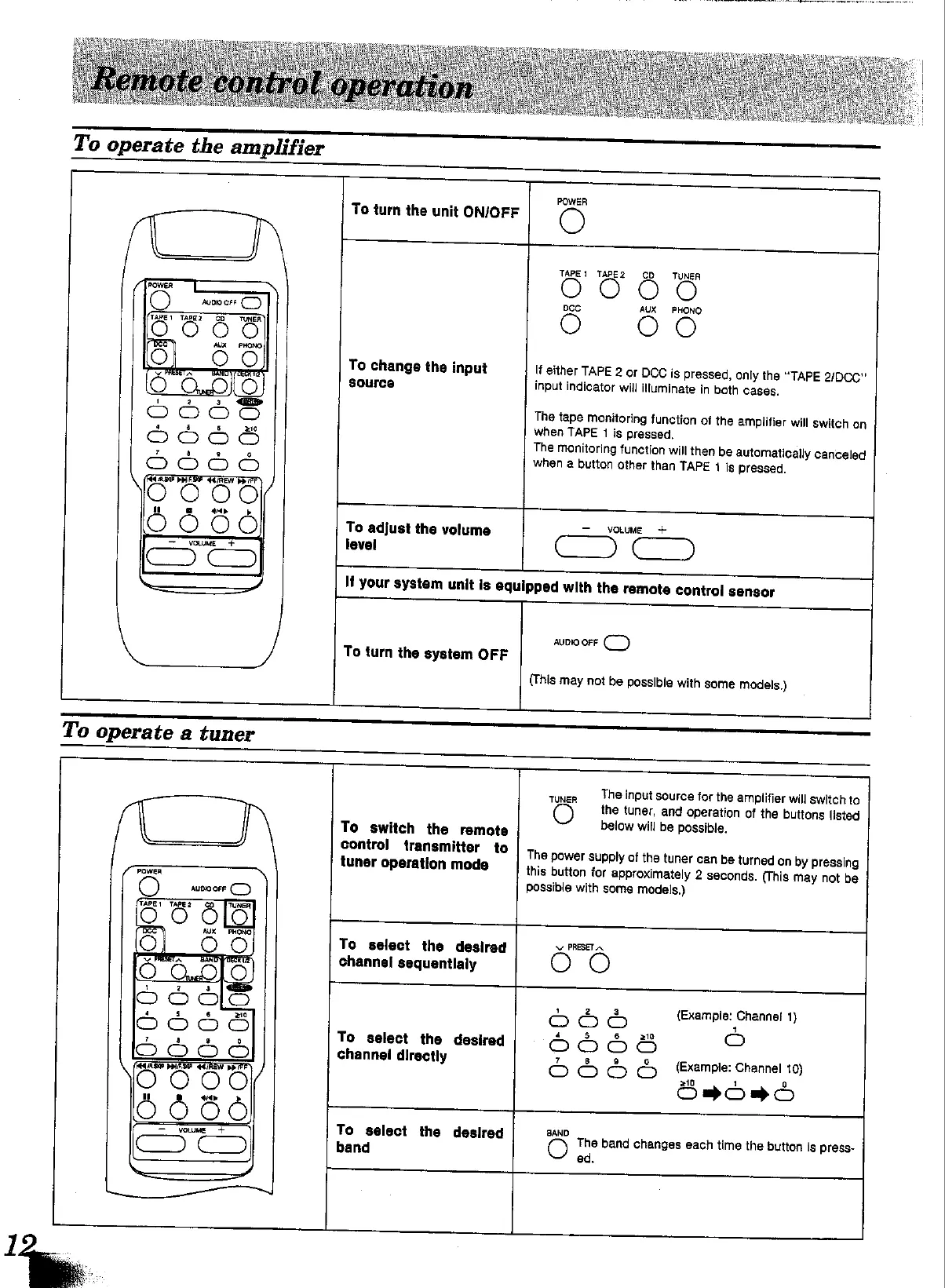
operate
the
amplifier
operate
a
tuner
To
turn
the
unit
ON/OFF
as
eee
To
change
the
input
source
To
adjust
the
volume
level
To
turn
the
system
OFF
lipped
with
the
remote
control
sensor
If
your
system
unit
is
equi
POWER
TAPE!
TAPE2
CD
TUNER
Lisiey
AUX
O
If
either
TAPE
2
or
DCC
is
pressed,
only
the
“TAPE
2/DCC”
input
indicator
will
iuminate
in
both
cases.
PHONO
The
tape
monitoring
function
of
the
amplifier
will
switch
on
when
TAPE
1
is
pressed.
The
monitoring
function
will
then
be
automatically
canceled
when
a
button
other
than
TAPE
4
is
pressed.
=
VOLUME
+
Co)
aunio
ore
(_)
(This
may
not
be
possible
with
some
models.)
|
To
switch
the
remote
control
transmitter
to
tuner
operation
mode
To
select
the
desired
channel
sequentlaly
pom
To
select
the
desired
channel
directly
SaOomad
ee
ee
a
ee
|
To
select
the
desired
band
po
The
input
source
for
the
amplifier
will
switch
to
the
tuner,
and
operation
of
the
buttons
listed
below
will
be
possible.
TUNER
O
The
power
supply
of
the
tuner
can
be
turned
on
by
pressing
this
button
for
approximately
2
seconds.
(This
may
not
be
possible
with
some
models.)
PRESET
A
<
o
S
fan)
(Example:
Channe!
1)
4
5
6
210
ran)
OOOO
o
ro)
O
Oo
(Example:
Channel
10)
oO
The
band
changes
each
time
the
button
is
press-
ed.

Other manuals for Technics SU-V620

Related product manuals