EasyManua.ls Logo

Technics SU-V620 - Page 14

Technics SU-V620
16 pages
Print Icon
To Next Page IconTo Next Page
To Previous Page IconTo Previous Page
Loading...
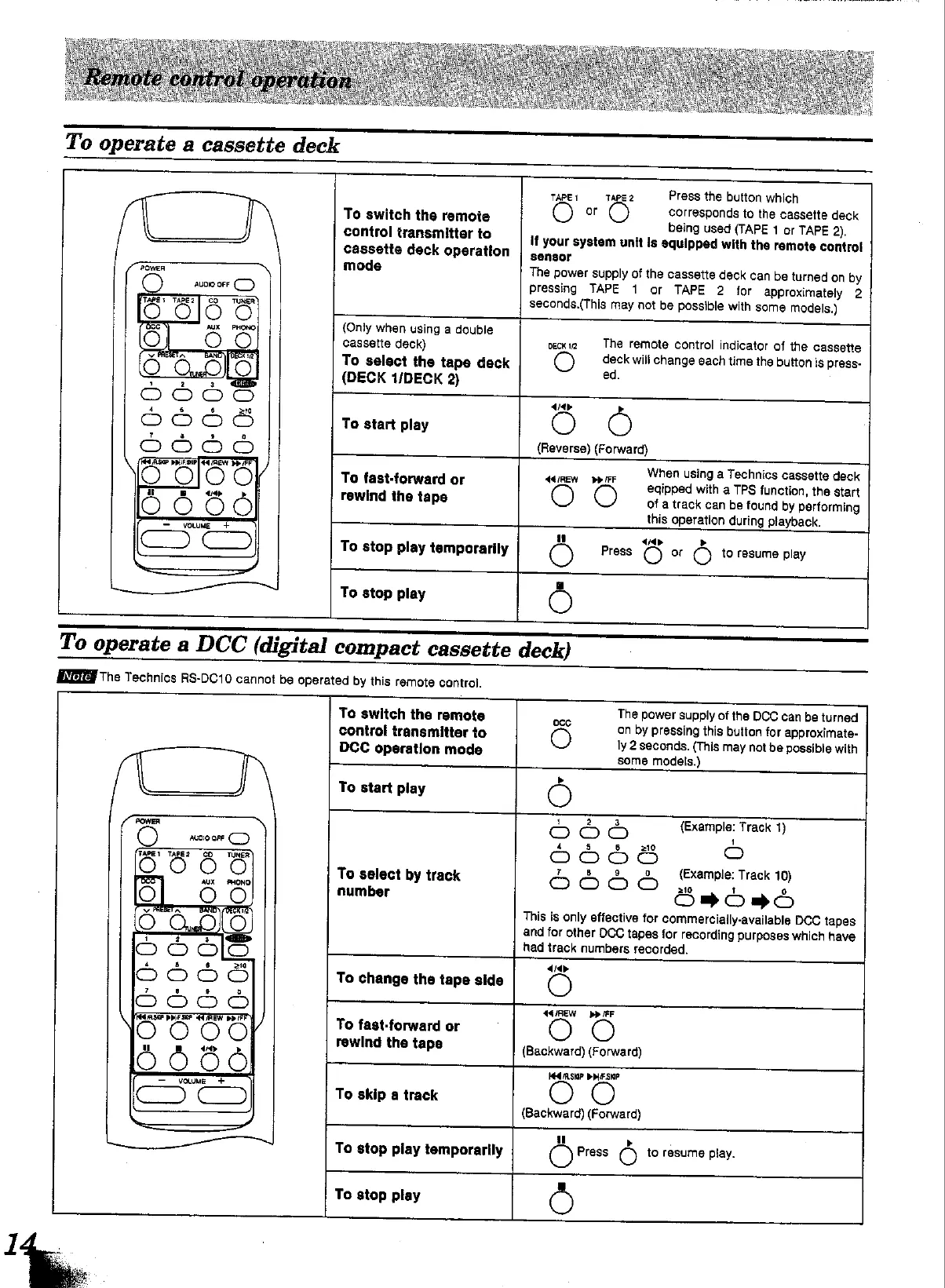
To
operate
a
cassette
deck
TAPE
TAPE2
Press
the
button
which
To
switch
the
remote
O
or
©
corresponds
to
the
cassette
deck
bei
id
(TAPE
1
or
TAPE
2).
control
transmitter
to
Te
ose"
(TAPE
1
of
TAPE
2)
if
your
system
unit
Is
equipped
with
the
remote
control
cassette
deck
operation
senawy
"
awe
mode
The
power
supply
of
the
cassette
deck
can
be
turned
on
by
pressing
TAPE
1
or
TAPE
2
for
approximately
2
seconds.(This
may
not
be
possible
with
some
models.)
{Only
when
using
a
double
cassette
deck)
peck
The
remote
control
indicator
of
the
cassette
To
select
the
tape
deck
O
deck
wili
change
each
time
the
button
is
press-
(DECK
1/DECK
2)
4.
pa
dap
To
start
play
O
O
(Reverse) (Forward)
When
using
a
Technics
cassette
deck
To
fast-forward
or
44REW
per
9
O
eqipped
with
a
TPS
function,
the
start
rewind
the
tape
of
a
track
can
be
found
by
performing
this
operation
during
playback.
>
4p
To
stop
play
temporarily
O
Press
O
or
O
to
resume
play
To
stop
play
OC
To
operate
a
DCC
(digital
compact
cassette
deck)
MEE
The
Technics
RS-DC10
cannot
be
operated
by
this
remote
control.
To
switch
the
remote
cco
The
power
supply
of
the
DCC
can
be
turned
on
by
pressing
this
button
for
approximate-
0
eme
control
transmitter
to
Sa
war
DCC
operation
mode
O
cone
rede
may
not
be
possible
with
To
start
play
O
POWER
oO
lan}
Oo
(Example:
Track
1)
aunioare
(_)
4
3
6
210
oO
fase
Walea
aq
TER
OOOO
5
O
To
select
by
track
OOD
Hanvle
Track
10)
Ls
AUX
=
PHONO
|
number
on)
»
ran)
>
ran}
This
is
only
effective
for
commerciaily-available
DCC
tapes
and
for
other
DCC
tapes
for
recording
purposes
which
have
had
track
numbers
recorded.
o
To
change
the
tape
side
44/REW
pp
FF
To
fast-forward
or
rewind
the
tape
(Backward)
(Forward)
alos
O'S
To
skip
a
track
(Backward)
(Forward)
ul
LS
To
stop
piay
temporarily
O
Press
eo
to
resume
play.
To
stop
play
O

Other manuals for Technics SU-V620

Related product manuals