EasyManua.ls Logo

Technics SU-V75 - Before Repair and Adjustment

Technics SU-V75
16 pages
Print Icon
To Next Page IconTo Next Page
To Previous Page IconTo Previous Page
Loading...
@
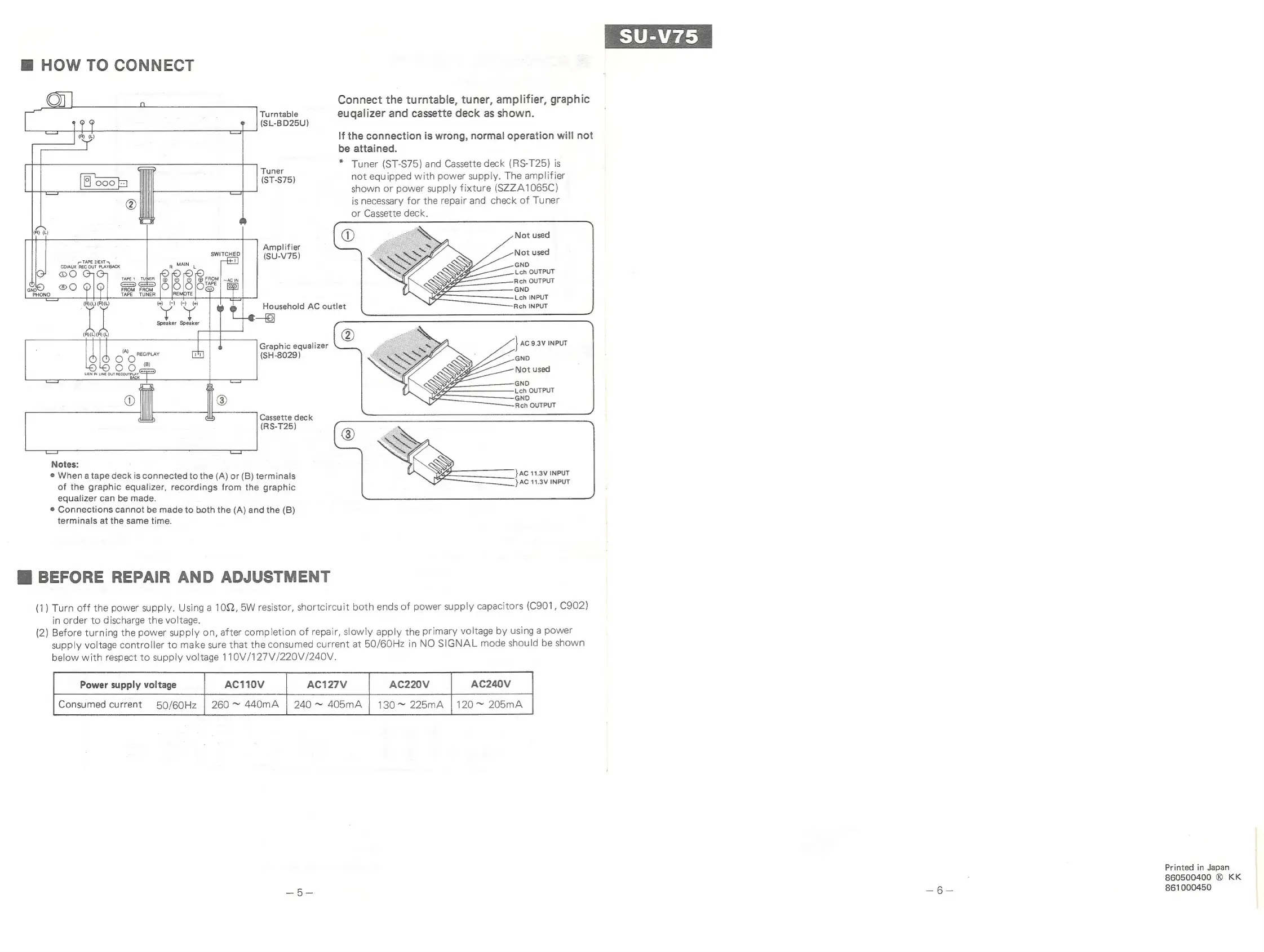
HOW
TO
CONNECT
Connect
the
turntable,
tuner,
amplifier,
graphic
Turntable
eugalizer
and
cassette
deck
as
shown.
(SL-BD25U)
If
the
connection
is
wrong,
normal
operation
will
not
be
attained.
=n
*
Tuner
(ST-S75)
and
Cassette
deck
(RS-T25)
is
u
‘i
S
nig
(ST-S75)
not
equipped
with
power
supply.
The
amplifier
shown
or
power
supply
fixture
(SZZA1065C)
is
necessary
for
the
repair
and
check
of
Tuner
or
Cassette
deck.
Not
used
lifi
SWITCHED
eaves
Not
used
CoiAUx
aes
OUT
PLATEAGK
p
MAIN
|
GND
©
taper
TUNER
|@
16
|
&
|
@
FROM
%
Loch
OUTPUT
~AC
IN
9
ol
slelioe5
al
TAPE
TUNER
REMOTE
ROOD
Y
pied
¢
Household
AC
outlet
Speaker Speaker
3)
(R)(L)(R)
(L)
(A)
a
Graphic
equalizer
O
ony
(SH-8029)
Or
LIEN
IN
LINE
OUT
RECOUIELAY,.
Cassette
deck
(RS-T25)
Notes:
©
When
a
tape
deck
is
connected
to
the
(A)
or
(B)
terminals
}AC
11.3V
INPUT
of
the
graphic
equalizer,
recordings
from
the
graphic
aaa
aialai
equalizer
can
be
made.
®
Connections
cannot
be
made
to
both
the
(A)
and
the
(B)
terminals
at
the
same
time.
@
BEFORE
REPAIR
AND
ADJUSTMENT
(1)
Turn
off
the
power
supply.
Using
a
10,
5W
resistor,
shortcircuit
both
ends
of
power
supply
capacitors
(C901,
C902)
in
order
to
discharge
the
voltage.
(2)
Before
turning
the
power
supply
on,
after
completion
of
repair,
slowly
apply
the
primary
voltage
by
using
a
power
supply
voltage
controller
to
make
sure
that
the
consumed
current
at
50/60Hz
in
NO
SIGNAL
mode
should
be
shown
below
with
respect
to
supply
voltage
110V/127V/220V/240V.
Power
supply
voltage
AC110V
AC127V
AC220V
AC240V
Consumed
current
50/60Hz
|
260
~
440mA
|
240
~
405mA
|
130
~
225mA
|
120
~
205mA
Printed
in
Japan
860500400
®
KK
861000450

Related product manuals