EasyManua.ls Logo

Technics SU-V75 - M@ HOW to CONNECT

Technics SU-V75
16 pages
Print Icon
To Next Page IconTo Next Page
To Previous Page IconTo Previous Page
Loading...
m@
HOW
TO
CONNECT
a
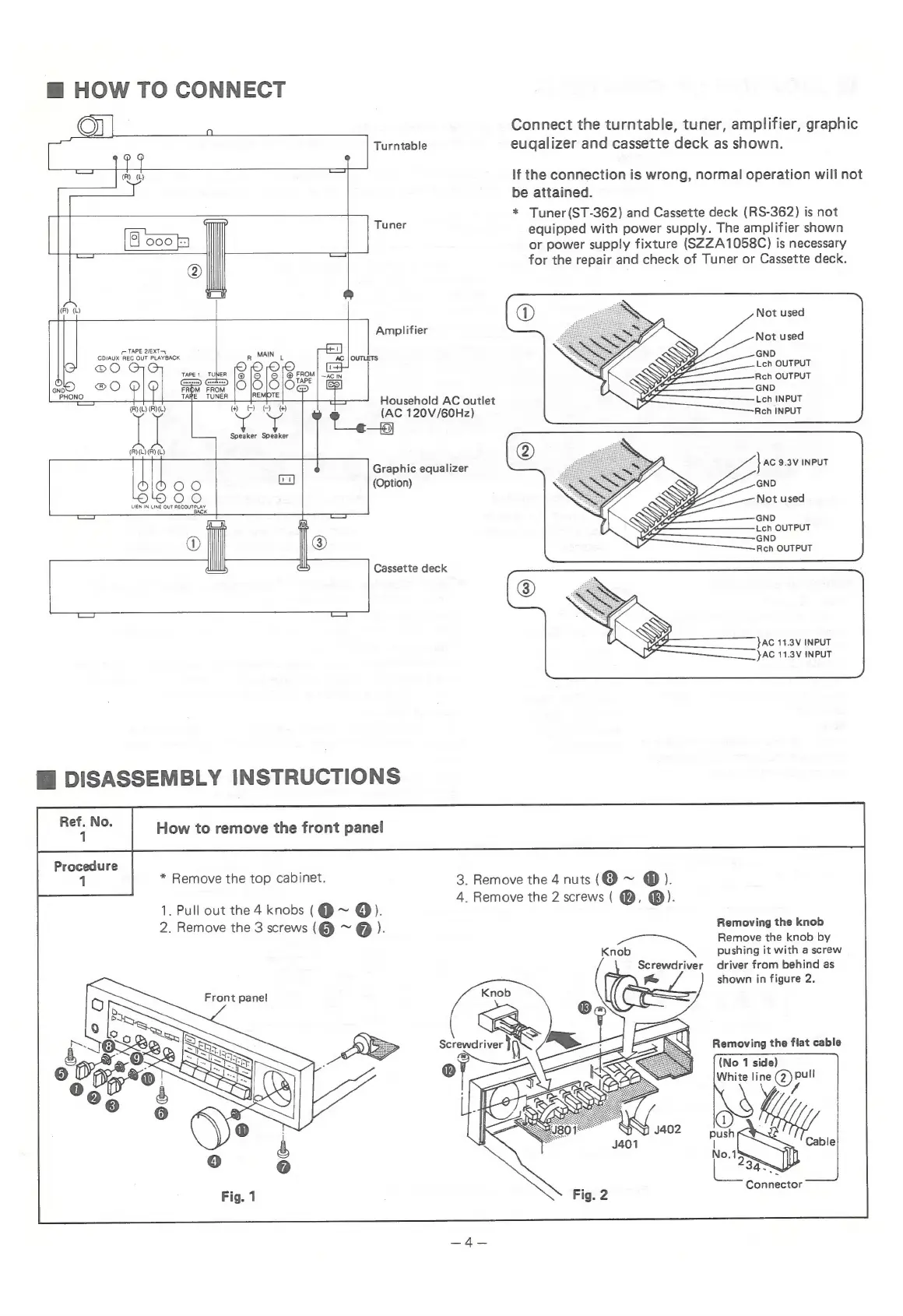
Connect
the
turntable,
tuner,
amplifier,
graphic
;
Turntable
eugalizer
and
cassette
deck
as
shown.
eat)
|
er
®
If
the
connection
is
wrong,
normal
operation
will
not
——
be
attained.
*
Tuner(ST-362)
and
Cassette
deck
(RS-362)
is
not
|
-
|
Tuner
equipped
with
power
supply.
The
amplifier
shown
O00
|s
or
power
supply
fixture
(SZZA1058C)
is
necessary
®
for
the
repair
and
check
of
Tuner
or
Cassette
deck.
@
(R)
(L)
Amplifier
ebias
ace
our
PUNTERGE
R
MAIN
L
AC
|
OUTLETS
Leh
OUTPUT
c
TaPE1
TUNER
1@
|
|
©
|
@
FROM|
~Acin
ea
fiiiee
Rch
OUTPUT
GND
Household
AC
outlet
(AC
120V/60Hz)
eg
Graphic
equalizer
(Option)
yaRe
TUNER
|
_|REMOTE
®
OO
Ww
|
(R)(L)
(R)(L)
Speaker Speaker
(R)(L)(R)
(L)
{Se
one)
LIEN
IN
LINE
OUT
RECOUTPLAY
K
Reh
OUTPUT
Cassette
deck
}AC
11.3V
INPUT
JAC
11.3V
INPUT
Hi
DISASSEMBLY
INSTRUCTIONS
*
Remove
the
top
cabinet.
3.
Remove
the
4
nuts
(@
~
@).
4.
Remove
the
2
screws
(
@,
®).
1.
Pull
out
the
4
knobs
(@~
@).
® ®
2.
Remove
the
3
screws
(@
~
@
).
Removing
the
knob
Remove
the
knob
by
“an.
%
pushing
it
with
a
screw
Screwdriver
driver
from
behind
as
shown
in
figure
2.
Front
panel
Removing
the
flat
cable
(No
1
side)
White
line
@m
Connector

Related product manuals