EasyManua.ls Logo

Technics SX-KN1400 - Page 20

Technics SX-KN1400
68 pages
Print Icon
To Next Page IconTo Next Page
To Previous Page IconTo Previous Page
Loading...
|
No.
|
Diagnostic
Part/Diagnostic
Device
Procedure
of
Service
Mode
MAIN
P.C.B.:
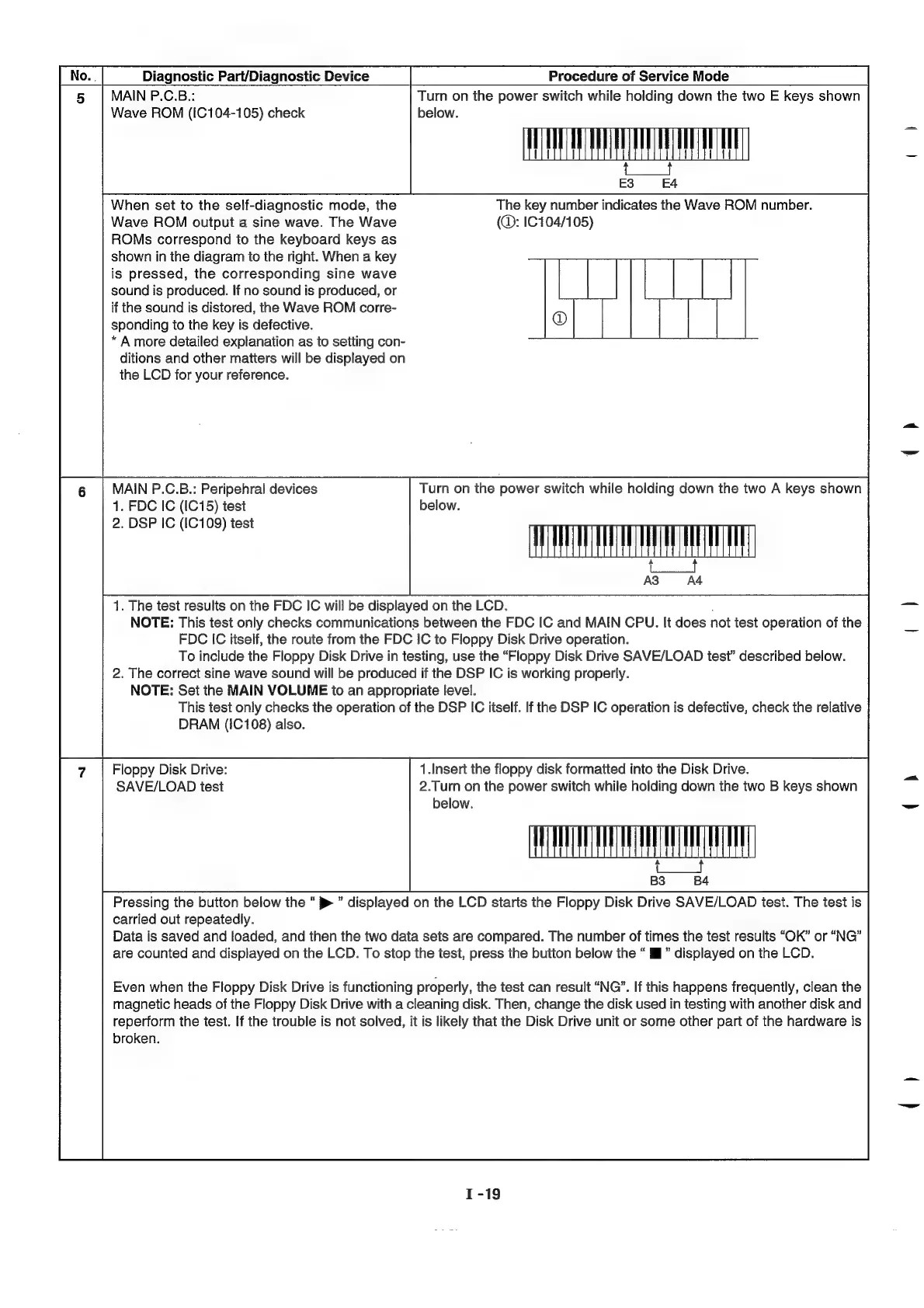
Turn
on
the
power
switch
while
holding
down
the
two
E
keys
shown
Wave
ROM
(IC104-105)
check
below.
HH
;
When
set
to
the
self-diagnostic
mode,
the
The
key
number
indicates
the
Wave
ROM
number.
Wave
ROM
output
a
sine
wave.
The
Wave
(®:
1C104/105)
ROMs
correspond
to
the
keyboard
keys
as
shown
in
the
diagram
to
the
right.
When
a
key
is
pressed,
the
corresponding
sine
wave
|
|
sound
is
produced.
If
no
sound
is
produced,
or
if
the
sound
is
distored,
the
Wave
ROM
corre-
sponding
to
the
key
is
defective.
*
A
more
detailed
explanation
as
to
setting
con-
ditions
and
other
matters
will
be
displayed
on
the
LCD
for
your
reference.
MAIN
P.C.B.:
Peripehral
devices
Turn
on
the
power
switch
while
holding
down
the
two
A
keys
shown
1.
FDC
IC
(IC
15)
test
below.
AH
(Reel
2.
DSP
IC
(IC
109)
test
1.
The
test
results
on
the
FDC
IC
will
be
displayed
on
the
LCD.
NOTE:
This
test
only
checks
communications
between
the
FDC
IC
and
MAIN
CPU.
It
does
not
test
operation
of
the
FDC
IC
itself,
the
route
from
the
FDC
IC
to
Floppy
Disk
Drive
operation.
To
include
the
Floppy
Disk
Drive
in
testing,
use
the
“Floppy
Disk
Drive
SAVE/LOAD
test’
described
below.
2.
The
correct
sine
wave
sound
will
be
produced
if
the
DSP
IC
is
working
properly.
NOTE:
Set
the
MAIN
VOLUME
ito
an
appropriate
level.
This
test
only
checks
the
operation
of
the
DSP
IC
itself.
If
the
DSP
IC
operation
is
defective,
check
the
relative
DRAM
(IC
7108)
also.
Floppy
Disk
Drive:
1.Insert
the
floppy
disk
formatted
into
the
Disk
Drive.
SAVE/LOAD
test
2.Turn
on
the
power
switch
while
holding
down
the
two
B
keys
shown
below.
=
WAU
Pressing
the
button
below
the
p>
displayed
on
the
LCD
starts
the
Floppy
Disk
Drive
SAVE/LOAD
test.
The
test
is
carried
out
repeatedly.
Data
is
saved
and
loaded,
and
then
the
two
data
sets
are
compared.
The
number
of
times
the
test
results
“OK”
or
“NG”
are
counted
and
displayed
on
the
LCD.
To
stop
the
test,
press
the
button
below
the
“i”
displayed
on the
LCD.
Even
when
the
Floppy
Disk
Drive
is
functioning
properly,
the
test
can
result
“NG”.
If
this
happens
frequently,
clean
the
magnetic
heads
of
the
Floppy
Disk
Drive
with
a
cleaning
disk.
Then,
change
the
disk
used
in
testing
with
another
disk
and
reperform
the
test.
If
the
trouble
is
not
solved,
it
is
likely
that
the
Disk
Drive
unit
or
some
other
part
of
the
hardware
is
broken.

Related product manuals