EasyManua.ls Logo

Technics SX-KN1400 - Error Display

Technics SX-KN1400
68 pages
Print Icon
To Next Page IconTo Next Page
To Previous Page IconTo Previous Page
Loading...
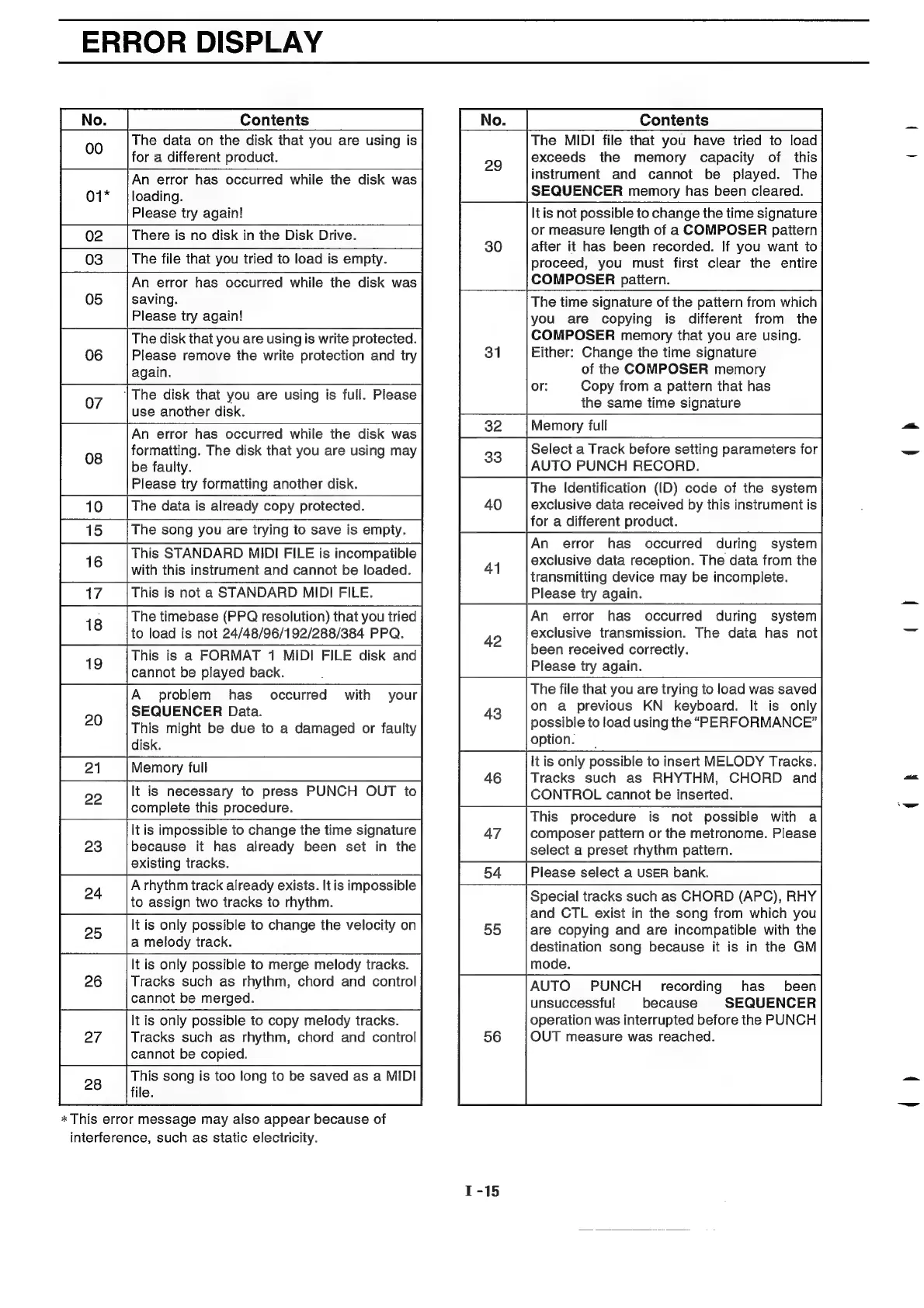
ERROR
DISPLAY
Contenis
Contents
The
data
on
the
disk
that
you
are
using
is
for
a
different
product.
An
error
has
occurred
while
the
disk
was
loading.
Please
try
again!
An
error
has
occurred
while
the
disk
was
saving.
Please
try
again!
The
disk
that
you
are
using
is
write
protected.
Please
remove
the
write
protection
and
try
|The
disk
that
you
are
using
is
full.
Please
use
another
disk.
An
error
has
occurred
while
the
disk
was
formatting.
The
disk
that
you
are
using
may
be
faulty.
Please
try
formatting
another
disk.
This
STANDARD
MIDI
FILE
is
incompatible
with
this
instrument
and
cannot
be
loaded.
1
9
The
timebase
(PPQ
resolution)
that
you
tried
to
load
is
not
24/48/96/192/288/384
PPQ.
This
is
a
FORMAT
1
MIDI
FILE
disk
and
cannot
be
played
back.
.
A
problem
has
SEQUENCER
Data.
This
might
be
due
to
a
damaged
or
faulty
disk.
Memory
full
occurred
with
your
It
is
necessary
to
press
PUNCH
OUT
to
complete
this
procedure.
2
It
is
impossible
to
change
the
time
signature
because
it
has
already
been
set
in
the
existing
tracks.
A
rhythm
track
already
exists.
It
is
impossible
24
;
to
assign
two
tracks
to
rhythm.
5
It
is
only
possible
to
change
the
velocity
on
a
melody
track.
It
is
only
possible
to
merge
melody
tracks.
Tracks
such
as
rhythm,
chord
and
control
cannot
be
merged.
It
is
only
possible
to
copy
melody
tracks.
Tracks
such
as
rhythm,
chord
and
control
cannot
be
copied.
This
song
is
too
long
to
be
saved
as
a
MIDI
file.
*
This
error
message
may
also
appear
because
of
interference,
such
as
static
electricity.
The
MIDI
file
that
you
have
tried
to
load
exceeds
the
memory
capacity
of
this
instrument
and
cannot
be
played.
The
SEQUENCER
memory
has
been
cleared.
lt
is
not
possible
to
change
the
time
signature
or
measure
length
of
a
COMPOSER
pattern
after
it
has
been
recorded.
If
you
want
to
proceed,
you
must
first
clear
the
entire
COMPOSER
pattern.
The
time
signature
of
the
pattern
from
which
you
are
copying
is
different
from
the
COMPOSER
memory
that
you
are
using.
Either:
Change
the
time
signature
of
the
COMPOSER
memory
or:
Copy
from
a
pattern
that
has
the
same
time
signature
Memory
full
Select
a
Track
before
setting
parameters
for
AUTO
PUNCH
RECORD.
The
Identification
(ID)
code
of
the
system
exclusive
data
received
by
this
instrument
is
for
a
different
product.
An
error
has
occurred
during
system
exclusive
data
reception.
The
data
from
the
transmitting
device
may
be
incomplete.
Please
try
again.
An
error
has
occurred
during
system
exclusive
transmission.
The
data
has
not
been
received
correctly.
Please
try
again.
The
file
that
you
are
trying
to
load
was
saved
on
a
previous
KN
keyboard.
It
is
only
possible
to
load
using
the
“PERFORMANCE”
option.
itis
only
possible
to
insert
MELODY
Tracks.
Tracks
such
as
RHYTHM,
CHORD
and
CONTROL
cannot
be
inserted.
This
procedure
is
not
possible
with
a
composer
pattern
or
the
metronome.
Please
select
a
preset
rhythm
pattern.
Please
select
a
USER
bank.
Special
tracks
such
as
CHORD
(APC),
RHY
and
CTL
exist
in
the
song
from
which
you
are
copying
and
are
incompatible
with
the
destination
song
because
it
is
in
the
GM
mode.
AUTO
PUNCH
recording
has_
been
unsuccessful
because
SEQUENCER
operation
was
interrupted
before
the
PUNCH
OUT
measure
was
reached.

Related product manuals