EasyManua.ls Logo

Technics SX-KN1400 - Precautions before Servicing the Main Circuit

Technics SX-KN1400
68 pages
Print Icon
To Next Page IconTo Next Page
To Previous Page IconTo Previous Page
Loading...
PRECAUTIONS
BEFORE
SERVICING
THE
MAIN
CIRCUIT
Note:
In
the
initial
production
(over
several
months)
of
this
model
(Type
A),
FLASH
ROMs
(EEPROM)
were
used
for
the
PROGRAM
ROMs.
In
models
produced
thereafter
(Type
B),
FLASH
ROMs
were
not
used.
If
changing
any
of
these
ICs,
service
the
MAIN
CIRCUIT
as
explained
here
following.
@
About
the
FLASH
ROM
The
FLASH
ROM
can
be
electrically
erased
and
rewritten.
This
model
is
designed
so
that
the
repair
technician
can
easily
write
and
change
programs
and
data
in
the
FLASH
ROM,
by
using
a
floppy
disk.
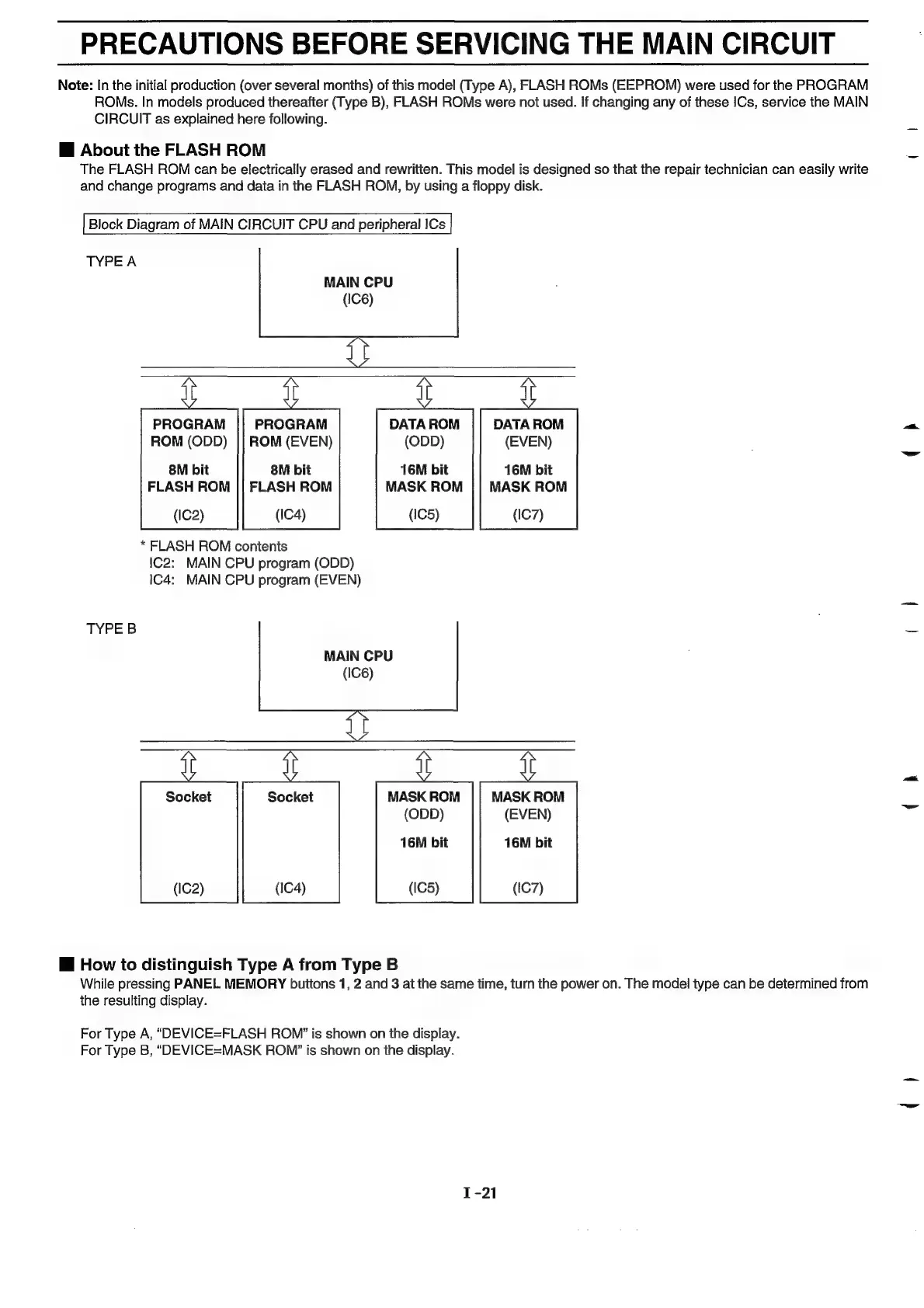
Block
Diagram
of
MAIN
CIRCUIT
CPU
and
peripheral
ICs
y
y
i
i
PROGRAM
||
PROGRAM
DATAROM
||
DATAROM
os
ROM
(ODD)
||
ROM
(EVEN)
(ODD)
(EVEN)
8M
bit
8M
bit
16M
bit
16M
bit
FLASH
ROM
||
FLASH
ROM
MASK
ROM
||
MASK
ROM
(IC2)
(IC4)
(IC5)
(IC7)
*
FLASH
ROM
contents
1C2:
MAIN
CPU
program
(ODD)
IC4:
MAIN
GPU
program
(EVEN)
TYPEB
.
as
MAIN
CPU
(IC6)
i i i
i
Socket
Socket
MASK
ROM
MASK
ROM
mee
(ODD)
(EVEN)
16M
bit
16M
bit
(IC2)
(IC4)
(IC5)
(IC7)
i
How
to
distinguish
Type
A
from
Type
B
While
pressing
PANEL
MEMORY
buttons
1,
2
and
3
at
the
same
time,
turn
the
power
on.
The
model
type
can
be
determined
from
the
resulting
display.
For
Type
A,
“DEVICE=FLASH
ROM”
is
shown
on the
display.
For
Type
B,
“DEVICE=MASK
ROM’
is
shown
on
the
display.

Related product manuals