EasyManua.ls Logo

Technics SX-KN1400 - About the Self-Diagnostic Function

Technics SX-KN1400
68 pages
Print Icon
To Next Page IconTo Next Page
To Previous Page IconTo Previous Page
Loading...
ABOUT
THE
SELF-DIAGNOSTIC
FUNCTION
This
model
has
some
self-diagnostic
capabilities.
There
are
two
types
of
self-diagnostic
functions:
the
“power
on
self-test”
which
runs
a
test
when
the
power
is
turned
on
and
notifies
the
user
if
an
error
is
detected,
and
the
“service
mode”
which
is
used
when
servicing
the
unit.
@
Power
on
self-test
This
model
runs
the
following
self-diagnostic
test
when
power
is
turned
on.
If
an
error
is
detected,
a
message
is
displayed
on
the
LCD
to
notify
the
user.
Communication
check
between
the
Control
Panel
CPU
(CPL
P.C.B.:
IC1/CPR
P.C.B.:
IC1)
and
the
MAIN
CPU
(MAIN
P.C.B.:
IC6)
When
power
is
turned
on,
the
model
checks
communications
between
the
MAIN
CPU
and
each
Conirol
Panel
CPU.
If
an
error
is
detected,
the
following
message
is
displayed
on
the
LCD.
CAUTION!!
**
ERROR
in
CPU
data
transiniasion
ae
Please
try
turning
off
and
on
again.
If
this
message
appears
again,
This
unit
needs
repairing.
If
this
error
occurs,
perform
the
Control
Panel
CPU
check
from
within
the
service
mode.
Using
the
self-diagnostic
function,
it
is
possible
to
determine
which
CPU
(CPL/CPR
P.C.B.)
is
suffering
trouble.
Mi
Service
mode
The
service
mode
makes
it
possible
to
determine
whether
the
various
test
modes
pass
or
fail.
The
test
modes
in
the
following
table
are
presented
in
an
order
based
on
circuit
operation,
but
they
are
completely
independent
of
one
another.
Select
a
mode
as
necessary,
and
run
the
test
or
check.
Ne.
Diagnostic
Part/Diagnostic
Device
Procedure
of
Service
Mode
MAIN
P.C.B.:
MAIN
CPU
peripheral
devices
1.Connect
the
CHECKING
DEVICE
to
CN4
on
the
MAIN
P.C.B.
(refer
DRAM
(1013)
to
page
I-20).
DRAM
(IC11)
2.Turn
on
the
power
switch
while
holding
down
the
CHECKING
DE-
EEROM
(IC8)
VICE
switch.
Unassigned
PROGRAM
ROM
(IC4)
PROGRAM
ROM
(IC2)
TABLE
DATA
ROM
(IC7)
TABLE
DATA
ROM
(IC5)
RHYTHM
DATA
ROM
(IC14)
10.
Unassigned
11.
LCD
CONTROLLER
(IC16)
12.
Unassigned
OPONOARWN>
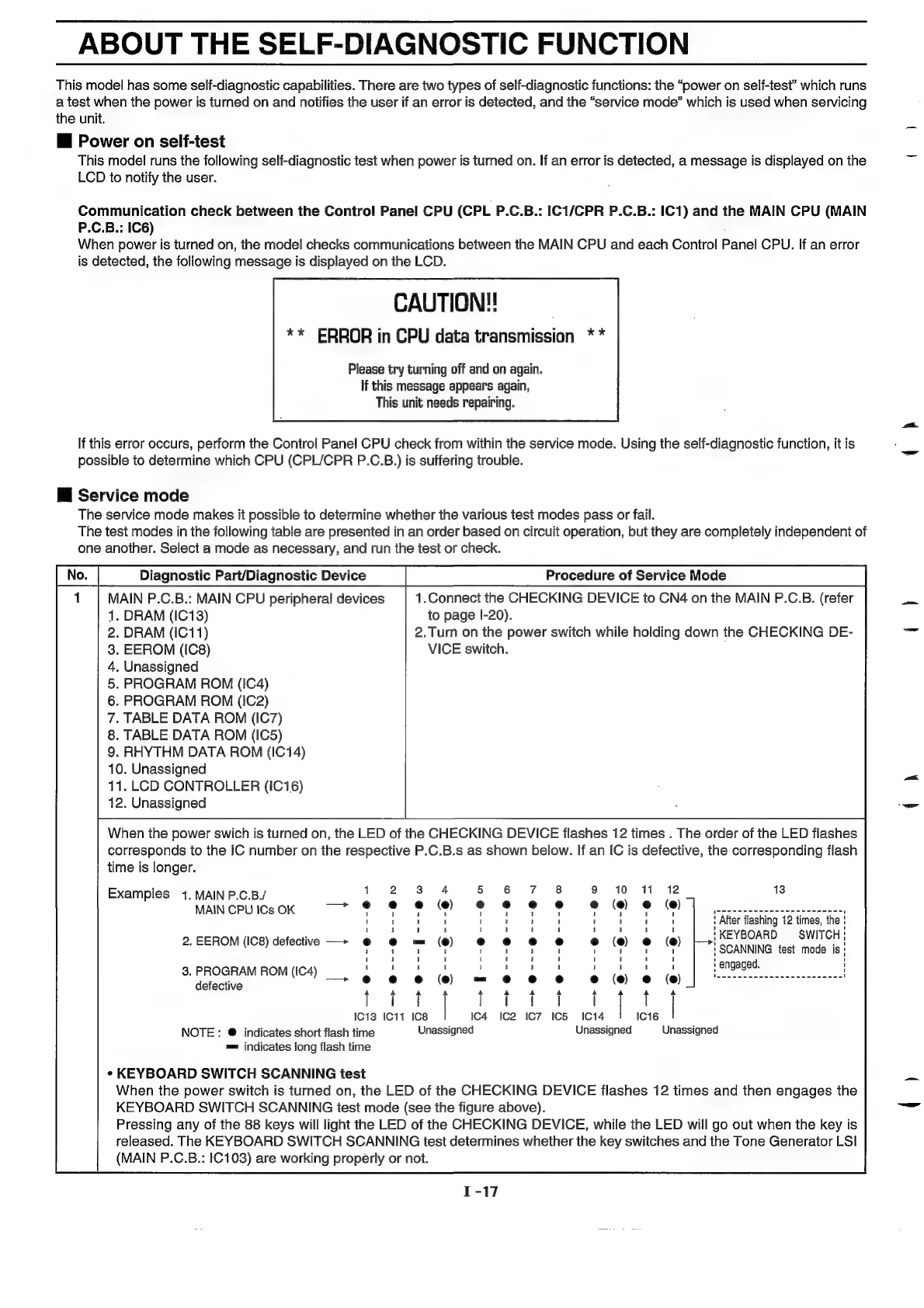
When
the
power
swich
is
turned
on,
the
LED
of
the
CHECKING
DEVICE
flashes
12
times
.
The
order
of
the
LED
flashes
corresponds
to
the
IC
number
on the
respective
P.C.B.s
as
shown
below.
If
an
IC
is
defective,
the
corresponding
flash
time
is
longer.
10
(@)
(@)
(e)
=
are
Examples
1.
MAIN
P.C.B./
MAIN
CPU
ICs
OK
'
After
flashing
12
times,
the
:
|
KEYBOARD
SWITCH
|
SCANNING
test
mode
is!
'
engaged.
2.
EEROM
(IC8)
defective
——>
eh
let
---G---Es
3.
PROGRAM
ROM
(IC4)
aa
defective
@---e---e=
(e)
@---@---@Nn
—>
e@---|
-+-@
w
—>
@---@---@~
@---@---@om
@---@---®
0
@---@---®@
t
1013
ICi1
IC8
1014
IC16
NOTE
:
@
indicates
short
flash
time
Unassigned
Unassigned
Unassigned
m=
indicates
long
flash
time
¢
KEYBOARD
SWITCH
SCANNING
test
When
the
power
switch
is
turned
on,
the
LED
of
the
CHECKING
DEVICE
flashes
12
times
and
then
engages
the
KEYBOARD
SWITCH
SCANNING
test
mode
(see
the
figure
above).
Pressing
any
of
the
88
keys
will
light
the
LED
of
the
CHECKING
DEVICE,
while
the
LED
will
go
out
when
the
key
is
released.
The
KEYBOARD
SWITCH
SCANNING
test
determines
whether
the
key
switches
and
the
Tone
Generator
LSI
(MAIN
P.C.B.:
1C103)
are
working
properly
or
not.
°
°
l
IC
GO
—>
@---@---@0
nm
i)
9
i?)
oa
y

Related product manuals