EasyManua.ls Logo

Technics SX-KN1400 - Page 7

Technics SX-KN1400
68 pages
Print Icon
To Next Page IconTo Next Page
To Previous Page IconTo Previous Page
Loading...
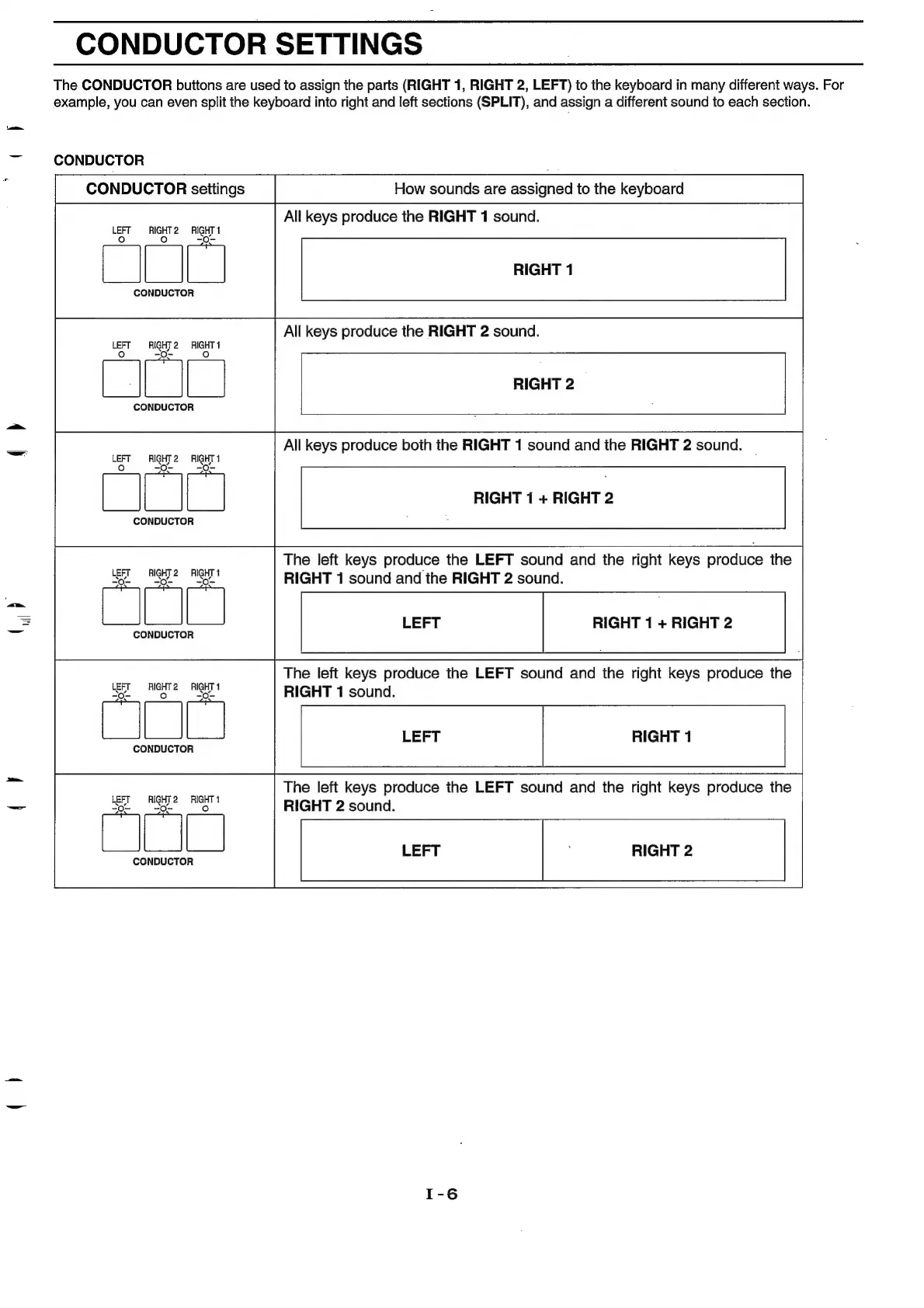
CONDUCTOR
SETTINGS
The
CONDUCTOR
buttons
are
used
to
assign
the
parts
(RIGHT
1,
RIGHT
2,
LEFT)
to
the
keyboard
in
many
different
ways.
For
example,
you
can
even
split
the
keyboard
into
right
and
left
sections
(SPLIT),
and
assign
a
different
sound
to
each
section.
7
CONDUCTOR
CONDUCTOR
settings
CONDUCTOR
LEFT
AIGHT2—RIGHT
1
-O-
-O-
-0.
-
CONDUCTOR
Fr
y
LEFT
RIGHT
2
RIGHT
1
CONDUCTOR
LEFT
RIGHT
2
RIGHT
1
=
-O-
-O-~
am
CONDUCTOR
How
sounds
are
assigned
to
the
keyboard
All
keys
produce
the
RIGHT
1
sound.
RIGHT
1
All
keys
produce
the
RIGHT
2
sound.
RIGHT
2
All
keys
produce
both
the
RIGHT
1
sound
and
the
RIGHT
2
sound.
RIGHT
1
+
RIGHT
2
The
left
keys
produce
the
LEFT
sound
and
the
right
keys
produce
the
RIGHT
1
sound
and
the
RIGHT
2
sound.
RIGHT
1
+
RIGHT
2
The
left
keys
produce
the
LEFT
sound
and
the
right
keys
produce
the
RIGHT
1
sound.
LEFT
RIGHT
1
The
left
keys
produce
ithe
LEFT
sound
and
the
right
keys
produce
the
RIGHT
2
sound.
LEFT
RIGHT
2

Related product manuals