76
Automatic / manual mode
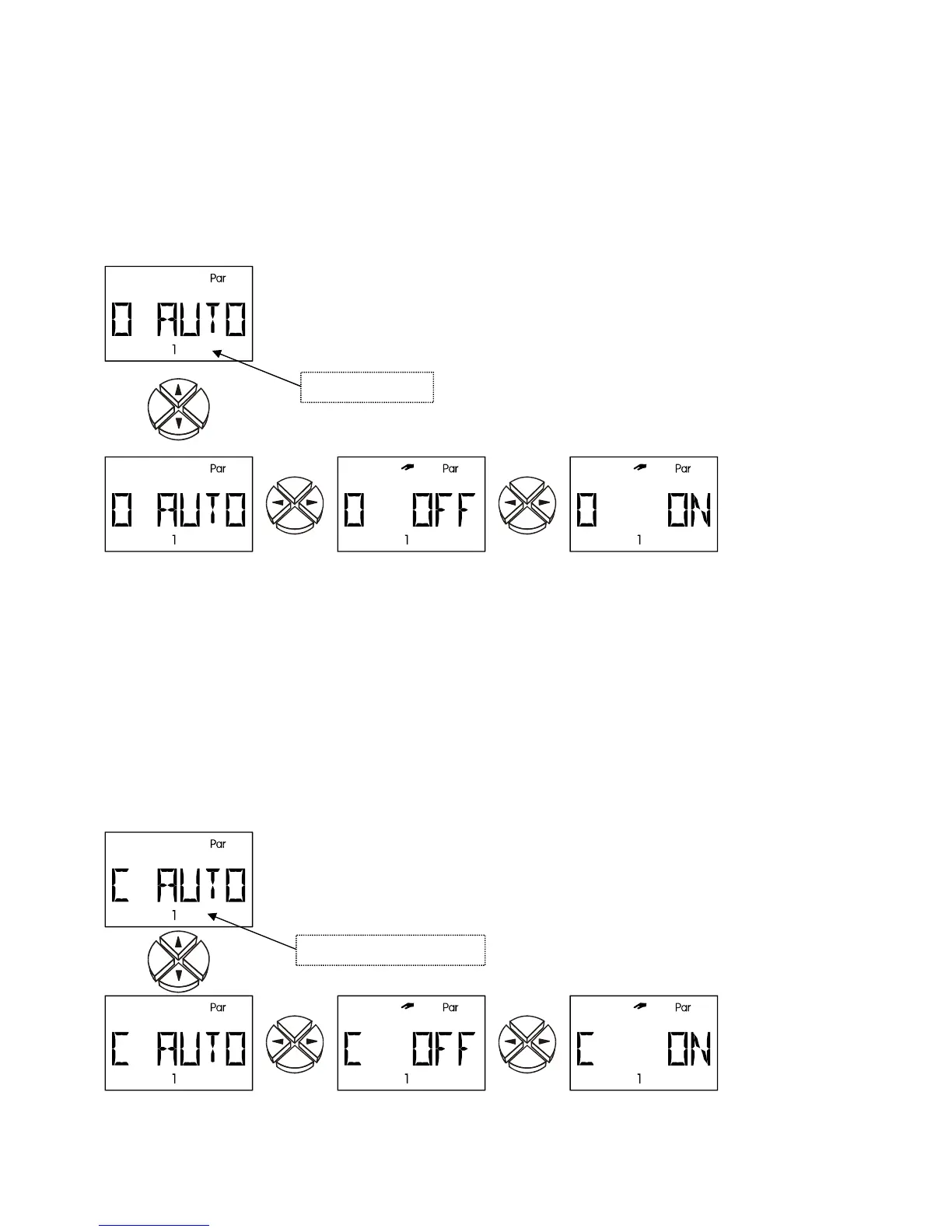
O AUTO The three outputs are set to automatic mode and can be set to manual mode for
test purposes (
O ON, O OFF). To indicate manual mode a flashing hand symbol
appears. An active output (pump is running) is indicated when a number (LED) appears next
to the display. (ex works = AUTO)
Settings:
AUTO the output switches according to the program diagram
OFF the output switches off
ON the output switches on
Automatic mode Manual OFF Manual ON
IMPORTANT: If the output is switched manually to ON or OFF this program diagram or these
functions (e.g. anti-freeze, start function etc.) no longer have any effect on the output.
C AUTO The 2 control outputs are set to automatic mode and can be changed over to
manual mode (
C ON, C OFF) for test purposes. To indicate manual mode a flashing hand
symbol appears. (ex works = AUTO)
Settings: AUTO the control output delivers a control voltage between 0 and 10 volts
dependent on the settings in the
COP menu.
OFF the control voltage is always 0 volts
ON the control voltage is always 10 volts
Automatic
operation
Manual 0 volts Manual 10 volts
Output number
Control output number


 To Next Page
 Loading...