3 Installation and Connections
Note: All the installation and operations here should conform to your local electric
safety rules.
3.1 Check Unpacked DVR
When you receive the DVR from the forwarding agent, please check whether there is any visible
damage. The protective materials used for the package of the DVR can protect most accidental clashes
during transportation. Then you can open the box to check the accessories.
Please check the items in accordance with the list. Finally you can remove the protective film of the DVR.
3.2 About Front Panel and Rear Panel
The model label in the front panel is very important; please check according to your purchase order.
The label in the rear panel is very important too. Usually we need you to represent the serial number
when we provide the service after sales.
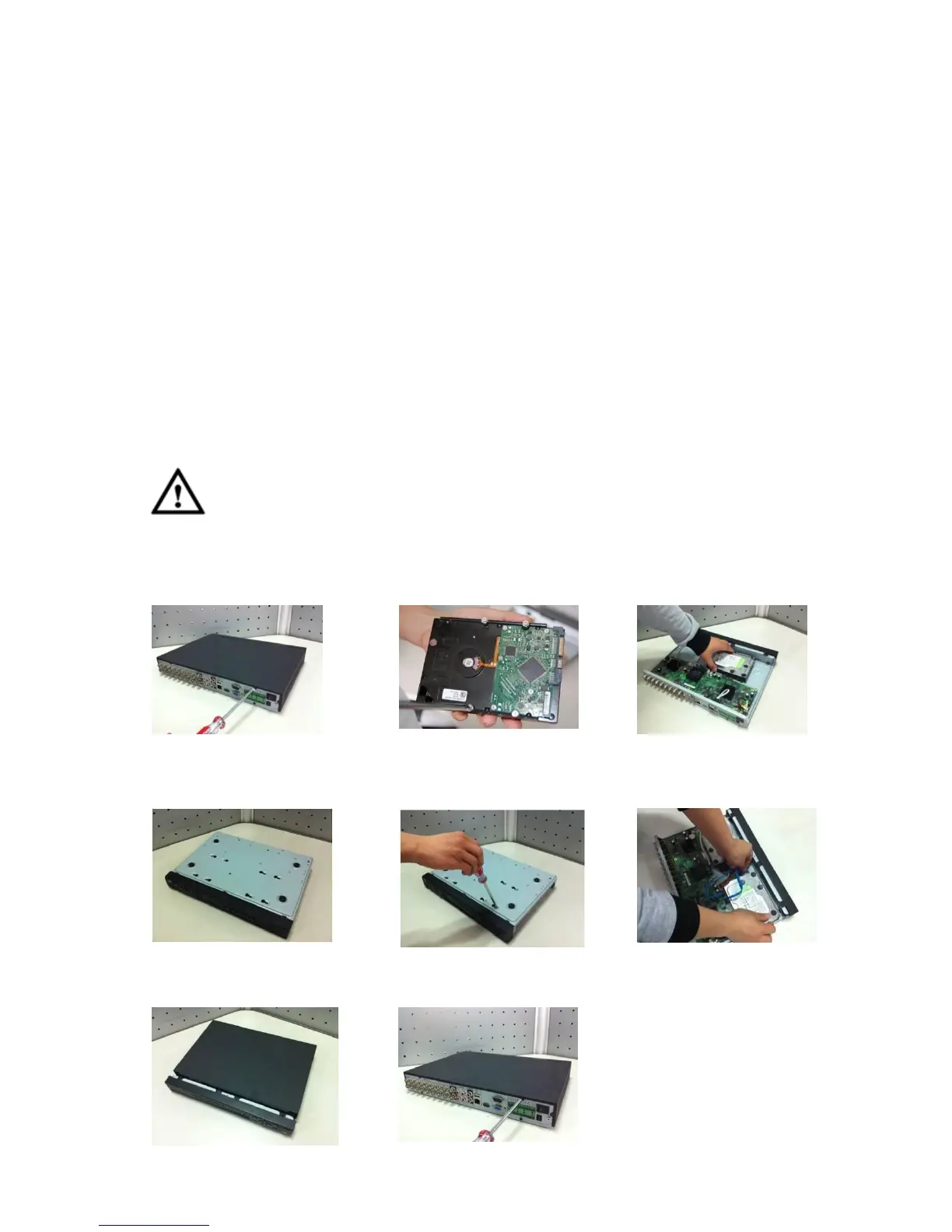
3.3 HDD Installation
Important
Shut down the device and then unplug the power cable before you open the case to
replace the HDD!
All figures listed below for reference only!
① Loosen the screws of the upper
cover and side panel.
②Fix four screws in the HDD (Turn
just three rounds).
③Place the HDD in accordance
with the four holes in the bottom.
④ Turn the device upside down and
then turn the screws in firmly.
⑤Fix the HDD firmly. ⑥Connect the HDD cable and
power cable.
⑦
Put the cover in accordance with the
clip and then place the upper cover
back.
⑧Secure the screws in the rear panel
and the side panel.


 To Next Page