Instructions for the installation, use and maintenance of Tecnicomar watermaker
6.3 Preservation of membrane modules in very cold areas
When the temperature may fall below 5 degrees Centigrade, it is necessary to add 20% of glycerine to the biocide
solution (SEE LONG SHUTDOWN PROCEDURE).
In any case the membranes should not freeze.
6.4 Optionals
6.4.1 Automatic flushing system
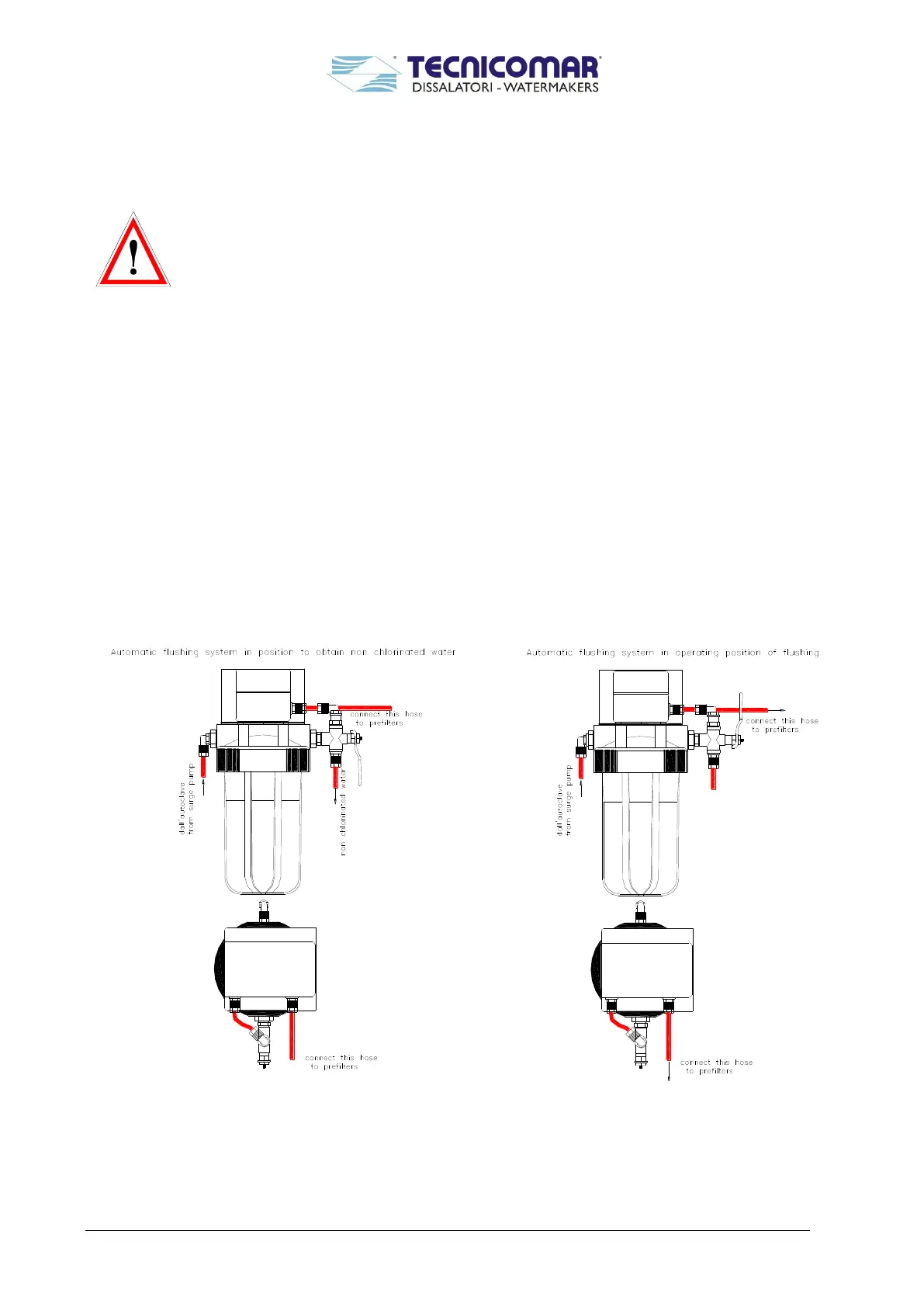
An automatic membrane flushing system is available as option. This system will automatically flush membranes
modules with fresh non-chlorinated water. This device will avoid corrosion and will longer membranes life.
This system will flush automatically the membranes whenever the operator wants. The Automatic Membrane Flushing
System has a special electronic control unit connected to the mother board (see AMF drawing).
Follow this procedure to operate it:
Shut off the system by pressing the STOP key;
Start the automatic flushing system by pushing the button F2 for 4 seconds;
The system will be automatically flushed for 7 minutes.
If the Remote Control (CD MAR 2) is installed, the Automatic Flushing System can be started by pressing two times
the STOP key situated on the Remote Control (when the motorized valve is completely open).
If the Remote Control (Touch screen) is installed, the Automatic Flushing System can be started by pressing at first the
“F2” situated on the main page and then pushing “ON”.


 To Next Page