EV 10-50
24
Wireless hybrid arm sy em
Wireless hybrid arm sy em
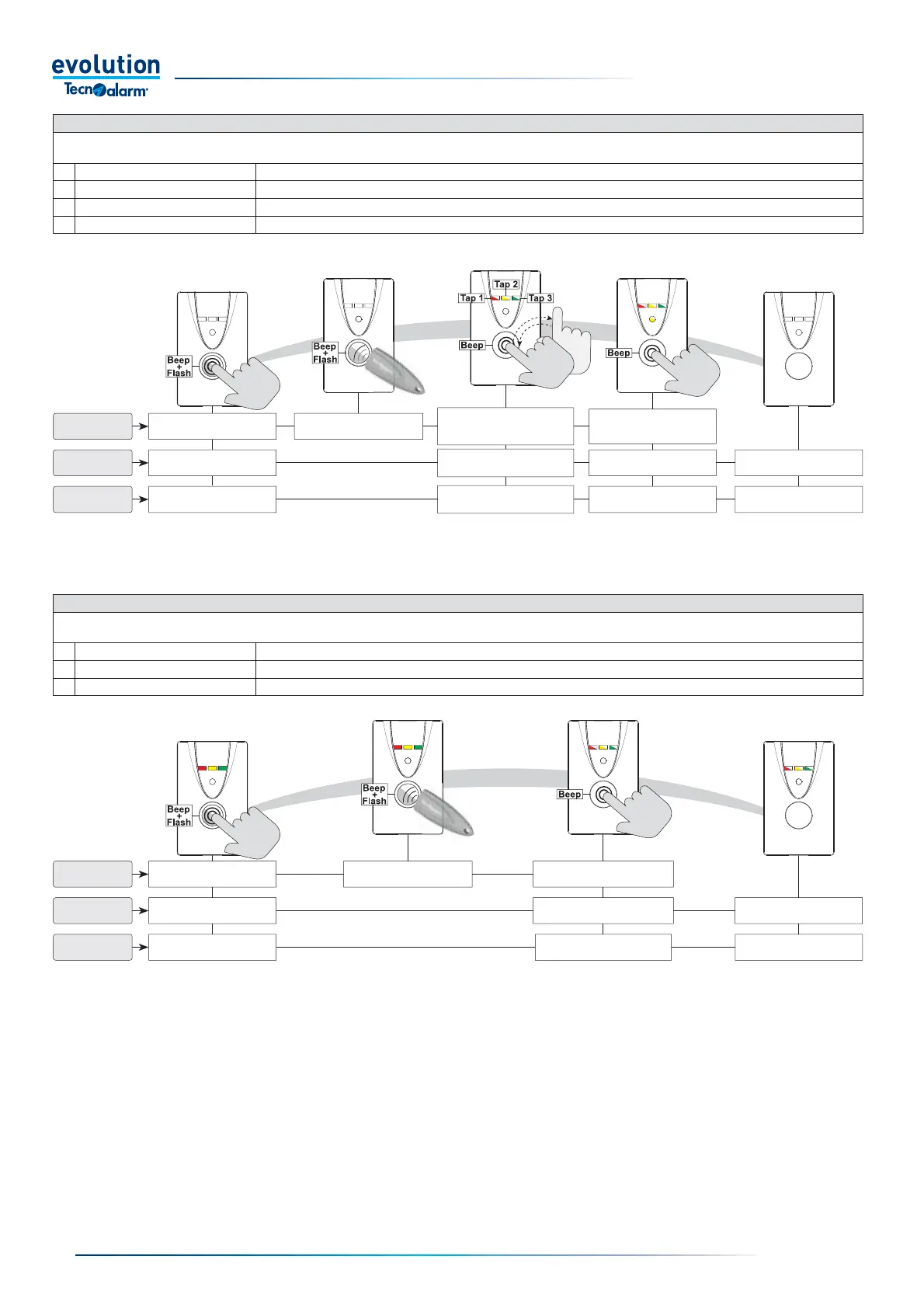
Program arming with exclusion of open zones
The procedure allows you to arm a program excluding open zones, after selecting the program to be armed, the OCG LED fl ashes indicating the
presence of open zones. The procedure is carried out in four stages
1 Turn on the reader
Press the button
2 Activate the reader Move the key up to the reading area
3 Select the program Press the button, one or more times, until the desired program is selected
4 Exclude the zones Press the button, the OCG LED turns off and the program is armed excluding the open zones
Partial disarming of the programs armed
The procedure allows you to partially disarm the activated programs, partial disarming can only be performed by the keys enabled for this function.
The procedure is carried out in three stages
1 Turn on the reader
Press the button
2 Activate the reader Move the key enabled to perform the partial disarming of programs close to the reading area
3 Partially disarm the programs Press the button to partially set the programs
The program and OGC
LEDs fl ash
Program
status
LED
Operations
At the end of the Time-out
the reader turns off
The program LED
fl ashes fast
Program selected
Program armed with open
Zones excluded
Program arming
Program LEDs off
Programs disarmed
Press the button
Press the button and wait
for the OGC LED to go off
Move the key close to
activate the reader
Press the button, one or
more times, until the desired
program is selected
The program LEDs
fl ash slowly
Program
status
LED
Operations
Programs partset
Programs being
partially set
Program LEDs on
Programs armed
Press the button
Press the button to partially
disarm the programs
Move the key close to
activate the reader
At the end of the Time-out
the reader turns off
Partial disarming of the programs armed
The procedure allows you to partially disarm the activated programs, partial disarming can only be performed by the keys enabled for this function.
The procedure is carried out in three stages
1 Turn on the reader
Press the button
2 Activate the reader Move the key enabled to perform the partial disarming of programs close to the reading area
3 Partially disarm the programs Press the button to partially set the programs


 To Next Page
 Loading...





