EV 10-50
31
Wireless hybrid arm sy em
Wireless hybrid arm sy em
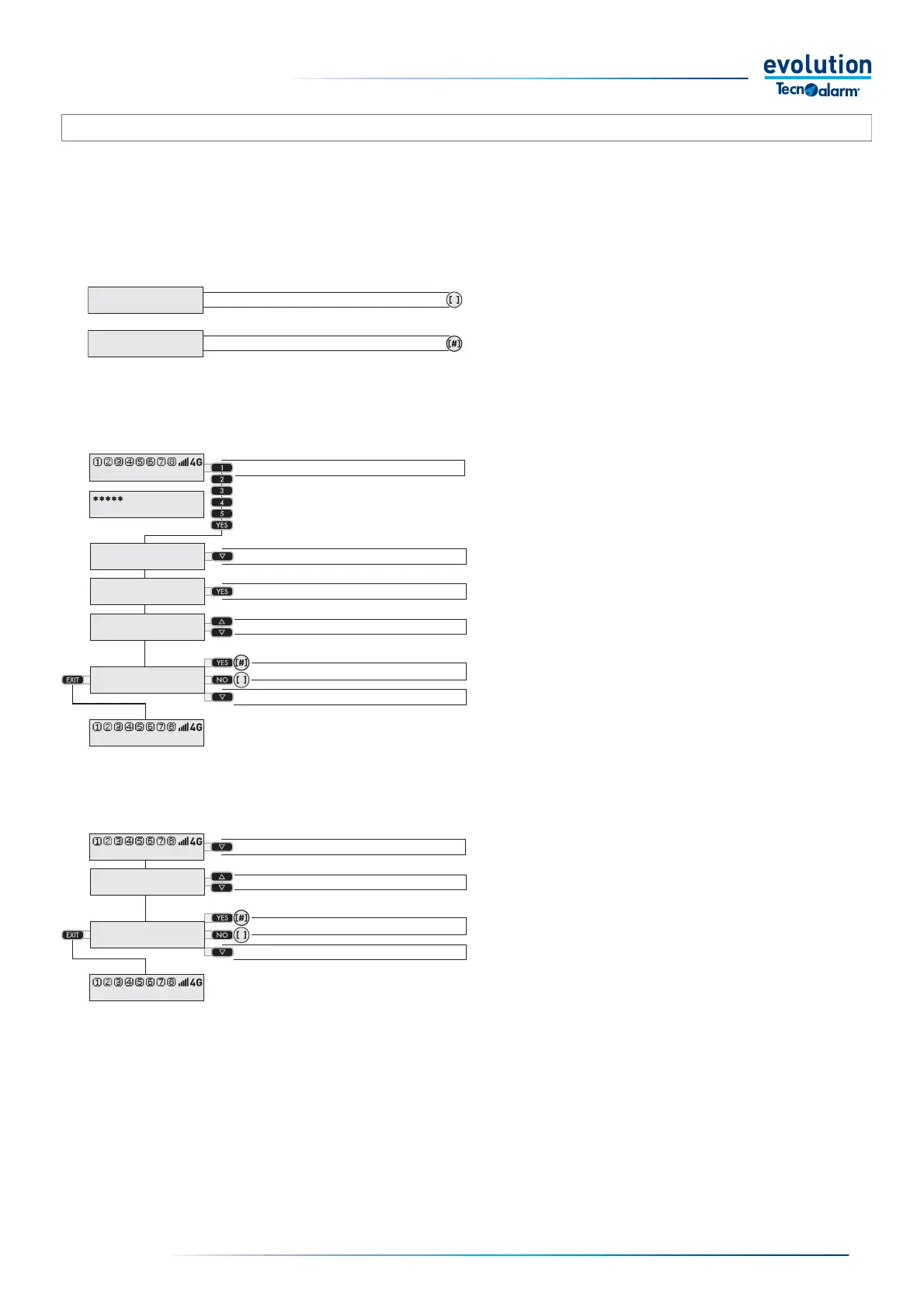
Access requires a code
Enter the access code.
Select the Remote Controls menu with the arrow key
Access the Remote Controls with the YES key.
Choose the remote control with the arrow keys.
To activate the remote control, press the YES key.
To disable the remote control, press the NO key.
Select another remote control with the arrow keys.
PTo exit the remote controls, press the EXIT key
or wait for the automatic exit from the function.
Status of the Remote Controls
The status of the remote control is indicated in square
brackets if the number sign (#) is displayed inside the
parentheses, the remote control is active (enabled), if the
number sign is not displayed inside the parentheses the
remote control is not active (disabled).
Direct access
Access the Remote Controls with the arrow key.
Remote control 1 is displayed.
Choose the remote control with the arrow keys.
To activate the remote control, press the YES key.
To disable the remote control, press the NO key.
Select another remote control with the arrow keys.
To exit the remote controls, press the EXIT key
or wait for the automatic exit from the function.
Warning: "Direct access" mode is possible
only if the installer has enabled the "Quick menu" function.
The EV 10-50 system has 36 remote controls, the installer can assign a specifi c function to each remote control.
Users can check the status of the activated or deactivated remote control, and manage its operation by activating or deactivating it.
Access to the management of the remote controls may require you to enter an access code, or it can be direct, in this case a code
is not required.The way to access the management of the remote controls depends on the system programming.
Remote control status active
Enable [#] or disable [ ] Remote Control
Remote control status not active
Enter the Code
Select the Remote Controls menu
Access the Remote Controls
Select the Remote Control
Select the next Remote Control
Access the Remote Controls
Select the Remote Control
Enable [#] or disable [ ] Remote Control
Select the next Remote Control
3-4.6 - Remote Control Management
Remote control 1
Activation [ ]
Remote control 1
Activation [#]
11:02 System ok
End with YES
- ACCESS -
Master
Access
Remotes
Remote control 1
Activation [ ]
Remote control 2
Activation [#]
11:02 System ok
11:02 System ok
Remote control 1
Activation [ ]
Remote control 2
Activation [#]
11:02 System ok


 To Next Page
 Loading...





