EV 10-50
30
Wireless hybrid arm sy em
Wireless hybrid arm sy em
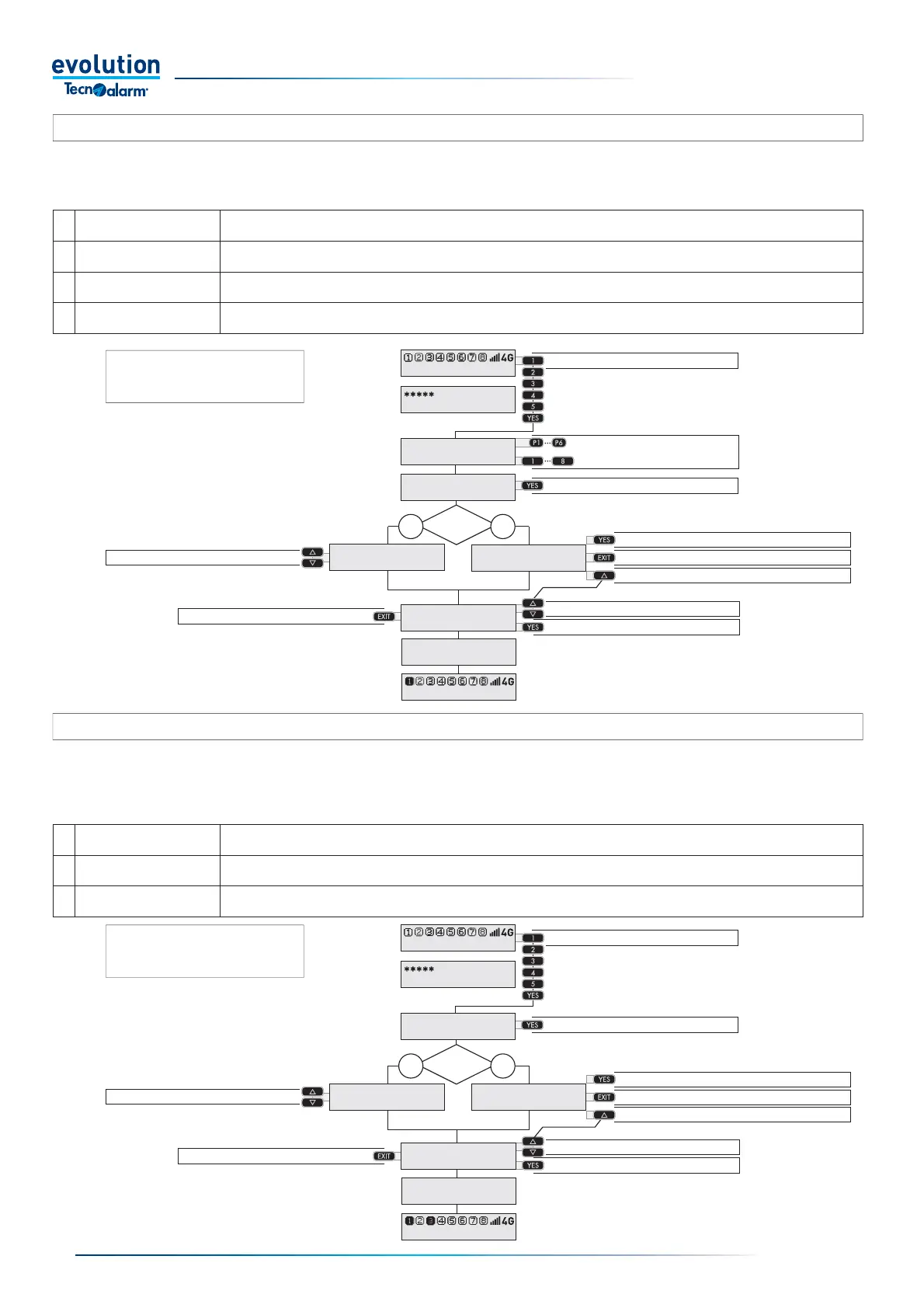
3-4.4 - Selective arming by voluntary Zone exclusion
The procedure allows the user to arm the programs selectively and to select the Zones to exclude from the operating session.
The arming takes place in four phases: entering the code, selecting the programs, confi rming arming and selecting the zones to be
excluded.
The possibility of excluding the Zones
is allowed only for codes enabled to
perform the function
3-4.5 - General arming (direct) by voluntary Zone exclusion
The procedure allows the user to arm the programs selectively and to select the Zones to exclude from the operating session.The
arming takes place in three phases: entering the code, confi rming the arming and selecting the zones to be excluded.The function
can be enabled or disabled from Menu:
11 Codes > 3 Master code > 4 Attributes > 7 Dis. direct.
The possibility of excluding the Zones
is allowed only for codes enabled to
perform the function
1 - Enter the Code
2 - Select the programs
3 - Confi rm arming
4 - Access Zone exclusion
Exit Zone exclusion
It arms excluding the open Zones
4 - Access selective exclusion
Stop arming
Select the Zone
Exclude the Zone
1 - Enter the Code
2 - Confi rm arming
4 - Access Zone exclusion
Exit Zone exclusion
It arms excluding the open Zones
3 - Access selective exclusion
Stop arming
Select the Zone
Exclude the Zone
Open
zones?
NO YES
Open
zones?
NO YES
1 Enter the Code
Enter the code followed by the YES key, if you make a mistake while entering the code, press EXIT and repeat the
code entry from the beginning.
2 Confirm arming
Press the YES key, all the programs associated with the code are armed.
If you do not press the YES key, the selected programs are activated after 15 sec.
3 Zone exclusion
You can exclude open Zones and/or other Zones, which you want to exclude from operating in the current session.
The excluded zones are automatically reactivated in the following operating session.
1 Enter the Code
Enter the code followed by the YES key, if you make a mistake while entering the code, press EXIT and repeat the
code entry from the beginning.
2 Select the programs
Press the command keys P1... P6 or the number keys 1..8 relating to the programs you want to arm.
If you make a mistake, press the key again, each time the key is changed from OFF to ON and vice versa.
3 Confirm arming
Press the YES key to stop the selection phase and activate the selected programs.
If you do not press the YES key, the selected programs are activated after 15 sec.
4 Zone exclusion
You can exclude open Zones and/or other Zones, which you want to exclude from operating in the current session.
The excluded zones are automatically reactivated in the following operating session.
11:02 System ok
End with YES
- ACCESS -
Master
Arming
Program 1
Arming
Control panel ok
OPEN ZONES
Bathroom window
EXCLUDE? by YES
Bedroom Zone
Forced arming
ZONES EXCLUDED
11:02 System ok
11:02 System ok
End with YES
- ACCESS -
Master
Arming
Control panel ok
OPEN ZONES
Bathroom window
EXCLUDE? by YES
Bedroom Zone
Forced arming
ZONES EXCLUDED
11:02 System ok


 To Next Page
 Loading...





