EV 10-50
33
Wireless hybrid arm sy em
Wireless hybrid arm sy em
General consultation
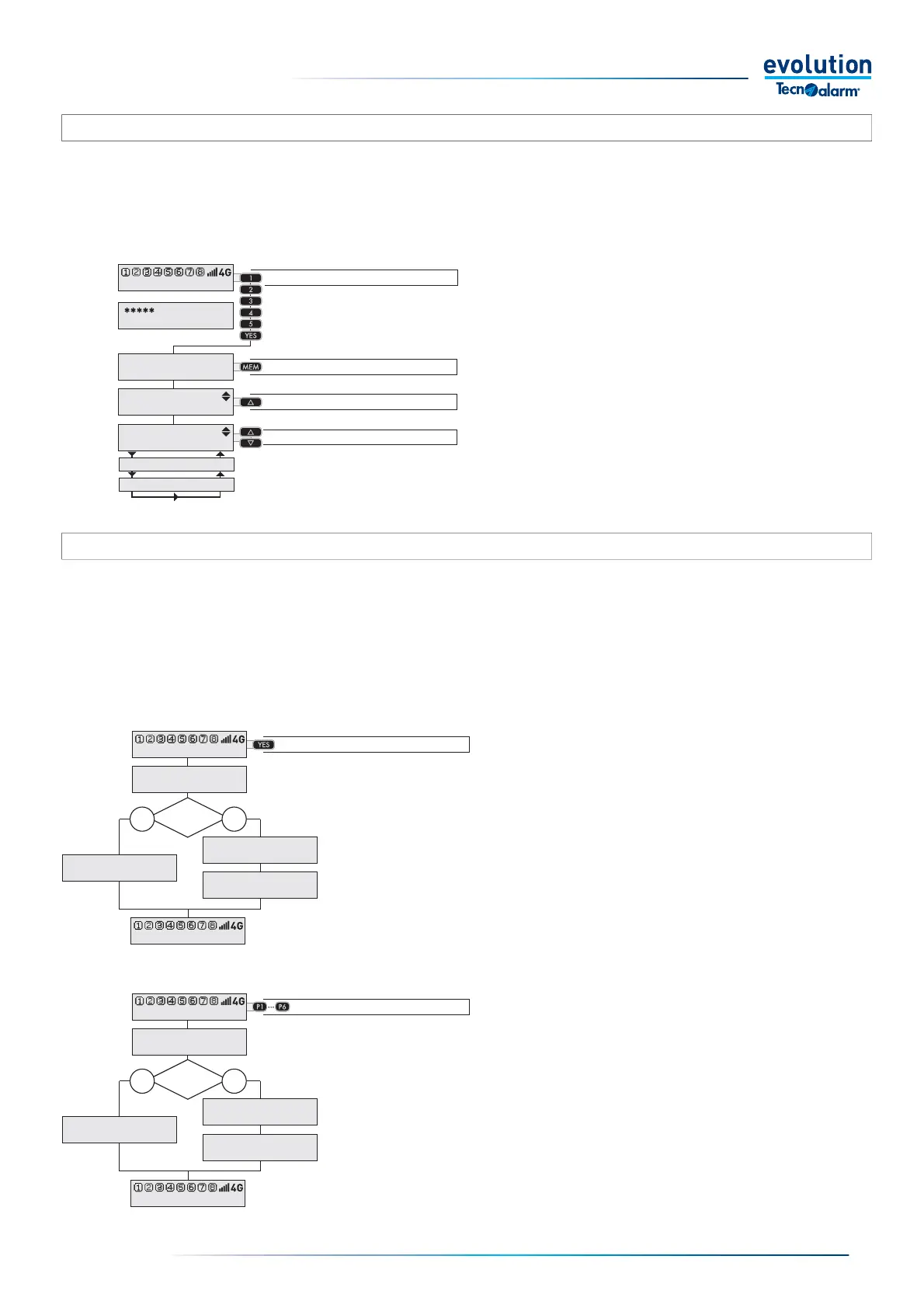
To display all the open zones of the system, press the
YES key.The display shows the list of all open Zones,
not considering which program they belong to.
If the system has no open zone, the display shows
"None".
3-4.8 - Consultation of Open zones
The procedure for consulting the Open Zones allows you to check whether the System has open Zones.
The term open Zones indicates Zones which, due to their functional status, cannot be put into service.
The procedure displays the list of Zones that are open on the console display, the identifi cation of the Zones allows the user to act
and resolve the situation, for example by closing the doors and windows indicated in the list of open zones.
The consultation of the open Zones can be general (open zones of all programs) or selective (open zones of each individual
program).
Consultation of the Event Log
The fi rst line of the display shows the date and time of
event recording.
The second line displays the description of the event
automatically displaying, one after the other, the words
that make up its description.
Exiting the consultation takes place automatically 15sec.
after pressing the last key.
3-4.7 - Consultation of the event log
The control panel stores and archives all system operating events in the Event Log.
The stored events are kept as long as the available space allows, the EV 10-50 system event log can store up to 64.000 events,
when another event must be recorded, the control panel records it by automatically deleting the oldest event.
Selective consultation
To view the open Zones of the program, press the
number of the program you want to consult, P1... P6.
The display shows the list of open Zones belonging to
the selected program.
If the system has no open zone, the display shows
"None".
Start the consultation
General consultation
Enter the Code
Select the program
Scroll down the list
Access the consultation
Open
zones?
NO YES
Open
zones?
NO YES
11:02 System ok
End with YES
- ACCESS -
Master
Viewing
Events
20/03 10:52:02
Access
Master
Console 1
11:02 System ok
OPEN ZONES
None
11:02 System ok
OPEN ZONES
Bathroom window
OPEN ZONES
Kitchen door
11:02 System ok
View open zones
Nught Program
OPEN ZONES
None
OPEN ZONES
Bathroom window
OPEN ZONES
Kitchen door
11:02 System ok
View open zones
Control panel


 To Next Page
 Loading...





