EV 10-50
34
Wireless hybrid arm sy em
Wireless hybrid arm sy em
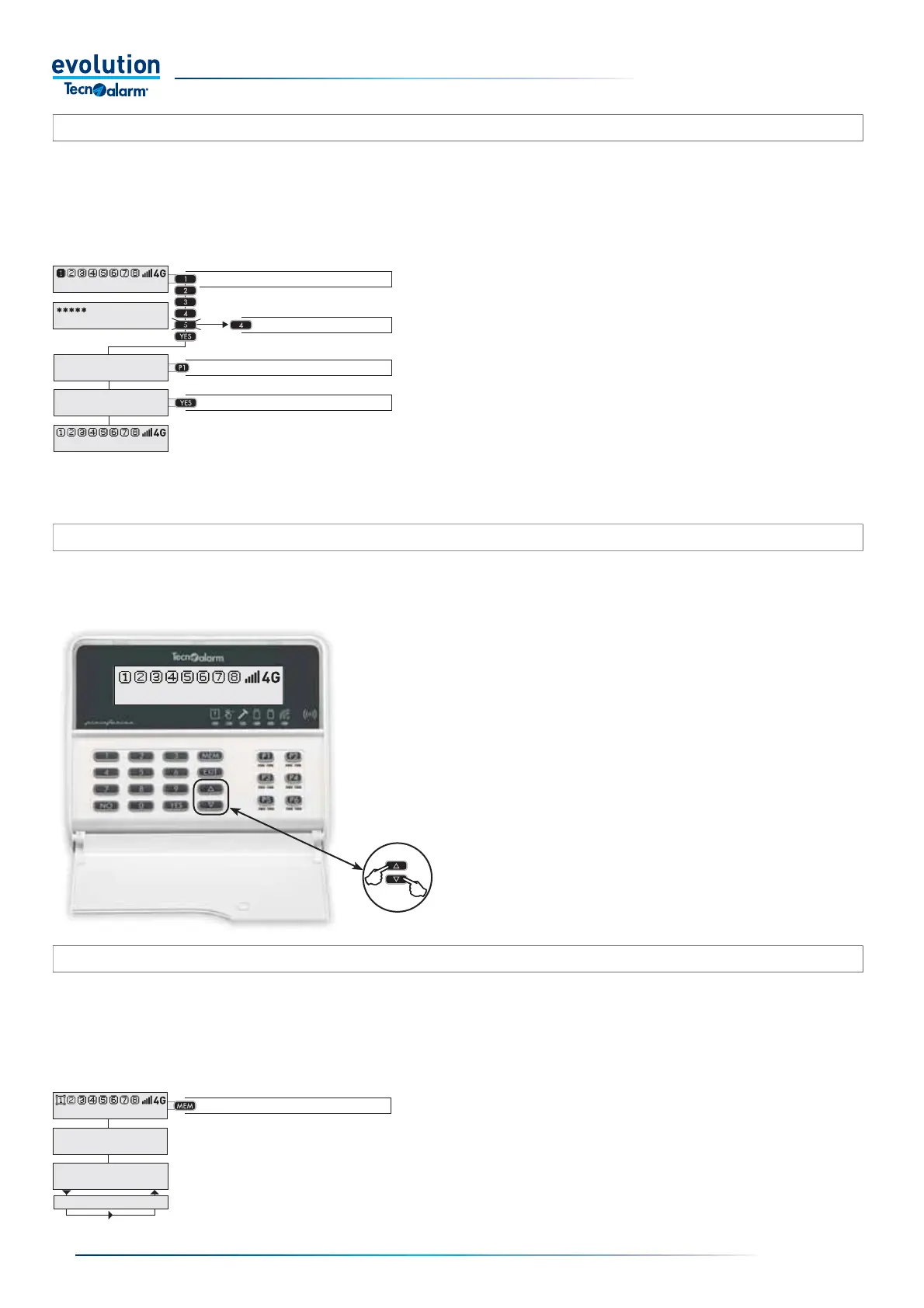
Panic alarm activation
To activate the "Panic" alarm, press the up and down
arrow keys simultaneously for at least 2 seconds.
Consultation of the Alarm memory
To consult the memory, press the MEM key.
If the memory is empty, the display shows "None".
If the memory contains stored events, the display shows
them one by one in sequence.
Exiting the consultation takes place automatically after a
few seconds.
3-4.10 - Panic alarm activation
The Panic alarm can be activated, from a console enabled to perform the function, at any time with the system armed or disarmed.
Warning: the activation and the execution mode of the Panic alarm can only be programmed by the installer.
3-4.11 - Consultation of the Alarm memory
The control panel stores in the Alarm memory, the alarm events detected by the Protection Zones in the last operating session, the
stored events are kept until the next operating session of the System.
When any program is activated, the contents of the alarm memory are automatically deleted, the alarm memory is thus ready to
store any alarm events of the new operating session.
Warning: the tamper alarm memory can only be cleared by the installer.
3-4.9 - Hold-up alarm act
The Hold-up alarm can only be activated by codes enabled for the "Hold-up code" function.The Hold-up alarm can be activated by
the user during the arming or disarming of the system, if the user is under threat, the latter can arm or disarm the System and at
the same time trigger the Hold-up alarm.
Warning: the method of carrying out the Hold-up alarm, for the implications and related consequences, must be agreed with the
user and/or with the person in charge of security of the protected site.
The Hold-up alarm activation mode can only be programmed by the installer.
Decrease by one units
Select the program
Enter the Code
Disarm the program
Access the consultation
11:02 System ok
11:02 System ok
End with YES
- ACCESS -
Master
Disarming
Program 1
11:02 System ok
11:02 System ok
ALARM MEMORY
Control panel
ALARM MEMORY
Volum. Lunchroom
Volum. Entrance
Activation mode
The normal arming or disarming procedure is used to
trigger a Hold-up alarm, the only difference is to change
the last digit of the code which must be decreased by
one unit.
For example if the code normally used is 1,2,3,4,5.
In the event of coercion, the user will enter the code by
decreasing the last digit by a unit, which is in this case
1,2,3,4,4
In the example shown, the last digit "5" becomes "4".
If the programmed code ends with the number "0" type
the number "9"


 To Next Page
 Loading...





