EV 10-50
35
Accesso
Menu
Accesso
Menu
Wireless hybrid arm sy em
Wireless hybrid arm sy em
Clearing the Alarm memory
To clear the memory, enter the access code.
Press the MEM key followed by the EXIT key.
The console automatically exits the procedure
3-4.12 - Clearing the Alarm memory
As already mentioned, the control panel stores the alarm events detected in the last operating session, the stored events are
automatically deleted when any program is activated, if you wish, it is also possible to clear the alarm memory manually.
Access the consultation
Enter the Code
Clear the memory
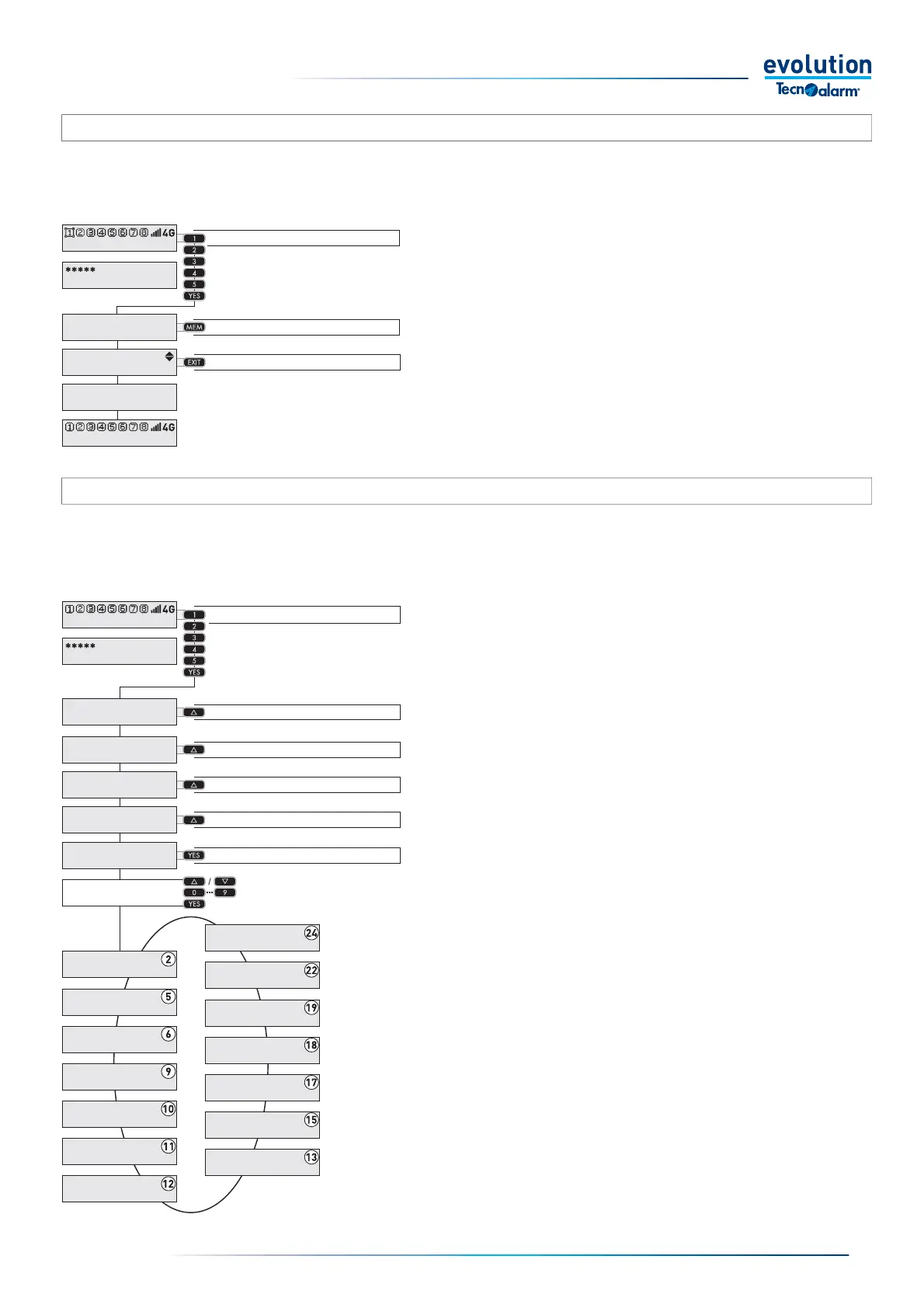
1 - Access to programming
To access programming, follow the operating sequence illustrated in
the drawing on the side.
In the example, the Master code consists of the numbers 12345
(factory code) the length of the code can be 4, 5 or 6 digits, the length
of the code is determined by the initial programming performed by the
installer, the master user can change the digits making up the code but
cannot change its length.
2 - Menu selection
Each menu is characterised by a number and a name, the menu
number is shown on the display in the fi rst row on the right, the menu
name in the second row.
3 - Menu display sequence
The diagram on the side illustrates the display sequence of the System
programming menus.
Pressing the up and down arrow keys allows you to scroll the
programming menus sequentially in ascending or descending direction.
The direct access numbers of the various menus are shown in the fi rst
row of the display (top right).
To help make things clear, in the diagram the direct access numbers
are highlighted in a white circle.
The menu is directly selected when you enter the number.
3-4.13 - Master code operation
The user with the Master code can access system programming. This code gives access to some programming menus.In stand-
by, the displays of the control consoles show the status of the system, access to programming can be performed from any control
console, access to programming puts all the other consoles that make up the system into stand-by status (consoles in stand-by
status cannot operate).
Access the programming menus
Enter the Code
Select Remote Controls
Select Menu
Select the Access
menu with YES
11:02 System ok
End with YES
- ACCESS -
Master
Access
Remotes
Access
Menu
Menu
Clock
Menu
Functions
Menu
Programs
Menu
Timers
Menu
Telephone
Menu
Codes
Menu
Keys
Menu
Wireless keys
Menu
Consoles
Menu
Wireless
Menu
Isolation
Menu
Test
Menu
Options
11:02 System ok
End with YES
- ACCESS -
Master
Viewing
Events
Clear buff er
11:02 System ok
Access
Thermostat 1
Access
Thermostat 2
Select Thermostat 2
Select Thermostat 1
Menu
Room thermostats


 To Next Page
 Loading...





