EV 10-50
36
B
A
A
B
C
C
Wireless hybrid arm sy em
Wireless hybrid arm sy em
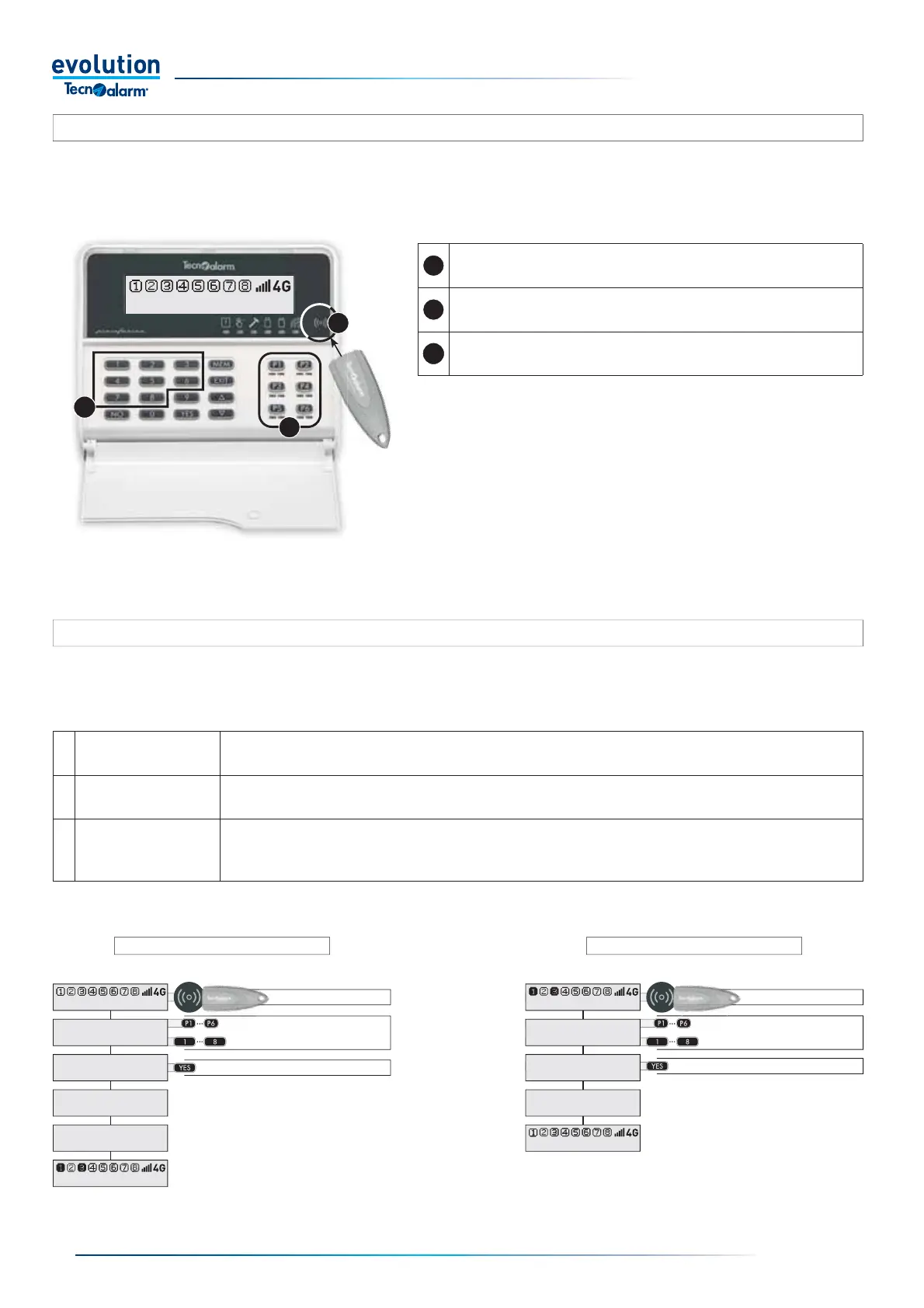
3-4.14 - Management by RFID key
The console includes an RFID key reader, thanks to this equipment it is possible to manage the operating programs either by
entering a code or by recognising a proximity key.
3-4.15 - RFID key armed and disarmed
The selective arming and disarming modes allow the user to choose which programs to arm or disarm.
The arming and disarming of the programs is carried out in three phases: recognition of the key, selecting the programs and
pressing the command.
Selective arming Selective disarming
1 - Key reading
2 - Select the programs
3 - Press the command
1 - Key reading
2 - Select the programs
3 - Press the command
1 Key reading Put the key on the reading area, check the fl ashing of the green LED (key read) then move the key away.
2 Select the programs
Press the command buttons P1... P6 or the number keys 1..8 relating to the programs you want to arm or disarm.
If you make a mistake, press the button again, each time the button is changed from OFF to ON and vice versa
3 Press the command
During arming, the YES key interrupts the selection phase and activates the programs.If you don't press YES, the
programs activate anyway after 15sec.When disarming, the YES key instantly deactivates the selected programs.
If you don't press YES, the programs are deactivated after 5sec.
RFID key reading area
Warning: the key must be placed above the reading area of the console
Area of program command buttons P1... P6.
As an alternative to the management keys P1.. P6 programs can
be managed via the number keys 1.. 8.
11:02 System ok
11:02 System ok
- ACCESS -
Key John
Arming
Program 1
Disarming
Program 3
Arming
Control panel ok
11:02 System ok
11:02 System ok
- ACCESS -
Key John
Disarming
Program 1
Disarming
Program 3
11:02 System ok



 To Next Page