EV 10-50
41
Wireless hybrid arm sy em
Wireless hybrid arm sy em
4-3 - Programmazione termostato
22.0°_ System ok
End with YES
- ACCESS -
Master
Access
Menu
Access
Remotes
Menu 2
Clock
Menu 24
Room thermostats
Room thermostats
Thermostat 01
Thermostat 01
Operating mode
Thermostat 01
Temperature levels
Thermostat 01
Programmer
Thermostat 01
Summer mode [ ]
Thermostat 01
Hysteresis
Thermostat 01
Anti-freeze temp.
Thermostat 01
Warn. high temp.
Thermostat 01
Warn. low temp.
Thermostat 01 1
Operating mode
Operating mode 2
Automatic
Thermostat 01 1
Operating mode
22.0°_ System ok
Thermostat 01 2
Temperature levels
Select the status of the thermostat:
Deactivated, Automatic, Anti-freeze
Select MENU
log in with YES
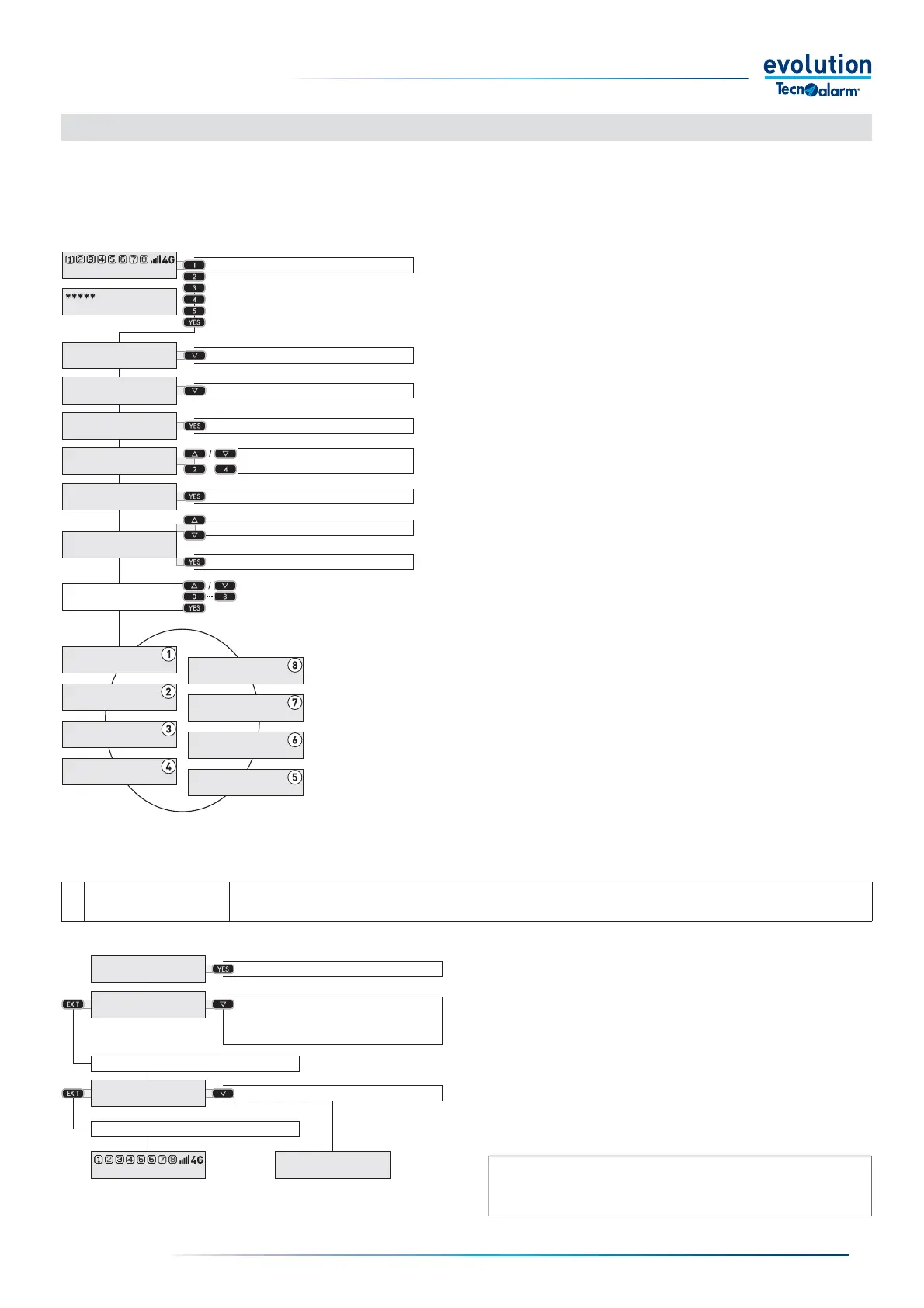
4-2 - Room thermostats menu programming
The Thermostats menu is divided into eight submenus with which it is possible to program the operating parameters of the two
available thermostats. Weekly operation can be programmed for each thermostat, defi ning up to eight time periods and fi ve
temperature levels (set-points) for each day of the week.It is also possible to program the summer or winter operating mode,
the hysteresis threshold, the anti-freeze temperature threshold and program the high temperature and low temperature signal
thresholds and enable the relative notifi cations.
Access the Thermostat menu
Enter the access code.
Select the menu item with the arrow button
Access the menus with the YES button.
Select the room thermostats menu with the arrow
buttons or numbers.
Access the menu with the YES button.
Select the thermostat on which to work on with the
arrow buttons.
Access the Thermostat with the YES button.
Enter the Code
Select the next item
Select the next item
Access the menus
Select the
Room thermostats menu
Access the menu
Select the Thermostat
Access the Thermostat
1
Operating mode
menu
The menu allows you to consult the operating status of the Thermostat.
The operating status can only be changed for the statuses: Deactivated, Automatic, Anti-freeze.
Operating mode menu
Access the menu with the YES button.
Select the status of the thermostat with the arrow button.
Confi rm the status with the YES button.
Select the next menu with the arrow button or save and exit
by repeatedly pressing the EXIT button
Access the menu
Confi rm the selected status
Save and exit
Select the next menu
N.B.: In the event of a block the thermostat stops working, to
reactivate the operation of the thermostat it is necessary to remove
the cause of the malfunction.


 To Next Page
 Loading...





