EV 10-50
42
Wireless hybrid arm sy em
Wireless hybrid arm sy em
Thermostat 01 2
Temperature levels
Temperature level 1
Level 01
Level 01 1
+22.5°C
Temperature level 1
Level 01
Thermostat 01 2
Temperature levels
22.0°_ System ok
Thermostat 01 3
Programmer
Thermostat 01 3
Programmer
Programmer 2
Monday
Monday 1
Time period 01
Time period 01 1
Enabled [#]
Time period 01 2
Start time
Time period 01 3
Temperature level
Thermostat 01 3
Programmer
22.0°_ System ok
Thermostat 01 4
Summer mode [ ]
Temperature level 1
Level 01
Start time 1
00:00 [hh:mm]
2
Temperature levels
menu
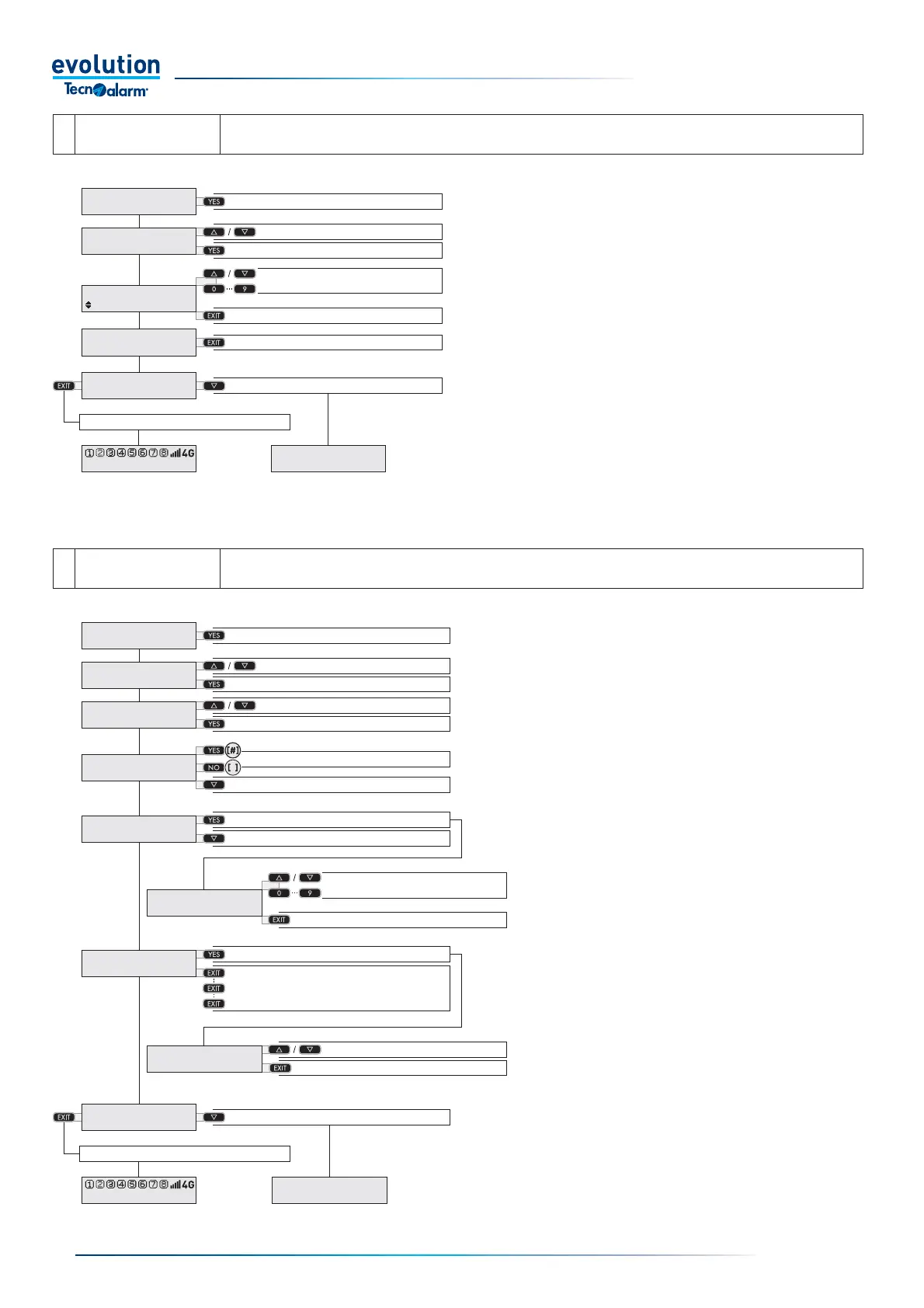
The menu allows you to program 5 temperature levels, these are recalled in the Programmer menu.
Access the menu
Select the temperature level
Access the temperature level
Set the temperature of the level
Confi rm the temperature
Exit the menu
Select the next menu
Save and exit
Access the Temperature levels menu
Access the menu with the YES button.
Select the temperature level with the arrow button
Access the temperature level with the YES button.
Set the temperature of the level
Confi rm the temperature with the YES button.
Go back with the EXIT button
Select the next menu with the arrow button or save
and exit by repeatedly pressing the EXIT button.
3
Programmer
menu
The menu allows you to program automatic operation on a weekly basis, defi ning up to eight time periods for each
day, and fi ve temperature levels.
Access the menu
Select the day of week
Access the day of the week
Access the time period
Enable [#] or disable [ ] the time period
Select the next item
Access the time
Select the next item
Access the temperature level
Exit the menu
Select the next menu
Save and exit
Confi rm the temperature level
Select the temperature level
Confi rm the programming
Set time period
Access the Programmer menu
Access the menu with the YES button.
Select the day of the week with the arrow button.
Confi rm and access the day of the week with the
YES button.
Select the time period with the arrow button.
Access the time period with the YES button.
Enable [#] the time period with the YES button
or disable [ ] the time period with the NO button.
Select the start time of the time period with the
arrow button.
Access the time with the YES button.
Set the time of the time period with the arrow and
number buttons.
Confi rm the time with the EXIT button.
Select the temperature levels with the arrow button.
Access the temperature levels with the YES button.
Select a temperature level to be associated with the
time period with the arrow button.
Confi rm the temperature level with the EXIT button.
Go back with the EXIT button.
Select the next menu with the arrow button or save
and exit by repeatedly pressing the EXIT button.
Select the time period


 To Next Page
 Loading...





