EV 10-50
44
Wireless hybrid arm sy em
Wireless hybrid arm sy em
Thermostat 01 7
Warn. high temp.
Warn. high temp. 1
Enabled [#]
Warn. high temp. 2
Temperature
Temperature 1
+22.0°C
Warn. high temp. 2
Temperature
Thermostat 01 7
Warn. high temp.
22.0°_ System ok
Thermostat 01 8
Warn. low temp.
Thermostat 01 8
Warn. low temp.
Warn. low temp. 1
Enabled [#]
Warn. low temp. 2
Temperature
Temperature 1
+17.0°C
Warn. low temp. 2
Temperature
Thermostat 01 8
Warn. low temp.
22.0°_ System ok
Thermostat 01 1
Operating mode
7
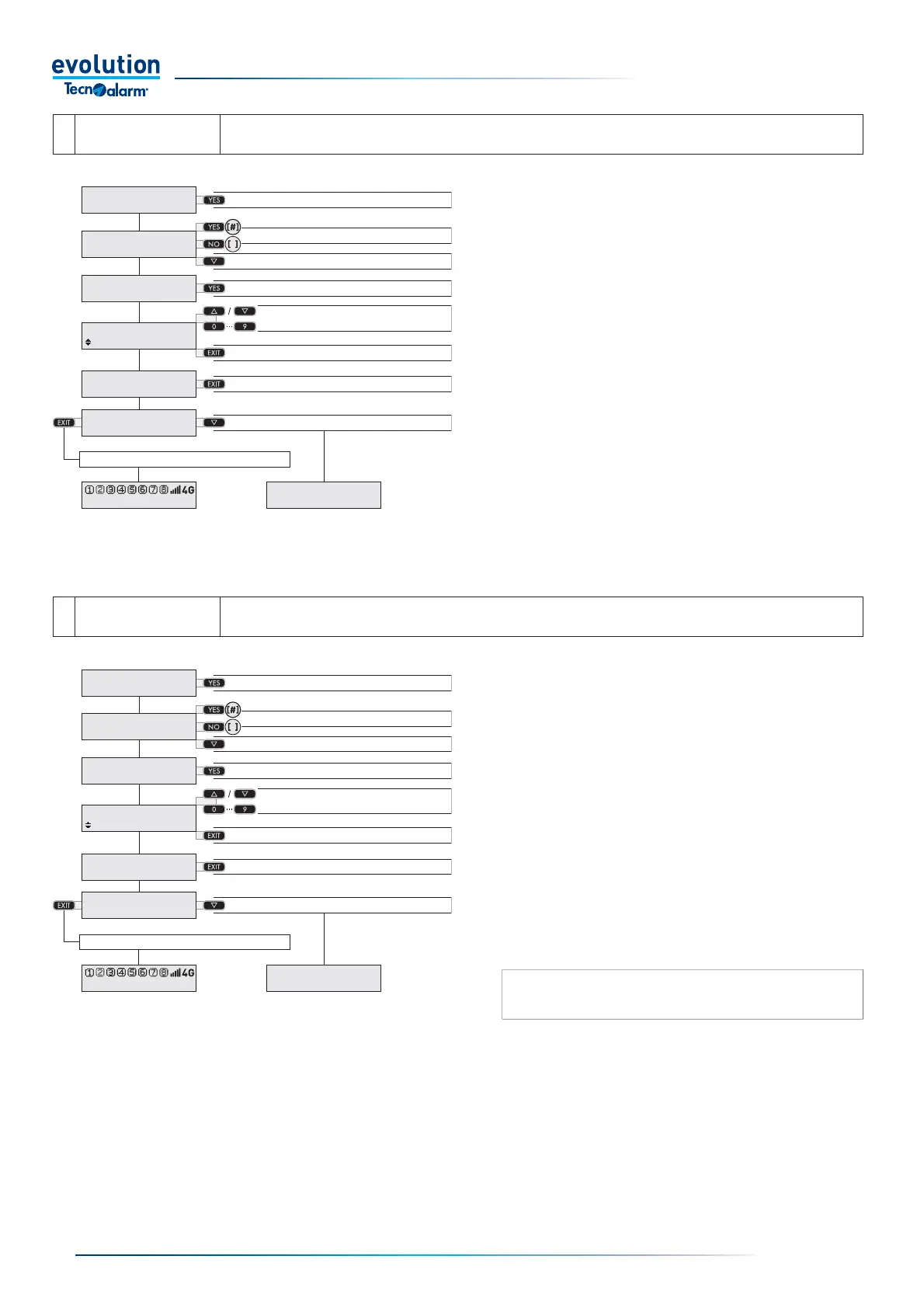
Warn. high temp.
menu
The menu allows you to program the maximum temperature threshold and to enable the sending
of the relative notifi cation.
Access the Warn. high temp. menu
Access the menu with the YES button.
Enable [#] the sending of the notifi cation with the YES
button or disable [ ] the sending of the notifi cation
with the NO button.
Select the temperature with the arrow button.
Set the maximum temperature threshold with the arrow
or number buttons.
Confi rm the temperature with the EXIT button.
Go back with the EXIT button.
Select the next menu with the arrow button or save and
exit by repeatedly pressing the EXIT button
Access the menu
Enable [#] or disable [ ] the notifi cation
Select the next item
Access the temperature
Set the temperature
Confi rm the temperature
Exit the menu
Select the next menu
Save and exit
8
Warn. low temp
menu
The menu allows you to program the minimum temperature threshold and to enable the sending
of the relative notifi cation.
Access the menu
Enable [#] or disable [ ] the notifi cation
Select the next item
Access the temperature
Set the temperature
Confi rm the temperature
Exit the menu
Select the next menu
Save and exit
Access the Warn. low temp. menu
Access the menu with the YES button.
Enable [#] the sending of the notifi cation with the YES
button or disable [ ] the sending of the notifi cation
with the NO button.
Select the temperature with the arrow button.
Set the minimum temperature threshold with the arrow
or number buttons.
Confi rm the temperature with the EXIT button.
Go back with the EXIT button.
Select the next menu with the arrow button or save and
exit by repeatedly pressing the EXIT button.
N.B.: the type of notifi cation for high and low temperature
warnings (push, digital, vocal) can only be programmed by
the installer.


 To Next Page
 Loading...





