EV 10-50
47
33316894653
Wireless hybrid arm sy em
Wireless hybrid arm sy em
1 - System Status
Query function.After entering the access code, select function 1 from the guided telephone menu, the system replies "all OK" or
lists any alarms.
Some system management functions can be carried out remotely via telephone, there are two management modes, the fi rst one
uses the recognition of DTMF tones, the second one uses the exchange of SMS messages.
Check the status of the system
All OK or list of any alarms.
To return to the menu, press hash (#)
To manage the operating
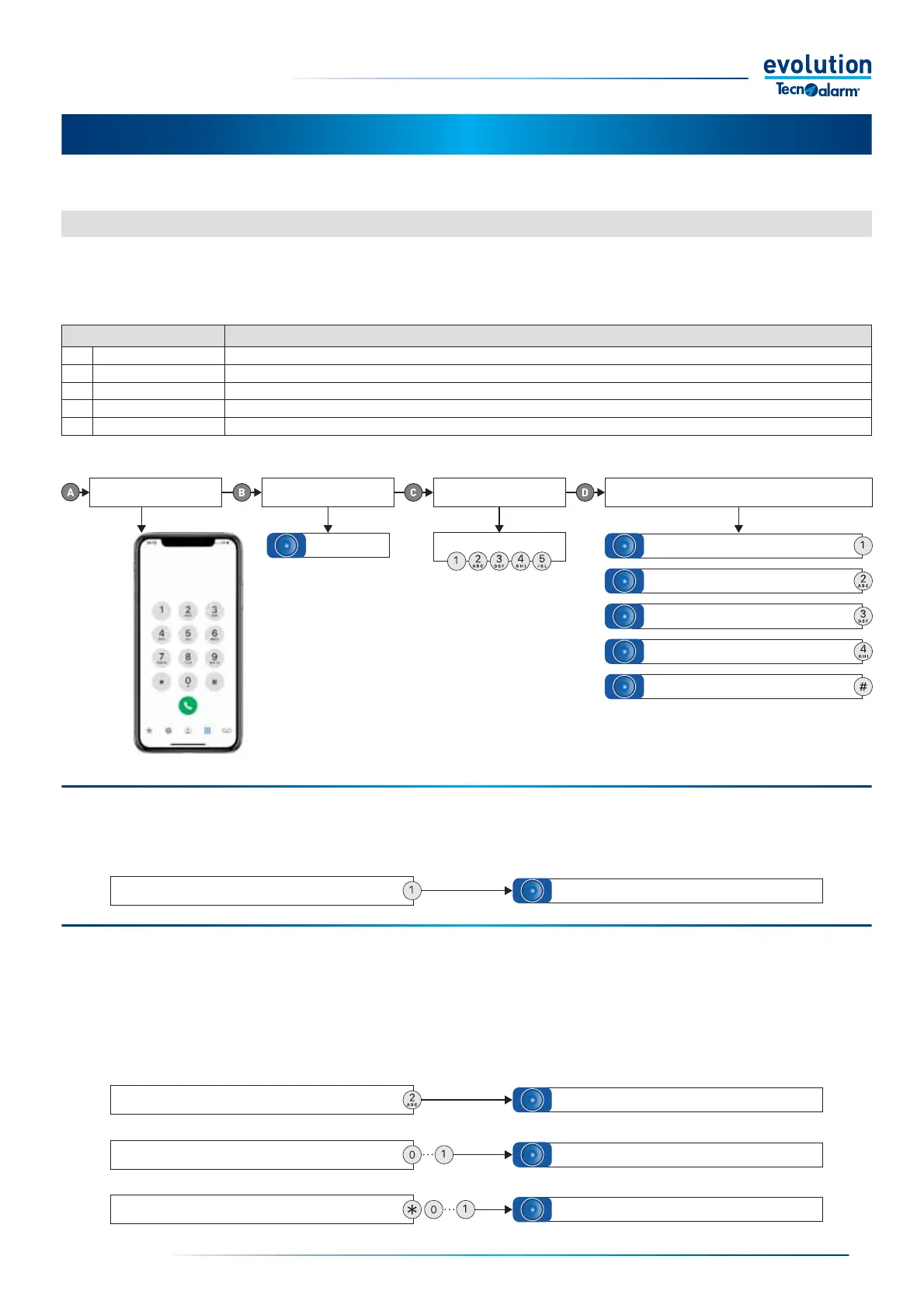
programs, press 2
Beeeeep
5-1 - Telephone management by DTMF tones
By calling your system by phone, you can check its functional statuses, check alarms, command programs and remote controls,
activate listening to the RDV
®
zones.
The chapter describes the operations that can be performed on the system via telephone. The table shows the possible operations.
To check the status
of the control panel, press 1
To manage the remote controls, press 3
To listen to the RDV
®
detectors, press 4
Call the system The system responds Enter the access code
The System answers and lists the options
of the telephone menu
For example
2 - Programs
Query and command function.After entering the access code, select function 2 from the guided telephone menu.
Query - To fi nd out the operating status of the programs, enter the program number and wait for the response from the system.
"Program active or inactive". The system lists any alarms stored
Command - To activate or deactivate a program, press star followed by the program number and wait for the system to reply
"Enabling or disabling the program number"
Verifi cation and management of programs
To query the program, enter the program number
To activate or deactivate the program, press star
and the program number
Program Menu.
To return to the menu, press hash (#)
Program Active or in Stand-by
Activating or deactivating program no...
5 - INTERACTION BY PHONE
Function keys Function
1 System Status Querying, request of the functional status of the system.
2 Programs Querying and enabling or disabling of operating programs.
3 Remote controls Querying and enabling or disabling remote controls.
4 RDV
®
Listening Listening to the RDV
®
function (only possible if the system has RDV
®
type detectors).
# End call Ending the phone call.
Favorites Recent Contacts Keypad Secretary
To end communication, press #


 To Next Page
 Loading...





